Schedule Social Media Posts and Reclaim Your Time
Learn how to schedule social media posts to drive growth and save hours. Our guide offers practical strategies and real examples for an efficient workflow.

If you're serious about growing your presence online, you need to get out of the last-minute posting trap. It’s time to move from a reactive "what do I post today?" mindset to a proactive, planned strategy. A dedicated tool like Repostly is your best friend here, letting you batch-create and schedule everything in advance.
This simple shift saves countless hours and guarantees your content goes live when your audience is most active. It’s how you turn social media from a daily headache into a genuine growth driver.
Move Beyond the Daily Posting Scramble
Does the "What should I post today?" question sound familiar? That daily scramble for ideas is not just draining; it’s a terrible way to manage your social media. It puts you in a constant state of reaction, where quality takes a backseat and your strategy gets lost in the chaos. Scheduling your posts is the way you break that cycle for good.
Instead of fighting daily fires, you can set aside a couple of hours to "batch" your content—creating a week's or even a month's worth of posts all at once. Think about it: having your entire Black Friday campaign scheduled and ready to fly before November even begins. This frees you up to handle the important stuff, like analyzing what’s working, actually talking to your followers, and planning your next big move.
For more ideas on building a solid content plan, check out the Repostly blog.
This isn't just about making your life easier; it's a fundamental shift in how successful brands operate, and the market reflects it.
The social media management market is on track to explode, growing from USD 17.5 billion to USD 51.8 billion by 2027. This isn't just random growth; it’s driven by businesses demanding smarter, data-backed tools to get the job done right. This trend shows just how seriously brands are taking a planned approach. You can dig deeper into this trend in this comprehensive guide on social media scheduling.
When you start scheduling, you take back control of your brand's story. You can finally maintain a consistent voice and look across every platform, which is absolutely essential for building the recognition and trust you need. At the end of the day, scheduling isn't just about saving time—it’s about laying the groundwork for real, sustainable growth.
Build Your Scheduling Foundation
Before you ever open a scheduling tool, you need a plan. Trust me, a little prep work up front is the secret sauce that separates a strategic, effective social media presence from a feed that just feels... chaotic. The first thing I always do is ask: what's the point of being on this platform? Your goals will be different everywhere you have a presence.
Think about a local boutique. They might use Instagram for slick Reels and candid Stories to build brand awareness, but they'll use LinkedIn to find and connect with potential wholesale partners. That's two completely different goals, which means two completely different content strategies. Nailing this down first keeps you from falling into the trap of blasting the same generic update across all your channels.
Define Your Core Content Pillars
Once your goals are clear, it's time to define your content pillars. These are simply the main themes you’ll talk about over and over again. I find that having 3-5 core pillars is the sweet spot. It gives your feed a nice balance and stops you from just hard-selling all the time. This structure is your best friend when you start scheduling posts because it guarantees variety.
I’ve seen these pillars work well for all sorts of businesses:
- Educational: Think "how-to" guides, quick tips, or deep dives into your industry. You're the expert, so share that knowledge!
- Promotional: This is where you talk about your products, services, or special deals. It's direct, but it shouldn't be all you post.
- Behind-the-Scenes: Show off your team, your process, or a day in the life. People connect with people, and this is how you humanize your brand.
- Community-Focused: Share content from your followers (with permission, of course!) or ask questions that get people talking.
The final piece of this puzzle is a simple content calendar. It doesn’t have to be fancy—a basic spreadsheet is all you need to get started.
Your content calendar is the blueprint for your entire workflow. Map out your pillars for the week—maybe Educational content on Monday, Behind-the-Scenes on Wednesday, and Promotional on Friday. This simple structure makes it easy to see gaps and ensures a consistent, engaging presence.
Doing this initial planning makes a tool like Repostly so much more powerful. Instead of staring at a blank screen wondering what to post, you’ll have a clear, strategic roadmap ready to go. This is how you turn scheduling from a chore into a real growth engine for your business.
Find Your Ideal Posting Rhythm
So, you're posting consistently. That's a great start. But the real magic happens when you nail the timing. To get the most out of every post you schedule, you need to look past generic advice and see what your own audience is telling you. The "best" time to post isn't some universal secret; it's simply when your people are actually online and scrolling.
Your platform analytics are your secret weapon here. Dive into the native insights on Instagram, Facebook, or whichever platform you're using. They'll show you exactly when your followers are most active, broken down by day and even by the hour. If your data reveals a huge activity spike on Wednesday evenings around 7 p.m., well, that's your new primetime slot.
Start With General Best Practices
Don't have much data to work with yet? No problem. You can get the ball rolling by using some widely accepted posting times as a baseline. It's true that certain windows tend to perform better across the board. Broad industry studies often point to the best times falling somewhere between Monday and Thursday from 10 a.m. to 1 p.m.
Platforms like Facebook and Instagram often get a bump in engagement in the mornings, while professionals on LinkedIn are usually most active during their midday break. If you want a solid foundation to build from, you can discover more insights about social media timing to get a general feel for each network.
Key takeaway: Think of these general times as a launchpad, not a permanent strategy. Use them to get started, but plan to adjust as soon as your own audience data starts rolling in. After just a few weeks, your analytics will tell a much more precise story.
Finding the Right Frequency
The next big question is always, "How often should I be posting?" Honestly, there's no single right answer—it really depends on the platform and what your audience expects. Posting too much can lead to follower fatigue, but posting too little can make you practically invisible. The goal is to find that sweet spot: a consistent rhythm that doesn't burn you out.
I've seen this play out time and again. A B2B tech company might thrive by posting insightful articles to LinkedIn 3-4 times per week. On the flip side, a direct-to-consumer fashion brand could post on Instagram 5-7 times per week, mixing Reels, Stories, and carousels to stay fresh in their customers' minds.
Finding the right posting cadence is a classic "quality over quantity" debate. Figuring out what works best for your brand and audience is crucial.
Recommended Weekly Posting Frequency By Platform
To give you a clearer picture, here’s how expert recommendations stack up against what the average business is actually doing.
| Social Network | Recommended Frequency (Posts per Week) | Average Business Frequency (Posts per Week) |
|---|---|---|
| 3-5 | 4 | |
| 3-5 | 5.5 | |
| X (Twitter) | 15-25 (includes replies/retweets) | 4.6 |
| 2-5 | 3.2 | |
| TikTok | 3-5 | 2.1 |
| 5-10 | 5.5 |
Notice the gaps? Many businesses aren't posting as often as recommended, especially on high-volume platforms like X (Twitter) or visual ones like Pinterest. This is where a scheduling tool can be a game-changer.
Ultimately, it’s far better to publish three fantastic posts a week than seven that feel rushed and uninspired. When you schedule your social media posts with a tool like Repostly, you can lay out your entire calendar visually. This helps you make sure each platform gets the right amount of love and that your posting frequency is both strategic and, most importantly, sustainable.
Building Your Go-To Scheduling Workflow
Alright, you've got your content pillars and know how often you want to post. Now for the fun part: turning that strategy into a real, live content calendar. This is where a repeatable workflow saves the day, and a tool like Repostly is your best friend for making it happen without the headache.
The biggest game-changer? Bulk uploading. Seriously. Stop posting on the fly. Instead, set aside some time to gather all your approved videos, images, and graphics for the week (or even the month!) and upload them all at once into your asset library. It’s a simple switch, but it saves an incredible amount of time and stops that frantic, last-minute hunt for the right file.
One Message, Many Voices: Tailor Your Content
With all your media ready to go, it's time to write the captions. And here's a pro-tip: never just copy and paste the same text everywhere. What works on Instagram won't land the same way on LinkedIn. A truly effective workflow involves a little bit of customization for each network.
Let's imagine you're launching a new product. Here’s how you’d approach it differently:
- For Instagram: You’d probably lead with a slick Reel. The caption would be punchy and to the point, loaded with 5-7 well-researched hashtags, and push everyone to your link-in-bio.
- For LinkedIn: That same launch needs a more professional spin. Think a high-res product photo, tagging any company partners, and a more detailed post that breaks down the business value and key features.
The goal is to get your core idea out there, but in a way that feels native to the platform your audience is on. This quick visual shows how scheduling is the final step in a solid process.
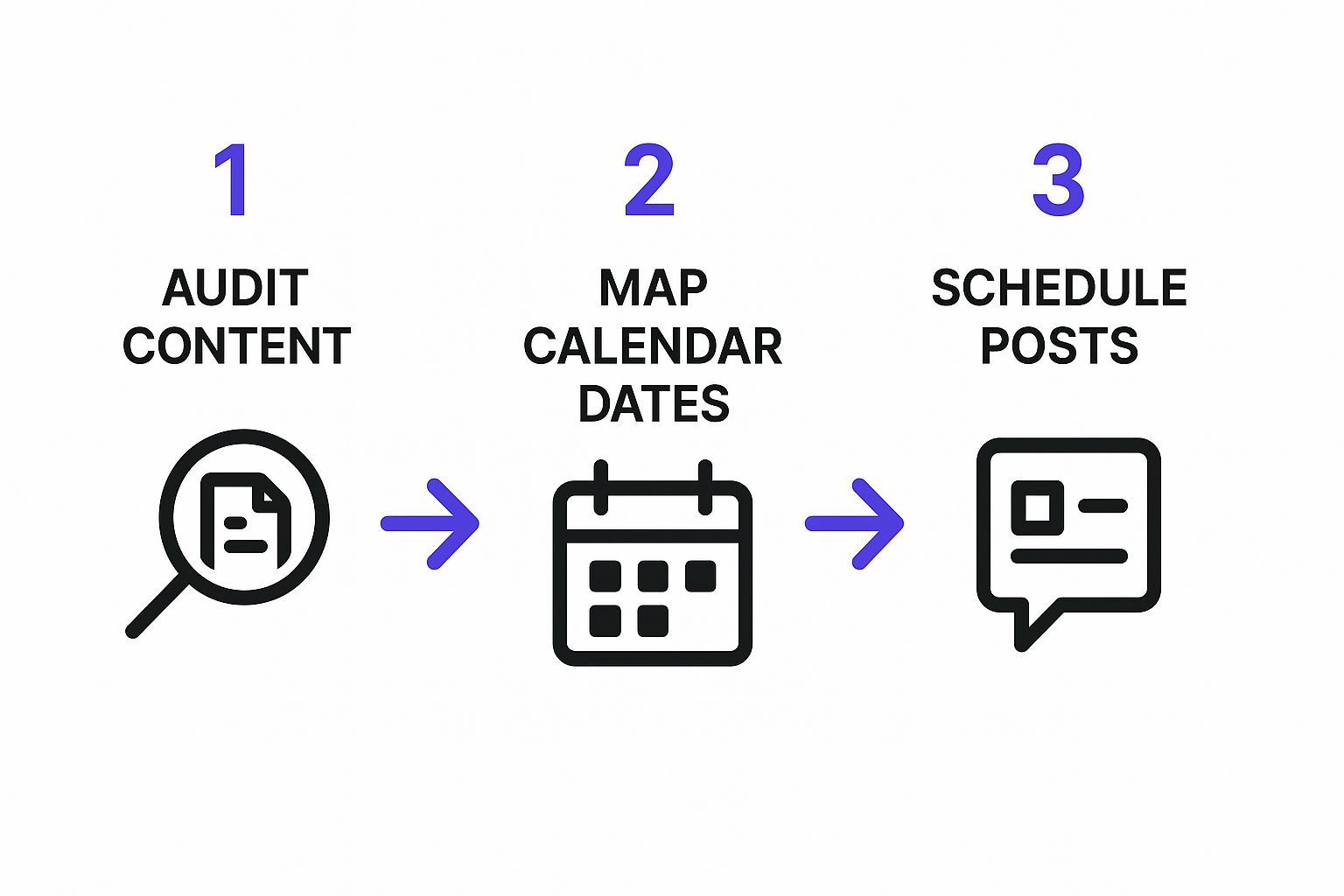
It’s a good reminder that you audit your content and map it out before you hit "schedule."
Get the Big Picture with a Visual Calendar
The final piece of this puzzle is seeing everything laid out on a visual calendar. This gives you that 10,000-foot view of your entire content plan, making it super easy to spot any awkward gaps, ensure a good mix of posts, and see if your feed feels cohesive.
A visual calendar isn't just for staying organized—it's your final quality check. It's the last chance you have to make sure you're not just posting salesy content all week and have a healthy balance of educational, entertaining, and behind-the-scenes posts.
Seeing your whole week or month at a glance, with every post planned across all your channels, just brings a sense of calm and control.
Want to dive deeper into streamlining your social media efforts? You can find more practical tips just like these over on the Repostly blog. Getting this workflow down is what lets you consistently schedule great social media posts that actually drive your strategy forward.
Use Advanced Tactics to Boost Your Reach
Okay, so you've got a consistent posting routine down. That's a huge win. But if you really want to see your accounts take off, it's time to layer in some smarter strategies. This is where you move from just filling a calendar to making every single post count.
One of my favorite pro-level tricks is building out content queues for evergreen topics. Imagine having a ready-to-go stash of your best content, organized by theme. A personal finance blogger might have queues for "Money-Saving Tips" or "Investing 101."
When you use a tool like Repostly, you can tell it to automatically pull from these queues to fill any gaps in your schedule. It’s a total game-changer for staying active and providing value, especially when you're swamped with other work.
Test, Measure, and Refine Your Approach
If you're not testing, you're just guessing. The best way to understand what your audience truly wants is to run simple A/B tests. It sounds technical, but it’s really just about comparing one thing against another to see what performs better. This is fundamental when you schedule social media posts for real results.
For instance, you could try posting:
- Two different captions for the same image to see which one gets more comments.
- An image with a person versus a graphic to find out what stops the scroll.
- At 9 AM versus 6 PM to nail down your audience's most active times.
Even tiny tests like these can give you some incredible insights. Every result adds another piece to the puzzle of what makes your specific audience tick.
By dedicating a little bit of your content schedule to testing, you stop relying on assumptions and start making decisions based on cold, hard data. This iterative process is what separates the good social media managers from the great ones, often creating a snowball effect of growth over time.
Finally, get comfortable digging into your analytics. Make it a regular habit to review your top posts. Are you noticing that short video clips always get more shares? Or that asking a direct question in your caption always starts a conversation?
Use those discoveries to guide your content creation. This simple feedback loop is the key to a strategy that gets smarter and more effective with every post you schedule.
So, you're thinking about scheduling your social media posts but have a few nagging questions. That’s completely normal. A lot of people worry that using a scheduler might make their content feel robotic or, even worse, get them in trouble with the social platforms. Let's tackle those concerns head-on.
One of the biggest myths I hear all the time is that scheduling posts will kill your engagement. I'm happy to report that this just isn't true. Big players like Instagram and Facebook have made it clear their algorithms don't punish content just because it came from a third-party tool. What really matters is the quality of your content and when you post it—and scheduling actually gives you more control over both.
Think about it: planning your posts allows you to consistently hit those peak engagement times when your audience is scrolling. Instead of hurting your reach, this often gives it a nice boost.
How Far Out Should I Schedule My Content?
Okay, so scheduling is a good thing. The next logical question is, how far in advance should you plan? There's no one-size-fits-all answer, but I've found a sweet spot for most businesses.
Aim to schedule your core content one to two weeks in advance.
This gives you a solid buffer, so you're not scrambling to find something to post every single day. It ensures your feed stays active and consistent. But it also leaves you flexible enough to hop on a trending meme or share some breaking news without having to tear up your entire plan. For major campaigns, like a holiday sale or a big product launch, you might even map out key posts a month or more ahead of time.
Your content calendar is a guide, not a cage. The real magic happens when you mix your scheduled posts with spontaneous, in-the-moment updates. Think of your scheduled content as the reliable backbone of your strategy, freeing you up to engage with comments and react to what's happening right now.
This hybrid approach is what sets successful brands apart. It’s all about blending consistency with authenticity. If you're trying to figure out the right workflow for your brand, don't hesitate to reach out to our team for guidance.
Ready to stop the daily posting scramble and start building a smarter, more effective social media strategy? Repostly gives you the tools to schedule content, analyze performance, and save hours every week. Start your free 7-day trial today!
Keep reading

10 Fresh Instagram Story Idea Tactics for 2025
Stuck for content? Discover our top Instagram story idea list, with actionable tips to boost engagement and grow your audience in 2025.

A Practical Social Media Planner for German Markets
Build a results-driven social media planner for Germany. This guide offers actionable strategies for content, scheduling, and analysis in the German market.

Crafting Your Social Media Content Plan
Stop guessing and start strategizing. This guide provides an actionable social media content plan to audit, plan, and execute content that gets results.
Post once. Show up everywhere.
Start your 7-day free trial and publish your next video to every platform in minutes.Pick a plan and publish your next video to every platform in minutes.
Start your free trialSee plansCancel anytime