A Guide to Auto Social Media Posting
Discover how to use auto social media posting to save time and grow your brand. This guide covers tools, content strategy, and performance analysis.

Let's get real for a moment: if you're still manually posting to every single social media platform, you're on a fast track to burnout. Auto social media posting isn't some lazy shortcut. It’s a smart, strategic move that completely changes the game for how you show up online. In short, it’s about using a tool to schedule your content ahead of time, so you can maintain a consistent presence without being chained to your phone.
Why Auto Posting Is a Non-Negotiable Strategy
Trying to juggle content for TikTok, LinkedIn, Instagram, and X (formerly Twitter) is a nightmare. It’s not just the time it sucks up; it’s a strategic black hole. Every platform has its own rhythm—peak times when users are most active, different audience expectations, and unique content formats.
When you're constantly trying to post in real-time, you end up with sloppy, inconsistent content. You miss golden opportunities. Your brand voice gets watered down. Think about it: your ideal customer might be in a totally different time zone, scrolling through their feed while you're fast asleep. Without automation, you simply don't exist in that moment.
This is exactly why auto-posting tools shift from being a "nice-to-have" to an absolutely essential part of your marketing engine. They let you step back, plan your content with a clear head, and make sure your message hits home precisely when your audience is ready to listen.
Reach Your Audience, No Matter Where They Are
The internet never sleeps, and your audience is scattered all over the globe, on a bunch of different platforms. The sheer scale is mind-boggling. We're talking about 5.45 billion social media users worldwide, with the average person bouncing between seven different platforms every single month.
And they aren't just passively scrolling. Data shows that 26.6% of users are looking for inspiration to buy something, and another 25.9% are actively searching for products. If you want a deeper dive, the trends on Sonary.com are eye-opening. Auto posting makes sure your brand is front and center during those crucial decision-making moments, regardless of the time or place.
Trying to keep up with that manually? It's just not sustainable. Automation is the bridge that closes that gap, acting like your 24/7 marketing assistant.
By scheduling your content, you are proactively managing your brand’s narrative. You control the timing, the message, and the frequency, turning social media from a reactive chore into a strategic asset that builds brand equity around the clock.
Before we go further, let's break down the fundamental differences between the old way and the new way.
Manual Posting vs Auto Posting: A Quick Comparison
| Aspect | Manual Posting | Auto Posting |
|---|---|---|
| Time Investment | High; requires daily, real-time effort. | Low; schedule weeks of content in one session. |
| Consistency | Often sporadic, prone to human error and missed posts. | High; maintains a reliable and consistent posting schedule. |
| Strategic Focus | Reactive; focused on the task of "posting now." | Proactive; focused on long-term content planning and analysis. |
| Audience Reach | Limited by your time zone and working hours. | Global; posts go live at optimal times for any time zone. |
| Error Potential | Higher risk of typos and last-minute mistakes. | Lower risk; allows for review and approval before publishing. |
This table really just scratches the surface. The real magic happens when you realize what automation frees you up to do.
Go Beyond Saving Time and Start Driving Growth
Sure, saving a ton of time is a huge win. But the real power of automation is what it unlocks. When you're not constantly scrambling to hit "publish," you can finally focus on the work that actually moves the needle:
- Creating amazing content: You get more headspace for creativity and production value.
- Digging into the data: You can actually analyze what's working and what's not.
- Engaging with your people: It's easier to reply to comments and build real relationships.
- Thinking strategically: You can make smarter, data-backed decisions about your overall plan.
At the end of the day, auto social media posting isn’t about replacing the human touch. It’s about automating the boring, repetitive stuff so you can pour your most valuable resource—your creativity and strategic brainpower—into what matters most.
Choosing Your Auto-Posting Toolkit
Picking the right tool for auto social media posting is a bit like choosing a business partner. You need one that gets your vision, complements your workflow, and helps you reach your goals. The "best" tool isn't some universal, one-size-fits-all platform; it's the one that fits your specific strategy like a glove.
Before you get dazzled by feature lists, take a step back and think about your core mission. Are you a B2B consultant trying to become the go-to expert on LinkedIn? Or maybe you're a D2C brand that lives and breathes on the visual appeal of Instagram and Pinterest? Knowing this from the start will instantly filter out a ton of noise.

Platform Integrations Are Non-Negotiable
First things first: does the tool even work with the platforms where your audience hangs out? If a tool can't connect seamlessly to your most important social networks, it’s a dealbreaker. It's that simple.
Many schedulers handle the basics like Facebook and X (formerly Twitter) just fine, but the devil is in the details.
A visual brand, for instance, absolutely needs a tool that offers deep Instagram and Pinterest integrations—think first-comment scheduling for hashtags or detailed analytics on individual pins. If you're all-in on short-form video, direct publishing to TikTok and YouTube Shorts is a must. This is where a tool like Repostly shines, as it’s built to let video creators upload a clip once and have it pushed out to all their key platforms.
What Features Actually Matter to You?
Once you’ve confirmed the platform support, you can start digging into the features that will genuinely make your job easier. Think about your entire process, from creating content to analyzing its performance. If you want to dive deeper into building a solid system, our guide on https://repostly.app/blog/how-to-automate-social-media-posts-68b5608b650d8992d6cf70e6 is a great place to start.
Let's walk through a few real-world scenarios:
- You're a solo creator: Simplicity is your best friend. You need a clean interface, a reliable mobile app for last-minute changes, and a content calendar that doesn't feel like you need a degree to understand. This is why many solopreneurs gravitate toward tools like Buffer.
- You're a growing agency: Your needs are all about scale and collaboration. Look for things like team member permissions, client approval workflows, and white-label reports you can send out proudly. A platform like Sendible is often a top pick for agencies because it’s packed with these kinds of features.
- You're a data-driven marketer: For you, it's all about the numbers. You need more than just likes and shares; you need a dashboard that tracks engagement rates, click-throughs, and can help you calculate the ROI of your social media efforts.
Your automation tool should feel like a natural extension of your brain, not another piece of clunky software you have to fight with. The real win is finding a platform that removes friction and frees you up to focus on being creative and strategic.
A Quick Look at a Few Popular Tools
So, how do some of the big names in the space stack up? This isn't a comprehensive review, but it gives you a sense of how different tools are designed for different users. As you do your research, checking out lists of the top social media automation tools can give you an even wider perspective.
| Feature | Repostly | Buffer | Later |
|---|---|---|---|
| Best For | Video creators & multi-platform efficiency | Simplicity & streamlined scheduling | Visual planning for Instagram & Pinterest |
| Unique Strength | One-upload cross-posting to video platforms | Clean, intuitive user interface | Visual grid planner and link-in-bio tools |
| Analytics | Unified dashboard for cross-platform video performance | Solid core metrics for engagement | Strong focus on Instagram analytics |
At the end of the day, your choice will come down to a mix of your budget, team size, and what you’re trying to achieve. My advice? Sign up for a few free trials. There’s no substitute for getting your hands on the software and seeing which one feels right for your workflow.
Building Your First Automated Campaign
Alright, let's get our hands dirty and turn all that theory into a real, working system. Setting up your first auto social media posting campaign isn't rocket science, but getting it right from the start will save you a ton of headaches later. We'll walk through it using Repostly, but honestly, the core ideas apply to just about any solid automation tool out there.
First thing’s first: connect your social accounts. This is a secure, one-time step where you give the platform the keys to post on your behalf. Don't just connect one or two—go ahead and link up every profile you plan to use, whether it's LinkedIn, Facebook, Instagram, or X (formerly Twitter). Doing this now gives you a central command center for everything.
Designing Your Posting Schedule
With your accounts linked, the real strategy begins: building a smart posting schedule. The biggest rookie mistake I see is applying one generic schedule across all platforms. That’s a massive missed opportunity. Each network has its own vibe, its own peak times, and its own audience expectations.
The smarter move is to create a tailored schedule for each profile.
- For X (Twitter): The feed moves at lightning speed. You need to stay visible, so think higher frequency—maybe 3-5 posts per day, mixing in your own content with relevant retweets and replies.
- For LinkedIn: This is the home of quality over quantity. Aim for 3-5 high-value posts per week, scheduled during business hours when professionals are most active.
- For Instagram: Consistency is the name of the game here. Try to post one high-quality piece of content per day (a Reel, carousel, or a great static image) when your audience is scrolling, which is often in the evenings or on weekends.
This isn’t just about scheduling; it’s about scheduling with purpose.
This visual really breaks down the workflow into three simple stages.
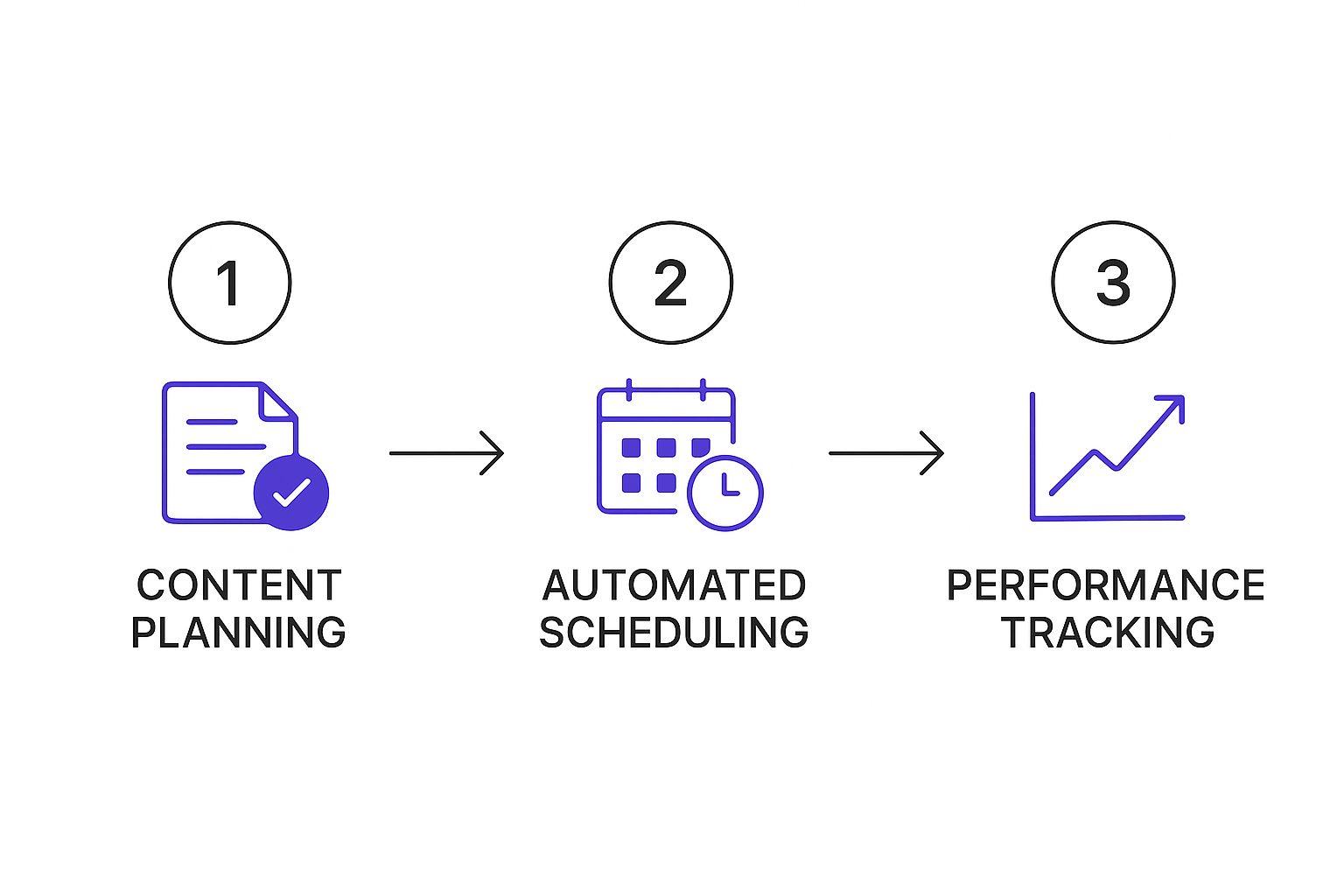
As you can see, good automation isn't a "set it and forget it" machine. It’s a cycle: you plan, you automate the execution, and then you review the data to get even better next time.
Organizing Content with Smart Categories
Here’s a pro-tip that will genuinely change how you manage content: stop scheduling posts one by one. Instead, start organizing your content into categories or what some platforms call "autolists." This is an absolute game-changer for keeping your feed balanced and interesting without living on the platform 24/7.
Think of autolists like creating themed programming blocks for your social media channels. Your audience learns what to expect and when, which builds anticipation and loyalty.
For instance, you could set up a few categories that align with your content pillars:
- 'Weekly Tips': A collection of your best evergreen advice. You could set this category to post every Tuesday morning like clockwork.
- 'Company Culture': This is for all your behind-the-scenes photos and team shout-outs. Schedule it for Friday afternoons to wrap up the week on a high note.
- 'Promotional Content': Save this for your product announcements and special offers. Maybe that goes out every Thursday to build buzz before the weekend.
Top-tier tools are built around this very concept. They let you group posts into these queues and then schedule the entire category for specific time slots. Some even let you recycle evergreen content automatically. Considering that average social media engagement rates can be as low as 1.4% to 2.8%, this kind of strategic consistency is what helps you break through the noise.
By building out these categories and schedules from day one, you’re not just posting—you’re creating a sustainable content engine. If you want to see what other platforms offer this kind of functionality, we put together a list of the best social media automation tools to help you compare.
Creating Content That Works on Autopilot
An auto social media posting tool is fantastic, but it's only as effective as the content you feed it. If you want to truly set your social media on autopilot, you have to shift your thinking from a post-by-post grind to building a solid library of high-quality, reusable assets.
The secret? Evergreen content.
This is the stuff that stays relevant for months, or even years, not just a few hours. Think foundational advice, core industry insights, and the behind-the-scenes stories that define your brand. This is the material you can load into your content queues and confidently recycle, knowing your automated schedule is always packed with value.
Adapting One Idea for Multiple Platforms
Look, the most efficient social media managers I know don't come up with ten ideas for ten posts. They take one great idea and spin it out for different platforms. This is the key to maximizing your reach without constantly reinventing the wheel, and it's a perfect strategy for automation.
Let's say you have one solid piece of data: "Email marketing open rates are 25% higher when subject lines include an emoji." Here’s how you could turn that single insight into a whole week's worth of content:
- LinkedIn Article: You could write a more professional, data-heavy post titled something like, "The Surprising Impact of Emojis on B2B Email Engagement," maybe with a chart or two.
- Instagram Carousel: This is perfect for a visual swipe-through. The first slide could ask, "Do Emojis Really Work in Emails?" Then, the following slides reveal the statistic and offer a few best practices.
- X (Twitter) Thread: Break it down. A quick, punchy thread with bite-sized tips is ideal for sparking conversation and getting those retweets.
Using this approach, you build a deep content library that keeps your automated schedule feeling fresh and engaging, not repetitive.
Prioritizing Formats That Perform
You also have to be smart about what you're creating. Your content mix should be heavily influenced by what's actually grabbing people's attention right now. It's no secret that short-form video is king; Instagram Reels alone get almost 139 million views every single minute. An automation tool ensures you can maintain a consistent presence on these must-have formats without burning out.
Once you have a bank of evergreen content and platform-specific variations, your automation tool becomes more than a simple scheduler. It turns into a powerful content distribution engine that consistently delivers value without trapping you in a never-ending cycle of content creation.
To really make sure your automated posts land with impact, it's always a good idea to apply proven content optimization strategies. This final layer of polish can make a huge difference in performance, ensuring every scheduled post is working as hard as it possibly can for you.
How to Measure and Optimize Your Strategy
Alright, you've set up your auto social media posting schedule. That's a huge win, but the work isn't quite over. The real magic happens when you stop treating automation as a "set it and forget it" tool and start thinking of it as a cycle of constant improvement. This is where we dive into the numbers to see what’s hitting the mark, what's falling flat, and most importantly, why.
It’s easy to get caught up in vanity metrics like follower counts, but those don't pay the bills. Instead, we need to zero in on the data that actually moves the needle for your business. Your analytics dashboard inside a tool like Repostly is your new best friend for this.
Key Performance Indicators to Watch
Think of your analytics dashboard as your mission control. It's where you get the direct feedback you need to stop guessing and start making truly smart decisions about your content.
Here are the core metrics I always keep an eye on:
- Engagement Rate: This is the big one. It tells you what percentage of your audience is actually interacting with your posts—liking, commenting, sharing. A high engagement rate is a dead giveaway that your message is connecting.
- Click-Through Rate (CTR): If your goal is to drive people to your website or a landing page, this is your metric. It measures how many people actually clicked the links in your posts.
- Reach and Impressions: Reach shows you how many unique people saw your post, while impressions tell you the total number of times it was viewed. Both help you understand how far your content is traveling.
Tracking these numbers gives you a solid, real-world picture of what’s going on. If you want to go deeper, we've got a whole guide on this: https://repostly.app/blog/how-to-measure-social-media-engagement-68ac2ca9650d8992d6cf7044. To tie it all back to business goals, it’s crucial to understand How to Measure Content Performance and Prove Its Value.
A Simple Framework for Monthly Reviews
Let's make this practical. Carve out a little bit of time each month to sit down with your data. This simple habit is what turns a bunch of numbers into powerful insights that will make your automated strategy smarter over time.
To give this a bit more structure, I’ve put together a table of the key metrics you should focus on during these monthly check-ins.
Key Metrics for Auto Posting Success
| Metric | What It Measures | Why It Matters | Actionable Goal |
|---|---|---|---|
| Engagement Rate | The percentage of your audience that interacts with your content (likes, comments, shares). | This shows if your content is genuinely interesting and relevant to your followers. | Aim for a 1-3% engagement rate, depending on the platform. |
| Click-Through Rate (CTR) | The percentage of viewers who click on a link within your post. | This directly measures how effective your post is at driving traffic to a specific destination. | A CTR of 2-5% on platforms like Facebook and LinkedIn is a strong benchmark. |
| Reach | The total number of unique people who saw your post. | This tells you the breadth of your content's visibility and brand awareness. | Consistently try to grow your reach by 10% month-over-month. |
| Follower Growth | The rate at which you gain new followers. | While not the most important metric, steady growth indicates your content is attracting a new audience. | Focus on a sustainable growth rate, not just spikes. Aim for a 2-4% monthly increase. |
By using this table as a guide, you can quickly assess what’s working. During your monthly review, ask yourself these simple but powerful questions:
- Which posts got the highest engagement? Was it a video? A question? A behind-the-scenes photo? Look for patterns.
- What were the best times to post? Your analytics will show you when your audience was online and most active. Tweak your schedule based on that data, not a generic "best times to post" article.
- Which platforms are bringing in the most traffic? This tells you where to double down with your best content and creative energy.
The rise of AI-generated content has made organic engagement more challenging, pushing social algorithms to prioritize genuine interaction. Marketers in 2025 must focus on data-driven strategies and authenticity over sheer volume, which is where systematic scheduling becomes crucial. You can discover more insights about social media trends on sproutsocial.com.
By getting into a rhythm of analyzing and tweaking, your automated system doesn't just save you time—it gets smarter and more effective every single month. This is how you turn a simple scheduling tool into a real growth engine for your brand.
Got Questions About Auto-Posting? Let's Clear Things Up
Jumping into social media automation can feel like a big step. A lot of people worry they might trade genuine connection for a bit of convenience. It’s a valid concern, but let’s walk through some of the most common questions I hear to put your mind at ease.
Will My Brand Seem Robotic?
This is probably the #1 fear I see, and it's a fair one. But here’s the thing: automation only feels robotic if you do it wrong.
The secret is to automate the scheduling, not the engagement. Think of a tool like Repostly as your personal assistant for getting great content out on time, every time. You still need to be the one in the driver's seat, personally responding to comments, answering DMs, and sparking conversations. This combo gives you the best of both worlds: consistency without sacrificing that crucial human touch.
How Often Should I Check on My Automated Schedule?
It's easy to fall into the "set it and forget it" trap, but that’s a mistake. You need to keep your finger on the pulse.
A monthly check-in is a great rhythm to get into. It’s frequent enough to catch trends but not so often that you get lost in the data. During your review, you’re basically a detective looking for clues.
- What's working? Pinpoint your smash-hit posts. Was it a video? A behind-the-scenes photo? A specific topic? Whatever it is, do more of it.
- When's the best time to post? Look at the analytics. Are Tuesdays at 10 AM a dead zone but Thursdays at 2 PM on fire? Adjust your schedule to hit those peak times.
- What's falling flat? If one of your content buckets consistently gets crickets, it’s time to either refresh the content or scrap that category and try something new.
I like to think of my automation tool as the engine and my monthly review as the steering wheel. The engine provides the power to keep moving, but I’m the one who needs to steer, making sure we're actually headed in the right direction.
Can I Really Auto-Post Everywhere?
For the most part, yes! All the big players—Facebook, Instagram, X (formerly Twitter), LinkedIn, Pinterest—have APIs that let scheduling tools publish content directly. It’s what makes this whole system work.
But there are always a few little quirks to be aware of. For instance, some of the really interactive features, like certain Instagram Story stickers, might still need a manual touch. It's always a good idea to check the specific capabilities of your chosen tool to make sure it meshes perfectly with your strategy. Knowing these small details upfront saves a lot of headaches later on.
Ready to stop wasting time and start growing your audience with a smarter strategy? Repostly helps you automate your social media workflow in under five minutes. Start your free 7-day trial today and see the difference.
Keep reading

10 Fresh Instagram Story Idea Tactics for 2025
Stuck for content? Discover our top Instagram story idea list, with actionable tips to boost engagement and grow your audience in 2025.

A Practical Social Media Planner for German Markets
Build a results-driven social media planner for Germany. This guide offers actionable strategies for content, scheduling, and analysis in the German market.

Crafting Your Social Media Content Plan
Stop guessing and start strategizing. This guide provides an actionable social media content plan to audit, plan, and execute content that gets results.
Post once. Show up everywhere.
Start your 7-day free trial and publish your next video to every platform in minutes.Pick a plan and publish your next video to every platform in minutes.
Start your free trialSee plansCancel anytime