How to Automate Social Media Posts: Boost Engagement Effortlessly
Learn how to automate social media posts with our guide. Discover top tools and tips to save time and increase audience engagement.
Automating your social media posts means using a specialized tool, like Repostly, to schedule content, create queues of evergreen posts, and instantly share new blog articles across all your platforms. You simply connect your accounts, build out a content calendar, and let the software do the heavy lifting. The result? You get hours of your week back.
Why Social Media Automation Is a Game Changer
Let’s face it, manually posting across every single social platform is a fast track to burnout. When people hear "social media automation," their minds usually jump to one thing: saving time. And while that's a massive perk, the real magic is how it turns your social media from a daily grind into a powerful, strategic marketing machine.
This isn't about setting it and forgetting it. It’s about working smarter. Automation is what allows you to maintain a consistent brand voice around the clock, even reaching audiences in different time zones without chaining yourself to a desk. Imagine your best content dropping at peak engagement hours in London, New York, and Sydney—all while you're fast asleep. That’s the strategic edge we're talking about.
Before we dive deeper, let's quickly summarize the core advantages.
Core Benefits of Social Media Automation
| Benefit | Impact on Your Marketing |
|---|---|
| Time Savings | Frees you from manual posting to focus on high-impact tasks like strategy and community engagement. |
| Consistency | Ensures a steady stream of content, keeping your brand top-of-mind with your audience. |
| Global Reach | Allows you to post at optimal times for different time zones without working 24/7. |
| Scalability | Makes it possible to manage multiple accounts and platforms efficiently as your brand grows. |
| Better Analytics | Centralizes data, making it easier to track what works and refine your content strategy. |
As you can see, the benefits go far beyond just saving a few minutes here and there.
Freeing Up Your Most Valuable Resource
The biggest win here isn't just getting hours back—it's about reallocating your brainpower. Instead of starting your day copying and pasting the same update into five different apps, you can finally focus on what actually moves the needle.
Think about what you could do with that time:
- Actually talk to your audience: Jump into the comments, respond to DMs, and build real relationships.
- Analyze what's working: Dive into the data to figure out which posts your followers truly love.
- Plan your next big move: Brainstorm that killer campaign or viral content series you've been dreaming about.
Automation handles the tedious logistics so you can step into the role of a strategist. It frees you up to be a social media director, not just an operator.
The online world is incredibly noisy. As of 2025, there are roughly 5.45 billion social media users across the globe, and they spend an average of 2 hours and 24 minutes a day scrolling through seven different platforms. Trying to cut through that clutter manually is a losing battle.
To really grasp the power behind this, it helps to understand the broader concept of content automation. When you learn how to properly automate your social media, you’re not just scheduling posts—you’re building a system that works for you, ensuring your brand stays active and engaging without burning you out.
Choosing Your Social Media Automation Toolkit
Before you can automate a single post, you need the right co-pilot. Picking an automation platform isn't about finding the one with the most bells and whistles; it’s about finding a tool that actually fits your workflow and solves your biggest problems. Think of it like hiring an assistant—you need someone who is reliable, smart, and easy to work with.

For most of us, whether we're creators or running a business, a few features are absolute must-haves. A platform like Repostly, for example, gives you a clean, visual content calendar. This is your mission control. It lets you see your entire schedule at a glance, so you can easily spot gaps and keep things balanced. Without it, automation can feel like organized chaos.
Identifying Your Must-Have Features
First up, look for solid bulk scheduling capabilities. If you’re a social media manager who batches content creation (and you should be!), you need a tool that lets you upload and schedule a month's worth of posts at once, not one painful post at a time. This feature alone can turn an entire day's work into a one-hour task.
Another game-changer is an evergreen content library. This is where you park your greatest hits—the timeless blog posts, killer tips, and glowing testimonials that always get a reaction. A good tool will automatically sprinkle this content back into your schedule, keeping your profiles lively and driving traffic to your best stuff without you lifting a finger.
Finally, don't ever skimp on insightful analytics. Automation without data is just guessing. Your toolkit needs to give you clear, easy-to-understand feedback on what’s actually working. You should be able to see:
- Engagement rates for every single post
- The best times to post for your audience
- Follower growth trends over time
- Click-through rates on your links
A great automation tool doesn't just post for you; it gives you the data you need to post smarter. It turns raw performance numbers into a clear roadmap for what to create next.
Feature Comparison for Automation Tools
Not all automation platforms are created equal. They generally fall into two camps: basic schedulers and more advanced, all-in-one solutions. Here's a quick breakdown to help you see what you might be missing.
| Feature | Basic Tools | Advanced Tools (like Repostly) | Why It Matters |
|---|---|---|---|
| Visual Calendar | Basic list view | Drag-and-drop interface | Instantly see content gaps and plan visually. |
| Bulk Scheduling | Often limited or unavailable | Upload hundreds of posts at once | Saves massive amounts of time for batch creators. |
| Evergreen Library | Not included | Dedicated library for automatic reposting | Keeps your profiles active with proven content, effortlessly. |
| Analytics | Simple metrics (likes, comments) | In-depth performance reports | Provides actionable insights to refine your strategy. |
| Team Collaboration | Single user only | Shared workspaces and approval flows | Essential for agencies and marketing teams to work together. |
As you can see, investing in a more advanced tool often pays for itself in time saved and better results.
Matching the Tool to Your Scale
The right tool also depends on who's using it. If you're a solopreneur, simplicity and a friendly price tag might be your top priorities. But if you're part of a marketing team, you'll need more advanced collaboration features, like approval workflows and shared media libraries, to keep everyone on the same page.
To get a feel for what's out there, our guide on the top social media automation tools is a great place to start.
It's no surprise the marketing automation market is booming, projected to jump from $5.65 billion in 2024 to $14.55 billion by 2031. In fact, recent data shows that 49% of marketing decision-makers are already automating key social media tasks. As you can learn from these automation statistics and trends on venasolutions.com, this isn't a "nice-to-have" anymore—it's how you stay competitive. Picking the right toolkit is your first step.
Building Your First Automated Content Calendar
Switching from posting on the fly to a fully automated system is a game-changer. It’s like going from a quiet backroad to the open highway. The real win here isn't just about speed; it's about building a smart, strategic content engine that practically runs itself. Let’s get you out of the daily scramble and into a system that works for you.
It all starts with defining your core content pillars. These are the 2-4 main themes that your audience actually cares about. Think about what they consistently respond to. For a fitness coach, this might be "Workout Tutorials," "Nutrition Myths," "Client Success Stories," and "Motivational Mindset." Nailing these down gives every single post a purpose.
To keep things fresh from day one, it helps to explore a variety of social media content ideas before you start loading up your calendar.
Creating a Balanced Content Mix
With your pillars in place, the next step is building a schedule that doesn't burn out your audience. I always swear by the 80/20 rule for this. 80% of your content should give value—educate, entertain, or inspire—while a lean 20% can be promotional. This simple mix is what keeps your feed from feeling like one long sales pitch and helps build real trust.
Mapping this out in a tool like Repostly is where it gets easy. You can drag and drop your content pillars into specific slots.
- Mondays: A motivational quote from your "Mindset" pillar.
- Tuesdays: A "Weekly Tip" video from your "Workout Tutorials" pillar.
- Thursdays: A great story from your "Client Success" pillar.
- Fridays: A gentle nudge towards a free consultation, fitting into that promotional 20%.
See how that works? You've just turned random posting into a predictable, value-packed experience your followers can look forward to.
Batching and Scheduling in Practice
The secret to making all this feel effortless is content batching. Stop thinking one post at a time. Instead, dedicate a block of time to create a month's worth of content for a single pillar. Spend one afternoon filming four "Weekly Tip" videos. The next day, knock out all your motivational quote graphics for the month.
This is the heart of effective social media automation. You create all the pieces in focused bursts, then use a tool like Repostly to schedule everything in one go. The system takes over the daily grind, freeing you up to think bigger.
This visual guide shows you exactly how that workflow comes together.
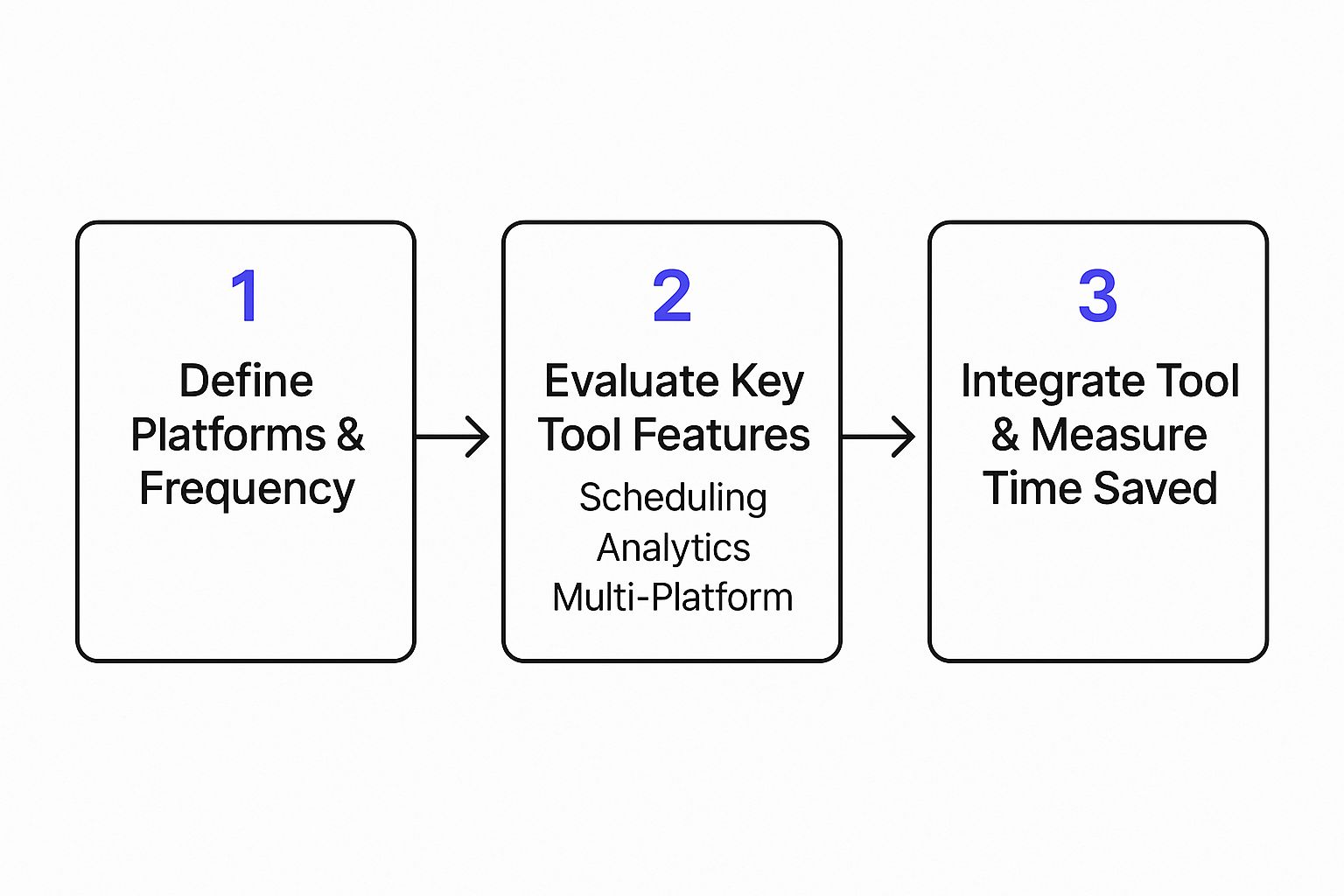
From strategy to scheduling, this is the process that will save you a ton of time. If you want to go deeper on this, our full guide on how to create a content calendar at https://repostly.app/blog/how-to-create-a-content-calendar-68a978a344be737efa9f3c61 is the perfect next step. By combining solid pillars, a balanced schedule, and smart batching, you’re not just posting—you’re building a self-sustaining content machine.
So, you’ve got the hang of building out a solid content calendar. That’s a huge first step. But now it’s time to really let the tools do the heavy lifting and build a social media presence that practically runs itself. We're moving beyond just scheduling posts and into creating smart, automated systems that work for you 24/7. This is how you stop being a content creator and start being a content strategist.

One of the most powerful things you can set up is an evergreen content queue. I think of this as a digital treasure chest. It’s where you store all your best, most timeless content—the killer tips, popular blog posts, impressive case studies, and glowing testimonials that never get old. These pieces are too valuable to just post once and forget.
With a tool like Repostly, you can create a special queue just for this evergreen content. The system will then automatically dip into this library, pick out a gem, and republish it to fill any gaps in your schedule. It’s a brilliant way to keep your feed active and continuously drive traffic back to your best stuff, all without you having to lift a finger.
Tapping Into Industry News with RSS Feeds
Here’s another pro-level workflow: connecting RSS feeds from top industry blogs directly into your social media scheduler. This is a game-changer for positioning yourself as the go-to source for what's new and important in your niche. You build instant credibility by being the one who shares the latest trends first.
Instead of spending an hour every morning hunting down articles to share, you can completely automate it.
For example, if you run a digital marketing agency, you could link Repostly to the RSS feeds from sites like Search Engine Journal or MarketingProfs. Whenever they publish a new article, it can be automatically pulled into your drafts. You can set it up to require your approval, or you can get fancy and have it post automatically with a pre-written intro like, "Hot off the press:" followed by the article title.
This simple setup ensures you're always part of the industry conversation, sharing relevant, timely content your audience will find genuinely useful. It's a low-effort, high-impact strategy.
My Two Cents: Advanced automation isn’t about being lazy; it’s about working smarter. When you build systems for your evergreen content and curated news, you create a content engine that establishes your brand as both an invaluable resource and an industry authority.
Letting AI Optimize Your Automation
The next level of social media automation is all about artificial intelligence. AI-powered features aren't just a cool gimmick anymore; they're becoming essential for getting ahead. The data backs this up, too.
Globally, a staggering 80% of organizations have brought AI into their operations in some way. And in the U.S., 60% of companies are already using generative AI for their content strategies. It's how they're able to show up consistently without burning out their teams. For a deeper dive, check out the latest AI in social media statistics from sqmagazine.co.uk.
Within a platform like Repostly, AI can seriously upgrade your workflows. Here are a few ways I’ve seen it make a real difference:
- Generating Post Variations: AI can take one idea—like a blog post title or a client testimonial—and spin it into a dozen unique social media posts, each tailored for a different platform. No more staring at a blank screen.
- Optimal Timing Suggestions: Stop guessing when to post. AI digs into your past engagement data to tell you the exact times your audience is online and ready to interact.
- Caption Refinement: Not a natural writer? No problem. AI can help you punch up your captions, change the tone to match different networks, or suggest relevant hashtags to get more eyes on your content.
When you start weaving these advanced workflows into your strategy, you’re no longer just a post scheduler. You're building an intelligent, responsive system that gets smarter over time. You're turning your automation tool into a genuine competitive advantage.
Measuring Success and Refining Your Strategy
Automating your social media is a huge time-saver, but if you just set it and forget it, you're missing the most important part. It’s like driving with your eyes closed—sure, you’re moving, but are you even going in the right direction? This final piece of the puzzle is all about checking your results and building a smart feedback loop to make your strategy sharper month after month.
The analytics dashboard inside a tool like Repostly is where the magic happens. It’s easy to get overwhelmed by all the numbers, so let's cut through the noise and focus on what actually moves the needle.
Key Metrics That Actually Matter
Forget about vanity metrics like raw impression counts for a minute. Instead, let's zoom in on the data that shows people are genuinely interested in what you have to say.
I always recommend starting with these four:
- Engagement Rate Per Post: This is the big one. It's the percentage of people who saw your post and cared enough to interact with it—likes, comments, shares, the works. A consistently high engagement rate is the clearest sign that your content is hitting the mark.
- Link Clicks: If you're trying to drive traffic to your website or a product page, this is your bottom line. It directly measures how well your posts turn passive scrolling into active interest.
- Follower Growth Over Time: Is your content pulling new people into your orbit? A steady, consistent climb in followers shows your automated strategy is successfully expanding your reach.
- Best Performing Content Pillars: Take a hard look at which content themes or formats always get the best reactions. Is it your how-to videos? Behind-the-scenes photos? This data tells you exactly what your audience wants more of.
If you want to get more granular, our guide on how to measure social media engagement is a great resource for translating those numbers into a clear story.
The point of analytics isn’t just to see what happened. It’s to understand why it happened so you can make it happen again—on purpose. Data gives your automation a brain.
Turning Insights into Action
Data is just a bunch of numbers until you do something with it. This is where you connect the dots and start tweaking your approach.
Let's imagine your analytics show that your posts on Wednesday mornings are consistently duds. They just don't get much traction at all. Don't just shrug it off! It's time to run a little experiment. This is a perfect scenario for some simple A/B testing.
For the next month, try this:
- Week 1 & 3: Keep posting your usual content at that same old Wednesday morning time.
- Week 2 & 4: Post the same type of content, but schedule it for Wednesday evening instead.
After a month, look at the data. Did the evening posts do better? If they did, you’ve just used real-world feedback to find a better time to post. You can apply this same thinking to everything from your caption styles and content formats to the calls-to-action you use.
By constantly testing and refining, you turn your automation into an intelligent system that doesn’t just post for you—it helps you get real, measurable results.
Common Automation Questions Answered
Jumping into social media automation can feel a bit nerve-wracking. I get it. You've worked hard to build your brand's voice, and the last thing you want is to sound like a robot. Let's walk through some of the most common questions people have so you can build a workflow that's both smart and authentic.
Will My Social Media Feel Robotic?
This is probably the number one fear I hear. People worry that automation will strip the personality right out of their profiles. But that fear comes from a common misconception about what automation is really for.
Here’s the secret: Automate the logistics, not the personality.
A tool like Repostly is fantastic for handling the grunt work—the scheduling, the posting, the nitty-gritty stuff that eats up your day. This doesn't replace you; it frees you up. Now you have more time for the human stuff: replying to comments, jumping into DMs, and actually talking to your community. That’s where real connection happens.
Think of it this way: your automation tool is your behind-the-scenes scheduler. You're still the one on stage, engaging with the crowd. By getting the manual task of posting off your plate, you get back the headspace to be truly present with your audience.
The point of automation isn't to take you out of the picture. It's to give you more time and energy to be in the picture, having meaningful conversations.
Another big question is always about how often to post. Honestly, there's no single magic number. It all comes down to the platform you're on and who you're talking to. What works on a fast-moving feed like X would feel like spam on LinkedIn.
If you're just starting out, here are some solid baselines:
- X (Twitter): This platform moves fast. Several posts a day focused on conversations and quick updates usually works well.
- Instagram/Facebook: Aim for 1-2 high-quality posts per day. Quality over quantity is key here.
- LinkedIn: One thoughtful, professional post per business day is often the sweet spot.
This gives you a place to start. From there, your analytics become your roadmap. Dive into the data, see when your audience is actually online and engaging, and then tweak your automated schedule to match.
What Is the Biggest Automation Mistake?
By far, the biggest mistake I see is falling into the "set it and forget it" trap. People get excited, load up a month's worth of content, and then walk away. Your automation tool is a powerful assistant, but it's not the strategist. You are.
When you don't check your performance, interact with your community, or adjust your content based on what the data is telling you, your strategy will eventually fail.
Automation should create a cycle of improvement: Post, measure, learn, and refine. That’s how you turn simple consistency into real, measurable growth.
Ready to build a smarter social media presence without sacrificing your authentic voice? Repostly gives you the tools to automate your scheduling, analyze what’s working, and win back hours every single week. Start your free 7-day trial today and see the difference for yourself!
Keep reading

10 Fresh Instagram Story Idea Tactics for 2025
Stuck for content? Discover our top Instagram story idea list, with actionable tips to boost engagement and grow your audience in 2025.

A Practical Social Media Planner for German Markets
Build a results-driven social media planner for Germany. This guide offers actionable strategies for content, scheduling, and analysis in the German market.

Crafting Your Social Media Content Plan
Stop guessing and start strategizing. This guide provides an actionable social media content plan to audit, plan, and execute content that gets results.
Post once. Show up everywhere.
Start your 7-day free trial and publish your next video to every platform in minutes.Pick a plan and publish your next video to every platform in minutes.
Start your free trialSee plansCancel anytime