Automate Social Media Posting A Practical Guide
Learn how to automate social media posting with this practical guide. Save time, maintain consistency, and grow your engagement with real-world strategies.
So, you want to automate your social media posting? At its core, it's about using a tool like Repostly to line up all your content ahead of time, hitting multiple platforms from one central spot. You'll connect your accounts, map out a content schedule, and then let the software do the heavy lifting—publishing your posts when your audience is most active. This is the secret to maintaining a strong, consistent online presence without the daily grind.
Why Automation Is a Game-Changer for Social Media
If you're still logging into each platform every single day to post, you’re burning through precious time on a task that technology can handle much, much better. Let's be clear: automation isn't about setting it and forgetting it. It's about being smarter with your resources. It lets you step away from the tedious mechanics of posting and focus on what actually moves the needle—crafting great content and building a real community.
The digital world is massive, and frankly, a bit overwhelming. In 2025, we're looking at around 5.45 billion people using social media, and they're spending an average of 2 hours and 24 minutes scrolling every day. That's a huge opportunity, but trying to keep up with it manually is a recipe for burnout.
Get Your Most Valuable Asset Back: Time
Posting by hand is a repetitive cycle. Log in, upload your photo or video, agonize over the caption, find the right hashtags, and then do it all over again for the next platform. It's a huge time sink.
Automation flips the script. You can batch-create your content and schedule an entire week's worth of posts in the time it might take to manually publish just one day's content.
Suddenly, you have hours back in your week. That recovered time is pure gold. You can reinvest it into activities that actually drive growth, like:
- Actually talking to your audience: Jump into the comments, reply to DMs, and build genuine connections.
- Digging into your analytics: Figure out what’s resonating with people and what’s falling flat so you can double down on the good stuff.
- Making better content: With more breathing room, you can brainstorm fresh ideas, write more compelling copy, and create higher-quality visuals.
When you automate the repetitive tasks, you free up the mental space you need to be creative and strategic. Social media stops being a daily chore and starts becoming the powerful marketing tool it's meant to be.
Manual Posting vs Automated Posting A Quick Comparison
To really see the difference, let’s break down the daily reality of both approaches. The contrast in efficiency and strategic potential becomes crystal clear when you see it side-by-side.
| Aspect | Manual Posting | Automated Posting |
|---|---|---|
| Daily Workflow | Reactive and repetitive. Log in and post multiple times a day. | Proactive and strategic. Schedule a week's content in one session. |
| Consistency | Inconsistent. Prone to missed posts on busy days or holidays. | Rock-solid. Posts go out at optimal times, every time, without fail. |
| Strategic Focus | Focused on the task of publishing content. | Focused on strategy, content creation, and community engagement. |
The table really says it all. Shifting to an automated workflow isn't just a minor tweak; it fundamentally changes how you approach social media management for the better.
Build Unbreakable Consistency
Consistency is everything on social media. It builds trust with your audience and signals to the algorithms that your account is active and reliable. When your followers know they can count on you for regular, valuable content, they stick around.
Automation makes this consistency effortless. Your posts will go out like clockwork, even on weekends, holidays, or your busiest days. It's the foundation for steady growth. For a more detailed look at these principles, this complete guide to automated social media posting is a great resource to build on.
Getting Your Feet Wet with a Social Media Automation Tool

Jumping into social media automation feels like a big step, but the setup is surprisingly simple. This is where you lay the groundwork, transforming all those separate social media profiles into a single, cohesive command center. It’s less about being a tech wizard and more about a few minutes of focused clicking.
The very first thing you'll do is connect your accounts. Tools like Repostly use secure, official APIs, which means you’ll just be prompted to log in to your Instagram, Facebook Page, or LinkedIn account to authorize the connection. It's a standard process that gives the tool permission to post for you.
Hooking Up Your Core Profiles
My advice? Don't try to connect every single account you own right away. Start with your heavy hitters—the two or three platforms where you know your audience hangs out. If you're a B2B company, that's probably LinkedIn and X (formerly Twitter). For a lifestyle brand, it’s almost certainly Instagram and TikTok.
One common mistake I see people make is connecting their personal Facebook profile instead of their Business Page. Automation tools need a Business Page to work properly, so make sure you're authorizing the right one. Trust me, double-checking this now will save you a headache later.
If you're just starting to automate social media posting, picking the right platform is everything. For a deeper dive, check out our guide on the top social media automation tools on the market.
Once you’ve linked those first few accounts, your dashboard will light up, showing everything in one clean, unified view. This is your new mission control.
Getting to Know Your New Dashboard
Before you start creating posts, take a minute to click around and get a feel for the layout. You'll quickly notice a few key areas that will become your new best friends:
- Content Calendar: This is a visual map of all your scheduled posts.
- Post Composer: The creative studio where you'll write and design everything.
- Analytics Tab: Where you'll go later to see what's working and what isn't.
- Account Manager: The spot to add new profiles or disconnect old ones.
The real goal here isn’t just to connect accounts. It's about creating a single source of truth for your entire social media strategy and finally ending the chaos of jumping between a dozen different tabs.
This move toward automation isn't just a niche trend. By 2024, 49% of marketing decision-makers had already automated their social media posting. It's part of a huge wave, with the marketing automation market projected to hit $14.55 billion by 2031.
With your accounts connected, you're officially part of this efficiency-first movement. Now, you’re ready to build your first real workflow.
How to Build Your First Automated Content Workflow
Alright, with your accounts connected, we get to the fun part: building a content engine that practically runs itself. This isn't about firing off random posts into the void. It’s about creating a smart, organized system that keeps your audience engaged, even when you’re neck-deep in other work. The goal here is a set-it-and-trust-it system that keeps your social feeds alive and kicking.
Let's walk through a real-world scenario. Imagine you run a local home services business—maybe landscaping or house cleaning. Your audience wants to see your great work, get useful tips, and connect with the people behind the brand. Just posting whenever you remember isn't going to cut it. You need a plan.
Defining Your Content Categories
First things first, let's create some content "buckets" or categories. Think of these as the main themes you’ll always circle back to. Instead of waking up and thinking, "What on earth do I post today?" you'll just pull from one of these buckets.
For our local service business, a few solid categories would be:
- Client Testimonials: Short quotes or quick videos from happy customers. Social proof is gold.
- Helpful Tips: Quick, actionable advice. Think "3 ways to prep your garden for spring" or "The one cleaning hack you need for tough stains."
- Behind the Scenes: Photos or short clips of your team on the job. This builds trust and humanizes your brand.
- Blog Post Promotion: Driving traffic back to your website with links to your latest articles.
By setting up these pillars, you guarantee a healthy mix of content that sells, helps, and connects. This is the absolute foundation to automate social media posting without sounding like a robot.
This whole process is actually pretty straightforward. You connect your accounts, categorize your content, and then schedule it. It's that simple.
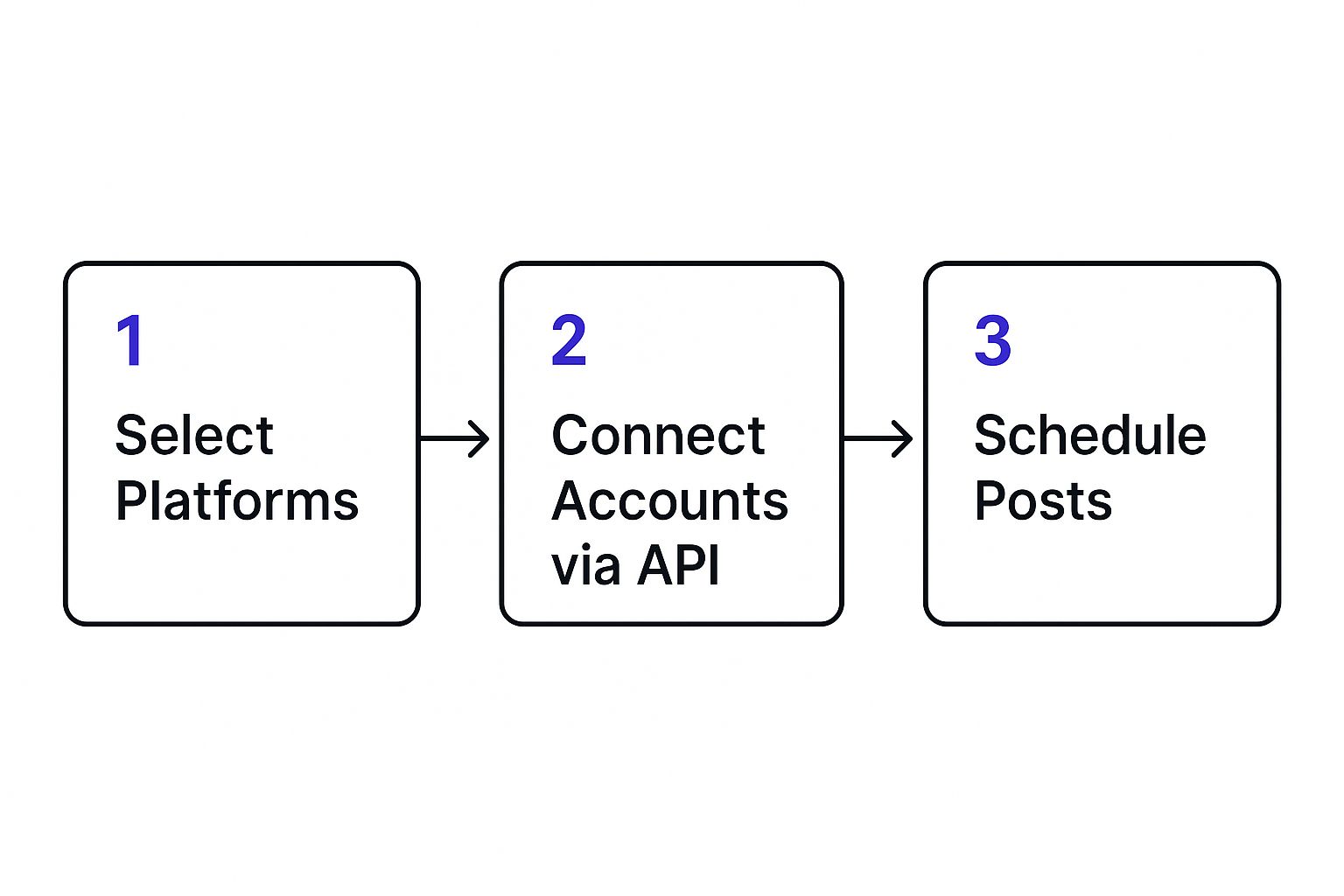
As you can see, breaking it down into these three stages makes automation feel a lot less intimidating.
Creating Your Automated Schedule
Now, let's give those categories a home in your weekly calendar. The idea is to create a rhythm your followers can get used to. Using a tool like Repostly, you can build this schedule once, and it'll run on a loop, automatically grabbing a post from the right content bucket at the right time.
Here’s what that could look like for our service business:
- Tuesdays at 10 AM: Pull a post from the 'Client Testimonials' bucket.
- Thursdays at 2 PM: Share something helpful from the 'Helpful Tips' category.
- Fridays at 11 AM: Drop a link to a new article from the 'Blog Post Promotion' bucket.
The real magic here is that you're not just scheduling one-off posts. You're building an intelligent, repeatable system. Once this is set up, the tool does the heavy lifting, publishing the right type of content every single week.
Your job completely changes. You're no longer a daily poster; you're a content curator. You can spend just a couple of hours a month loading up your content library with fresh testimonials, new tips, and blog links. The automation handles the rest, turning your social media from a daily chore into a powerful, hands-off asset for your business.
Customizing Posts for Each Social Platform
One of the biggest mistakes you can make when you automate social media posting is to treat every platform as if it’s the same. Blasting an identical message across all your channels is a fast track to looking out of touch and tanking your engagement.
Each platform has its own unwritten rules, audience expectations, and best practices. Real success comes from respecting those differences. It's not just about posting faster; it's about posting smarter. The idea is to take one core message and cleverly adapt it so it feels completely natural on every single channel.
From One Idea to Many Voices
Let's walk through a real-world example. Say you’re launching a new product feature. A generic, copy-pasted announcement is going to fall flat. Instead, you can use your automation tool to tweak that message for maximum impact everywhere.
Here’s how that one announcement can be transformed:
- For LinkedIn: This is your professional audience. You'll want to craft an update that focuses on the business value and uses industry-specific language. Make sure to include a direct link to a blog post for those who want a deeper dive. The tone here is all about benefits and expertise.
- For Instagram: It’s all about the visuals. Lead with a polished image or a quick Reel that actually shows the new feature in action. Your caption can be more casual and fun—use relevant hashtags and maybe ask a question to get people talking in the comments.
- For X (formerly Twitter): You have to be quick and to the point. Write a short, punchy message that grabs attention immediately. A couple of key hashtags and a compelling GIF can make all the difference in a feed that moves at lightning speed.
This is how you make sure your automated content never feels robotic. If you want to see exactly how this works inside a tool, our guide on how to schedule social media posts breaks down the process step-by-step.
How AI Is Changing the Game
This kind of strategic customization is getting way easier thanks to artificial intelligence. AI in social media is booming—by 2025, an estimated 80% of organizations will have integrated AI into their marketing. Already, 71% of social media marketers are using AI tools in their daily work.
These tools can suggest platform-specific edits, generate hashtag ideas, and even rewrite your copy in different tones, which seriously speeds up the customization workflow. You can find more stats on AI's impact on social media on sqmagazine.co.uk.
The whole point of smart automation is to make every single post feel like it was handcrafted for the platform it’s on. Customization is what connects efficiency with authenticity.
By taking just a few extra minutes to tailor your scheduled posts, you show your audience that you get the platform and you value their time. That little bit of effort pays off big time in engagement, helping you build a much stronger, more loyal community across the board.
Using Analytics to Refine Your Automation Strategy
https://www.youtube.com/embed/elhhL6DhOzo
Setting up your automation is just the beginning. The real magic happens when you treat it like a cycle: post, measure, refine, and repeat. This is where your analytics dashboard becomes your command center, helping you turn raw data into much smarter content decisions.
Think of your analytics as a direct line to your audience. It's not about getting bogged down in spreadsheets; it's about finding answers to the important questions. What kind of content actually stops the scroll? When are my followers really online and ready to engage? Is my follower count actually growing, or has it hit a plateau on one platform? Nailing down these answers is how your strategy evolves from good to great.
Identifying Your Top-Performing Content
The first thing you should do is figure out what’s already working. Look past the simple vanity metrics like 'likes' and dig deeper into what drives real results. Are people actually clicking the links in your bio, saving your posts for later, or taking the time to write a genuine comment? Those are the true signs of content that connects.
When you find a post that really takes off—maybe it's a behind-the-scenes video that got twice the usual number of comments—don't just give yourself a high-five. Break it down. What was it about that post? The format? The topic? The way you wrote the caption? Understanding the why is crucial because it lets you create more of what your audience is clearly asking for.
The whole point is to stop guessing. Your analytics give you the direct feedback needed to quit making content you think people want and start creating content you know they want.
Pinpointing Your Optimal Posting Times
One of the quickest wins you'll get from your data is discovering your own "golden hours" for posting. A generic guide might say to post at noon on a Tuesday, but what if your audience is full of night owls who are most active at 10 PM? Your own data will tell you the real story.
- Test and verify. Use what you find to tweak your Repostly schedule. Try moving that weekly "Tip Tuesday" post from the afternoon to the evening and see what happens to your engagement.
- Be platform-specific. Don't forget that your best time to post on Instagram could be totally different from your peak time on LinkedIn. Each platform has its own rhythm, so adjust your schedule accordingly.
This isn't rocket science, but it's a simple, data-backed change that ensures your posts land in front of more eyes, more often. For a deeper dive into finding the right tools, our guide on the top social media analytics tools is a great place to start.
Turning Data into Actionable Insights
At the end of the day, numbers on a screen don't mean much on their own. The goal is to turn that data into actionable insights that fuel real growth. It’s all about translating the numbers into clear, simple directives for your team.
For instance, if your data shows that posts with a question in the caption get 35% more comments, the action is obvious: start asking more questions! Or maybe you notice your reach on Facebook is slowly declining while your Instagram is booming. That’s a clear signal to shift more of your creative energy toward Instagram.
This constant feedback loop is what separates a basic, "set-it-and-forget-it" automation setup from a dynamic marketing engine that gets smarter with every post.
Common Questions About Social Media Automation
Jumping into social media automation can feel like a big step. It’s smart to have questions—you want to make sure you're not sacrificing the personal touch that makes your brand unique. Let's tackle some of the most common worries I hear from people all the time.
The biggest fear? Sounding like a robot. It’s a totally valid concern, but one you can easily avoid with the right mindset. Automation isn't about replacing you; it’s about taking the tedious job of manually publishing content off your plate.
Think about it this way: when you automate social media posting for your planned content, you reclaim hours. That’s more time you can spend in the comments, replying to DMs, and actually talking to your community—the stuff that really matters.
Will Automating Posts Hurt My Engagement?
Not if you do it right. The key is to see automation as your reliable publishing assistant, not your replacement. You’re still the one behind the strategy, deciding what to say and when.
A great approach is to schedule your core content—things like blog post announcements, helpful tips, or industry news—while always leaving space in your calendar for those spontaneous, real-time posts that capture a moment.
When you take a minute to tweak the caption for each platform and use your analytics to double down on what works, you end up with a steady flow of great content. That kind of consistency actually builds trust with your audience, which often leads to more engagement, not less.
How Often Should I Automate Posts?
There's no golden rule that works for everyone. The best posting frequency really comes down to your audience and the platform you're on. That said, if you're looking for a solid place to start, this is a pretty reliable baseline:
- X (formerly Twitter): 3-5 times per day
- Facebook: 1-2 times per day
- Instagram Feed: 3-5 times per week
- LinkedIn: 1 time per day
Use these numbers as your starting point, not your final destination. Keep a close eye on your analytics. If you see engagement start to drop, you might be overdoing it. On the other hand, if your audience is loving what you share, you could try posting a little more often.
Can I Automate Instagram Stories and Reels?
Yes, you absolutely can! Modern tools like Repostly let you schedule both Instagram Stories and Reels directly, which is a huge time-saver. You can finally plan out your most engaging video content instead of scrambling to create it on the fly.
You can get everything ready to go ahead of time—upload the video, write the caption, add your hashtags, and pick the exact time for it to go live. Folding this into your automated workflow is a game-changer.
This means your most powerful, attention-grabbing content is no longer an afterthought. It's a core part of your scheduled strategy, ensuring you’re consistently showing up where your audience is most engaged.
Ready to stop the daily grind and build a smarter, more consistent social media presence? Repostly makes it easy to schedule posts, analyze performance, and save hours every week. Start your free 7-day trial of Repostly today!
Keep reading

10 Fresh Instagram Story Idea Tactics for 2025
Stuck for content? Discover our top Instagram story idea list, with actionable tips to boost engagement and grow your audience in 2025.

A Practical Social Media Planner for German Markets
Build a results-driven social media planner for Germany. This guide offers actionable strategies for content, scheduling, and analysis in the German market.

Crafting Your Social Media Content Plan
Stop guessing and start strategizing. This guide provides an actionable social media content plan to audit, plan, and execute content that gets results.
Post once. Show up everywhere.
Start your 7-day free trial and publish your next video to every platform in minutes.Pick a plan and publish your next video to every platform in minutes.
Start your free trialSee plansCancel anytime