How to Post Facebook Videos to YouTube Easily
Learn how to post Facebook videos to YouTube with our simple guide. Get step-by-step instructions on how to post Facebook videos to YouTube today!
So, you've got a great video on Facebook and you're thinking about putting it on YouTube. This isn't just a simple copy-and-paste job; it's a smart strategic move to get your content in front of a whole new set of eyes. It involves grabbing the video file from Facebook and then giving it a new home on YouTube, but with a few tweaks to make it feel native to the platform. Done right, you’re essentially doubling your video's potential to be seen.
Why Bother Putting Facebook Videos on YouTube?
Leaving your video content stuck on one platform is a classic mistake. Think of it this way: Facebook is brilliant for that initial burst of engagement, popping up in your followers' feeds and sparking conversation. But YouTube? It’s the world's second-biggest search engine. That's a completely different ball game. Your video there has a much longer shelf life and can be discovered by new people searching for your topic months, or even years, down the line.
A big part of growing an online presence is about developing a solid cross-platform content strategy to maximise how many people see your work. You're not just chasing view counts; you're building your brand's credibility and authority in more than one place.
To really get this, you need to understand the fundamental differences between the two audiences. I've put together a quick comparison to help you visualise it.
Audience and Content Focus Facebook vs YouTube
This table gives a quick overview of key differences to help you adapt your video strategy for each platform's unique audience.
| Attribute | Facebook Video | YouTube Video |
|---|---|---|
| User Intent | Passive discovery (scrolling) | Active search (seeking info/entertainment) |
| Video Length | Shorter, attention-grabbing (1-3 mins) | Longer, in-depth content (8-15+ mins) |
| Content Longevity | Short-lived, high initial engagement | Evergreen, long-term search value |
| Monetisation | Ad breaks, branded content | AdSense, channel memberships, merchandise |
| Audio | Often viewed with sound off | Sound on is standard |
As you can see, what works on one platform won't necessarily fly on the other without some adjustments.
Moving content between platforms allows you to tap into distinct user bases. Someone who discovers your work on YouTube may not be an active Facebook user, and vice versa. By being present on both, you make your content accessible to the widest possible audience.
Maximise Your Reach in Key Markets
Let's take a real-world example, like targeting an audience in Germany. The potential here is massive. As of early 2025, YouTube had around 65.5 million users in Germany, which is a staggering 83% of all internet users in the country. That number alone shows you can't afford to ignore YouTube if you want to connect with a German-speaking audience.
By posting on both platforms, you're creating multiple pathways for people to find you. This is the essence of smart content distribution. If you're keen to learn more about getting the most out of every piece of content you create, check out these excellent content repurposing strategies. It's not just about sharing more; it's about being strategic and placing your content where it will make the biggest splash.
The Classic Manual Method: Download and Re-upload
Sometimes, you just want total control. If you're a creator who likes to get hands-on with your content, the manual download and re-upload method is a rock-solid choice. It’s the classic way to get your Facebook videos onto YouTube, and it’s perfect if you don't post a huge volume of content and want to personally manage every single detail.
The whole process kicks off inside your Facebook Page. Head over to your content library, find the video you want to move, and look for the download option. Here’s a pro tip: always, always choose the highest quality available. This is usually labelled "Download HD." Grabbing a low-res version is a rookie mistake that will make your video look pixelated and unprofessional on YouTube, especially on larger screens.
Prepping Your Video for its YouTube Debut
With the video file saved to your computer, you’re holding the master copy. But don't just rush to upload it. Take a moment to think about whether it needs any tweaks. For example, did the first few seconds of your video have a call-out that was specific to your Facebook audience? You might want to trim that for a more evergreen intro that works better on YouTube.
This infographic breaks down the essential steps for getting your video ready manually.
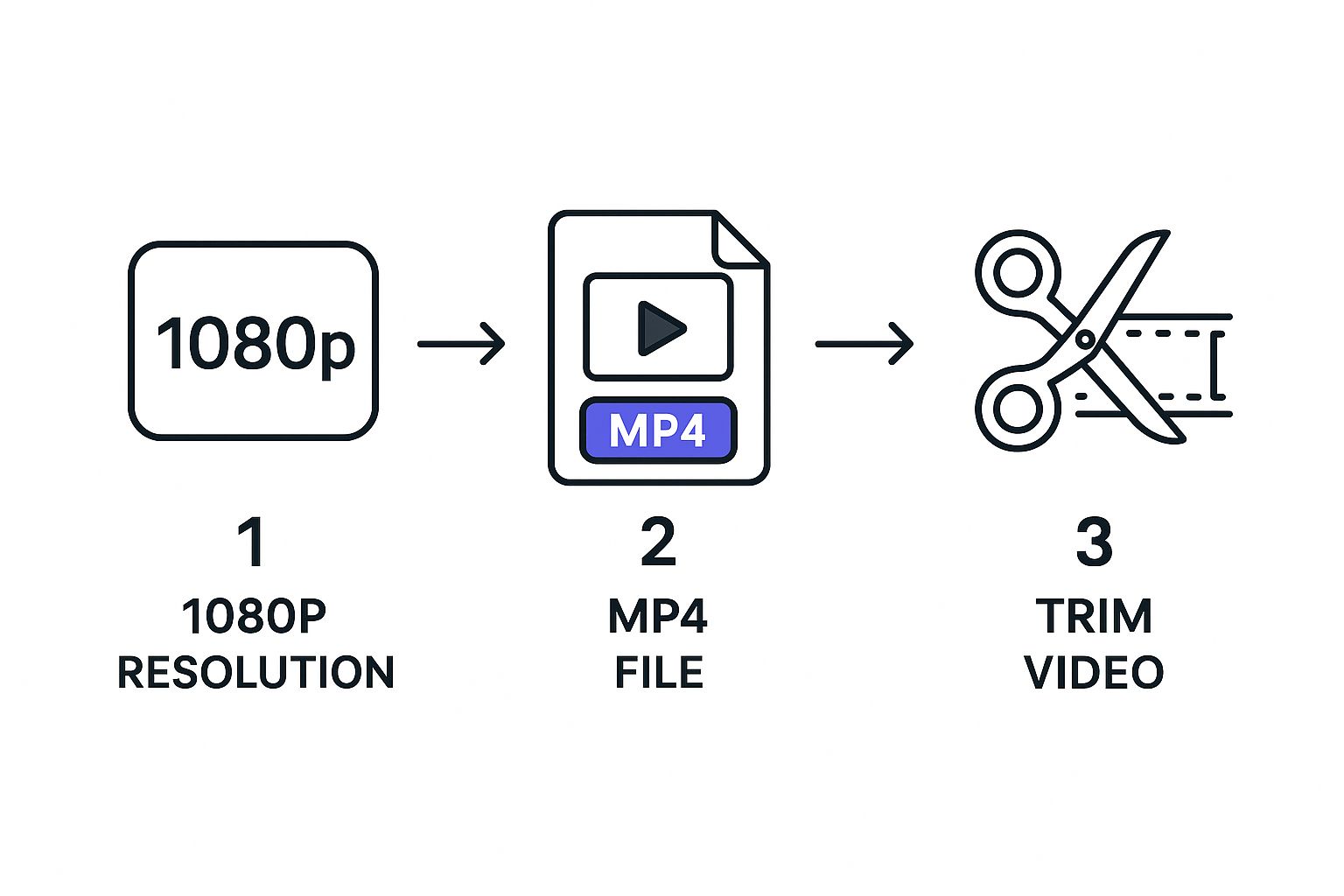
As you can see, it all starts with that high-definition download and then moves into making adjustments specifically for the new platform before you even think about hitting 'upload'.
Remember, YouTube and Facebook are two completely different worlds. A video that went viral on Facebook's fast-scrolling feed needs a new strategy for YouTube's search-driven platform. You have to completely rethink the title, description, and thumbnail to match how people find content there.
While Facebook still holds a massive 47.6% market share for general social media use in Germany, people go to YouTube with a specific search in mind. They’re actively looking for something. Your manual upload process has to be tailored for that search intent if you want it to succeed. You can find more interesting German social media stats over at Statcounter.com.
Finally, it's time to upload. Jump into your YouTube Studio and get ready to fill everything out. This is your chance to shine. Craft a compelling title, write a detailed description packed with relevant keywords, and add your custom tags. Don't be lazy with these fields; they are absolutely critical for getting discovered. And one last thing: creating a custom thumbnail isn't optional—it's the single most important factor for earning that click.
By the way, if you’re looking to do the reverse, we also have a great guide on how to post YouTube videos on Facebook the right way.
Automating Your Workflow with Cross-Posting Tools
Let's be honest, for busy creators and marketing teams, the whole download-and-upload dance is a major time sink. There's a much smarter way to handle this: automating the entire workflow. This is where dedicated cross-posting tools come into their own, giving you a "set it and forget it" system that can claw back hours every single week.
Think of these platforms as a bridge between your social accounts. Instead of you manually shuffling files around, the software does all the heavy lifting in the background. This frees you up to focus on what actually moves the needle—creating fantastic content.
Connecting Your Accounts and Setting Rules
Getting set up with a tool like Repostly is refreshingly straightforward. You just need to connect your Facebook Page and your YouTube channel by authorising access. Once they're linked, you can start building automation rules that tell the software exactly how to handle your videos.
For instance, you could create a workflow that automatically snags any new video you post on Facebook and schedules it to go live on YouTube a day later. Just like that, you've created a consistent content rhythm without any extra effort.
When you're comparing tools, here are a few key features I always recommend looking for:
- Smart Scheduling: The ability to plan your YouTube uploads weeks or even months ahead.
- Automatic Metadata: Some tools are clever enough to auto-generate titles and descriptions based on your original Facebook post, which is a huge time-saver.
- Quality Preservation: It's crucial that your video is transferred without any loss in resolution.
The real win with automation is consistency. When your audience knows when to expect new content on each platform, you build loyalty and keep them coming back for more. Automation simply removes the risk of human error, like forgetting to post.
If you're looking to go deeper, there are some excellent guides out there on the different social media automation tools and how they fit into a broader strategy. By delegating the repetitive task of content distribution, you reclaim precious time you can reinvest into growing your channels and actually talking with your community.
Optimising Your Video for the YouTube Algorithm
Simply copying a video file from Facebook over to YouTube and hoping for the best is a common mistake. It rarely works. You're moving from a social feed to a powerful search engine, and the rules of the game are completely different.
Facebook rewards immediate, in-the-moment engagement. YouTube, on the other hand, is playing the long game. It wants to understand your content deeply so it can recommend it to the right people for weeks, months, or even years. To get the algorithm on your side, you need to speak its language.
This starts before you even hit the upload button. Think about your title and description. What would a real person actually type into the YouTube search bar to find your video? Do some quick keyword research around those ideas and weave them into a title that grabs attention and a description that genuinely helps both viewers and the algorithm understand what your video is about.
Crafting a YouTube-Ready Package
Once you’ve nailed the text, it’s time to think visually. Your thumbnail is arguably the single most important factor in getting someone to click. Don't just pull a random, blurry frame from the video itself. Create a bright, clear, and compelling custom thumbnail that tells a story and promises value.
After uploading, make sure you use the tools YouTube gives you to increase your video's visibility and keep people watching:
- Tags: Use a healthy mix of broad (e.g., "baking recipes") and specific (e.g., "vegan sourdough chocolate chip cookies") tags.
- End Screens: Don't let viewers just drift away when the video finishes. Add an end screen that encourages them to subscribe or watch another one of your videos.
- Cards: You can add little pop-up links, or 'cards', during your video to point viewers to other relevant content or playlists.
The key is to treat this repurposed video like it's brand new and made specifically for YouTube. A lazy re-upload looks like a lazy re-upload, and the algorithm often treats low-effort content accordingly by limiting its reach.
Giving your video a final polish can make a world of difference. You might want to add a new intro, cut a section that was specific to Facebook, or add some new graphics. Finding the best video editing software for beginners can help you make these tweaks without a steep learning curve.
Putting in this extra effort pays off. The appetite for well-made video content is massive. In Europe alone, spending on video ads recently hit about €11.6 billion, which shows just how many people are watching. These optimisation steps are what transform a simple file transfer into a real, audience-building asset for your YouTube channel.
Common Cross-Posting Mistakes to Avoid
Knowing the technical steps to get your Facebook videos onto YouTube is one thing, but sidestepping the common mistakes is what really makes a difference. Just dumping your content from one platform to the other is a surefire way to get disappointing results. In fact, these missteps can do more harm than good for your channel's growth.
One of the quickest ways to get into trouble is by ignoring platform-specific policies, especially when it comes to music. A song that was perfectly fine for your Facebook Reel could earn you an immediate copyright strike on YouTube. The licensing agreements are completely different, and what's free to use on one platform can get your video demonetised or taken down on another. It's always worth double-checking your audio rights before you hit "upload".
Mismatched Formatting and a Ghost Town Community
Another classic error I see all the time is failing to adapt the video's format. When you upload a vertical, 9:16 Facebook Reel as a standard horizontal YouTube video, it just looks lazy. You end up with those massive black bars on the sides, screaming to viewers that this is a low-effort repost. That's a great way to lose your audience's interest before they've even seen what you have to say.
- Vertical Videos: For these, you absolutely should be using YouTube Shorts. It gets your content in front of the right audience, in the format they expect.
- Horizontal Videos: Longer, standard Facebook videos are a much better match for the main YouTube player, but they still need a little love.
Cross-posting isn’t just a technical task; it's about building a community. If you treat YouTube as just another place to drop a link, you're missing the entire point. You have to show up for the people there.
Finally, please avoid the "post and ghost" strategy. You simply can't upload your video and then disappear. YouTube's entire ecosystem is built on interaction. Make time to reply to comments, use your video description to ask questions, and actually engage with the community you're trying to attract. This signals to both your viewers and the YouTube algorithm that you're an active creator, which is vital for building a healthy, loyal subscriber base.
Got Questions? We've Got Answers
When you start moving your videos from Facebook to YouTube, a few common questions always seem to pop up. Let's tackle them head-on, so you can cross-post with confidence.
What About Using Someone Else’s Facebook Video?
Let's be crystal clear on this: no. Never, ever download another creator's video and re-upload it as your own. You absolutely need their explicit, written permission first.
Without it, you're not just bending the rules—you're breaking copyright law. The consequences can be serious:
- Your video will almost certainly be flagged and removed.
- You risk getting a copyright strike against your YouTube channel.
- In the worst-case scenario, you could face legal trouble.
The advice in this guide is all about repurposing your own content—the videos you created.
Does Downloading from Facebook Hurt the Video Quality?
Yes, it often does, but you can minimise the damage. Facebook compresses every video uploaded to its platform, which means the version you download won't be as crisp as your original file.
When you do need to download from Facebook, always look for the "Download HD" option. It's the best you're going to get from the platform.
Pro Tip: For the absolute best quality on YouTube, always upload your original, high-resolution master file. If downloading from Facebook is your only option, grabbing the HD version is the next best thing.
Should I Bother Removing the Facebook Watermark?
You definitely should. Leaving a Facebook watermark on a video you upload to YouTube can look unprofessional and might even signal to the YouTube algorithm that it's low-effort, repurposed content. This could potentially hurt your video's reach.
Your viewers might see it the same way—as something that wasn't made for them. If a watermark from a Facebook Live is stuck on your video, a quick trip through a video editor can fix it. Simply crop it out or cover it with your own channel logo for a much cleaner, more professional look.
Ready to stop juggling downloads and uploads? Repostly can handle all that for you. It’s the smart way to get your videos in front of a bigger audience without spending hours on manual cross-posting. Give automation a try and see how much time you save.
Keep reading

10 Fresh Instagram Story Idea Tactics for 2025
Stuck for content? Discover our top Instagram story idea list, with actionable tips to boost engagement and grow your audience in 2025.

A Practical Social Media Planner for German Markets
Build a results-driven social media planner for Germany. This guide offers actionable strategies for content, scheduling, and analysis in the German market.

Crafting Your Social Media Content Plan
Stop guessing and start strategizing. This guide provides an actionable social media content plan to audit, plan, and execute content that gets results.
Post once. Show up everywhere.
Start your 7-day free trial and publish your next video to every platform in minutes.Pick a plan and publish your next video to every platform in minutes.
Start your free trialSee plansCancel anytime