How to Repurpose Content for Maximum Reach
Learn how to repurpose content with our practical guide. Discover proven strategies to maximize reach, save time, and boost engagement on every platform.
Content repurposing is simply the art of taking something you’ve already created and giving it a new life in a different format. Think of it like this: you write a fantastic, in-depth blog post. Instead of just letting it sit there, you turn its key points into a snappy video, a shareable infographic, or a whole week's worth of social media updates.
It’s all about getting the most mileage out of your best ideas.
Why Repurposing Content Is No Longer Optional

Thinking about how to repurpose your content is so much more than a time-saving hack. It's a strategic move to maximize the impact of your work. Let’s be real—your audience is scattered everywhere, and their attention is divided.
The person who loves settling in to read your 2,000-word blog post is probably not the same person scrolling through TikToks or listening to your podcast during their commute. Repurposing acts as the bridge, connecting these different groups and making sure your core message hits home, no matter where they hang out online. This approach turns your content creation from a constant grind into a smart, sustainable system.
The Real Payoff of a Repurposing Mindset
When you start thinking this way, the benefits really start to stack up. Instead of always being on the hamster wheel of "what's next?", you can focus on amplifying what you already know works. This not only builds your authority on a topic but also gives your best content a much longer shelf life.
Here’s what you really gain:
- Reach a Wider Audience: You can finally connect with different groups on the platforms they actually use, from the visual learners on YouTube to the business-minded folks on LinkedIn.
- Make Your Message Stick: Repetition is how people remember things. Seeing your core ideas in different formats hammers home your expertise and what your brand stands for.
- Boost Your SEO Efforts: Creating multiple pieces of content around one central topic helps build topical authority. It also attracts different kinds of backlinks and sends positive engagement signals that search engines love.
Repurposing isn't about cutting corners; it's about working smarter. It makes sure the blood, sweat, and tears you poured into one amazing piece of content pay you back over and over again, not just once.
Smart Tools and Bigger Impact
These days, repurposing has become a must-do for getting the best return on your marketing investment. With AI-powered tools, you can slash production time by instantly turning one asset into dozens of formats, saving a ton of time and money. This allows brands to cater to how different people prefer to consume content—whether that’s video, audio, or text—and massively expand their reach.
To dive deeper into the strategies for getting more out of every piece of content you create, check out this comprehensive content repurposing guide.
Mining Your Existing Content for Gold

The smartest way to get more out of your content isn't always about creating something new from scratch. It's about finding what’s already resonating with your audience and giving it a new life. Before you start chopping up a blog post or turning a video into a carousel, you need to figure out which pieces are your "greatest hits."
This isn't about guesswork. Your content analytics are the treasure map.
Start by digging into your data, whether it's in Google Analytics, your email service provider, or your native social media dashboards. You're looking for the clear winners—the content that has already proven its worth.
Start with the Numbers: Your Quantitative Winners
Hard data tells a compelling story. The content that's already pulling in traffic, views, or downloads is your most logical starting point for repurposing. It’s already passed the first test with your audience.
Kick off a content audit and look for assets that are excelling in these areas:
- High-Traffic Blog Posts: Pinpoint the articles that consistently bring in the most organic search traffic. These are begging to be turned into a detailed infographic, a YouTube video script, or a series of LinkedIn posts.
- Long-Watch-Time Videos: Find the videos where people actually stick around. A high average watch time is a massive signal that the topic is engaging and can easily be broken down into shorter clips for TikTok or a step-by-step written guide.
- Top-Downloaded Podcasts: Which episodes have the most downloads? The core message in those episodes has already captured your audience's attention and can fuel dozens of quote cards, email newsletter snippets, and Twitter threads.
Key takeaway: Your best-performing content is a direct line into what your audience cares about. The topics that have already grabbed their attention are the ones most likely to succeed again in a new format.
Look for the Human Element: Your Qualitative Champions
Not all value can be measured in pageviews. Some of your most repurposable content reveals its potential through human interaction and its timeless relevance. These pieces solve real problems, and that’s a goldmine.
For instance, think about the content you've created that answers your most frequently asked customer questions. A single, comprehensive blog post that tackles a common pain point can be spun into an entire content ecosystem: a helpful FAQ video, a series of Instagram carousels, or even a downloadable checklist.
Also, keep an eye out for posts that sparked a passionate, lively comment section. When people are debating and sharing their own experiences, you've struck a nerve. That high engagement is a clear sign the topic is perfect for a deeper-dive webinar or a podcast episode where you can explore the conversation in more detail.
This isn't just a niche tactic; it’s a core part of modern marketing. Recent data shows that 82% of companies now use content marketing, with 72% saying it directly increases their traffic and engagement. Even more telling, 76% see it as a primary source for generating leads—a goal that smart repurposing can help you achieve much faster. You can learn more about how content marketing drives results and why this approach is so effective.
Matching Your Content to the Right Platform
You’ve figured out what your best content is—that’s a huge first step. But the real magic happens when you learn how to translate that content for different platforms. You can't just drop a link to your latest blog post on Instagram and expect it to work. It’s all about fitting your core message into a format that feels natural and native to where your audience is hanging out.
Think of it like this: that in-depth, data-heavy report you published? It’s perfect for the professional, career-focused crowd on LinkedIn. But take that same data over to Pinterest, and it needs to become a beautiful, shareable infographic. It's not about changing the message, but changing the delivery to match the room.
Tailoring Your Message for Different Audiences
Every social media platform has its own vibe and unspoken rules. LinkedIn users are there to learn, network, and get industry insights. So, breaking down a complex case study into a slick carousel post with key takeaways? That’s a home run.
Meanwhile, over on Instagram, people are scrolling for quick hits of visual inspiration. That same case study could be transformed into a 60-second Reel highlighting the most surprising outcome. Or maybe a series of clean, eye-catching quote graphics pulled from customer testimonials.
The goal is to make your content feel like it was born on the platform you're posting it to. When it feels native, people are far more likely to stop, look, and engage.
The data doesn't lie; some formats just perform better on certain platforms. The infographic below gives a great overview of how people actually prefer to consume repurposed content.
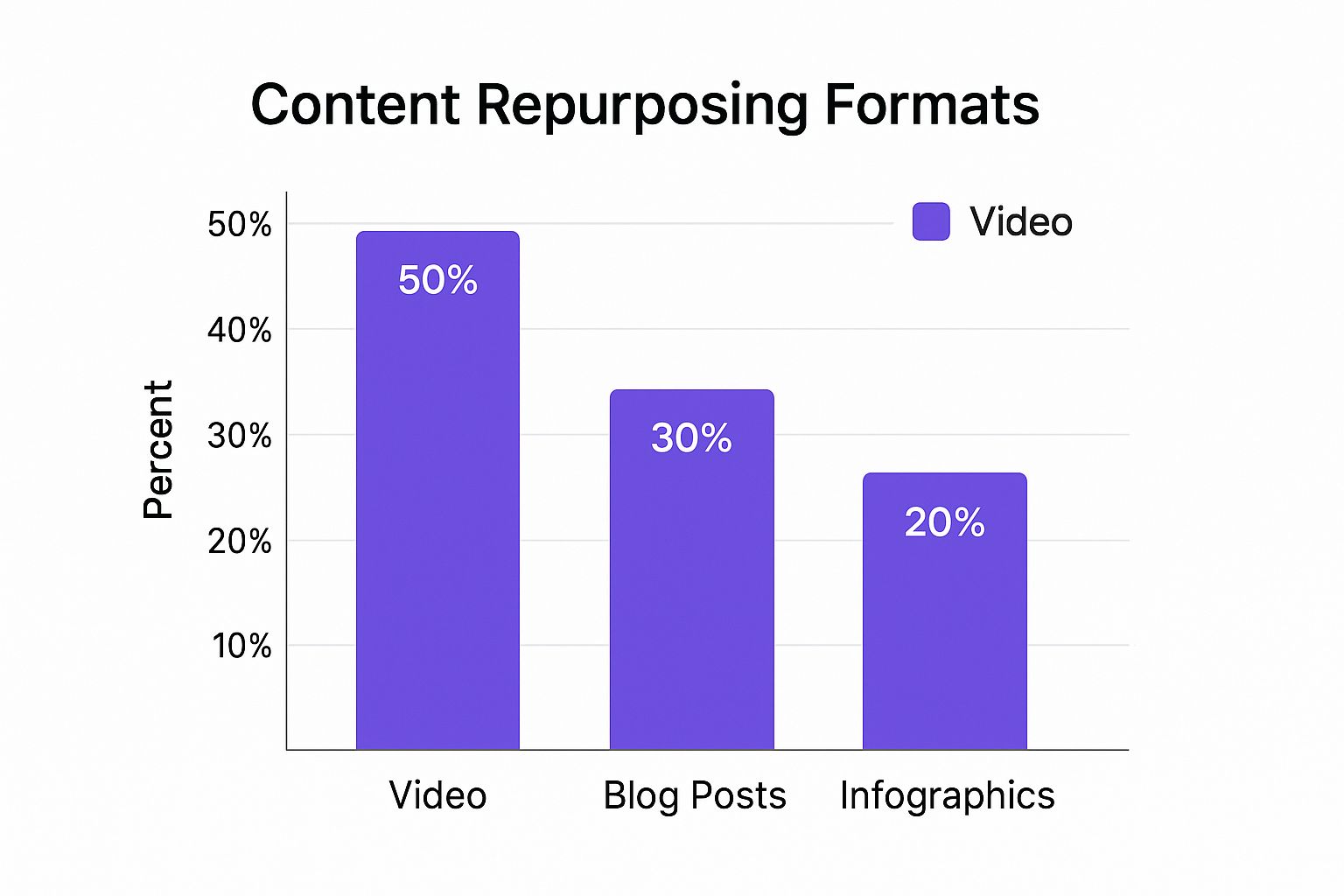
As you can see, video is a clear winner in many cases, but don't count out written and visual content just yet. A smart strategy uses a mix of all three to get the job done.
From One Idea to Many Assets
Let's make this real. Imagine you just finished recording an amazing 30-minute podcast interview with an expert in your field. Instead of just publishing the audio and calling it a day, let's break it down into a whole content ecosystem.
- Blog Post: Write a summary article highlighting the top 5 key takeaways from the conversation. You can embed the full podcast player right in the post and even include a transcript to boost your SEO.
- YouTube: Upload the full-length video interview. Then, find two or three of the best 2-minute clips and edit them into standalone YouTube Shorts for a quick, digestible bite.
- Instagram: Pull the most powerful quotes from your expert and turn them into shareable graphics for your feed. You could also take one of those YouTube Shorts, add some trending audio and on-screen captions, and you've got a killer Reel. If you need a little help with this, check out this guide on how to share videos from YouTube to Instagram.
- LinkedIn: Craft a thoughtful text post summarizing one key insight from the interview. Pair it with a professional headshot of your guest to start a conversation with other pros in your industry.
Just like that, one podcast episode has fueled your content calendar for a week or more, reaching completely different segments of your audience in the way they want to be reached. This is how you stop the content hamster wheel and start working smarter.
Content Repurposing Matrix From Source to Platform
To help you get started, I've put together a simple matrix. Think of it as a cheat sheet for matching your original content to the best formats for each platform. It takes the guesswork out of the process.
| Original Content Type | Best Repurposed Format | Ideal Platform |
|---|---|---|
| Blog Post / Article | Infographic, Carousel Post, Short Video Summary | Pinterest, LinkedIn, Instagram |
| Podcast Episode | Quote Graphics, Audiogram, Short Video Clips | Instagram, Twitter, YouTube |
| Webinar / Video | Blog Post Summary, Short Clips (Reels/Shorts) | Blog, Instagram, YouTube |
| Case Study / Report | Key Stat Graphics, Carousel Post, Short Video | LinkedIn, Twitter, Instagram |
| Customer Testimonial | Quote Graphic, Short Video Snippet | Instagram, LinkedIn, Website |
This matrix isn't exhaustive, but it's a solid foundation. Use it as a starting point to brainstorm how you can give your best content a second, third, or even fourth life across the web.
Your Practical Content Transformation Workflow
This is where the rubber meets the road. Turning a great idea into a whole library of fresh content is all about having a solid, repeatable process. Without a clear workflow, it’s easy to get bogged down, but with a structured approach, the whole thing becomes surprisingly manageable.
The first move is always to find the heart of your original piece. What’s the one big idea you absolutely need your audience to walk away with? Your job is to boil that 2,000-word article or 30-minute podcast down to a single, powerful theme.
Think of this core message as your North Star. Every new piece of content you spin off from the original will point back to it. This keeps everything consistent and hammers home your expertise, no matter the format.
Adapting Your Tone and Structure
Once you’ve locked in that core message, it’s time to think about delivery. The formal, in-depth tone of a white paper will fall flat in a TikTok video. That casual, conversational style from your podcast needs to be sharpened for a punchy LinkedIn post. You’re not changing what you say, but how you say it.
For example, let's say you're turning a blog post into a video script. You’ll need to:
- Write for the ear, not the eye: This means shorter sentences and more natural, conversational language. Read it out loud!
- Add visual cues: What will people be looking at while you talk? Plan for it.
- Nail the hook: You have 3-5 seconds to grab their attention before they scroll away. Make it count.
Your goal is for the new content to feel like it belongs on its new platform. When you do it right, no one will ever guess it started as something else; it will feel like it was created just for them, right there.
Structuring the new content is just as crucial. Please, don't just copy and paste paragraphs. You need a fresh outline built for the new format. If you’re turning a webinar into an email series, map out a three-part drip campaign with a clear beginning, middle, and end. For an animated graphic, a simple storyboard outlining each scene is a must. Our guide on creating a https://repostly.app/blog/social-media-content-planning-template-68aacdfc44be737efa9f3c71 can give you a great framework for organizing all these new assets.
Leveraging the Right Tools for the Job
Manually reworking every piece of content is a grind. Thankfully, the right tools can seriously speed things up. You don't need a huge budget, either—many of the best options have powerful free versions that are more than enough to get you started.
For Visual Creation:
- Canva is the go-to for a reason. It makes creating infographics, quote cards, and social media carousels incredibly simple, even if you have zero design experience. The templates are a massive time-saver.
- For a more advanced approach, a tool like Pin Generator: The Best AI Tool for Creating Pinterest Pins can rapidly convert your existing assets into fresh visuals.
For Text and Scripting:
- AI Summarizers (like ChatGPT or Claude) are your best friends here. They're fantastic for distilling long articles into key bullet points, brainstorming different headlines, or drafting initial social media captions. Just feed it the original text and ask for a version tailored to a specific platform.
These tools do the heavy lifting, letting you focus on the creative strategy. When you combine a clear core message with a custom-fit structure and the right tech, you build an efficient content engine. This workflow makes content repurposing a practical, repeatable, and scalable part of your marketing—not just a nice idea.
Getting Your Repurposed Content Seen
So, you've transformed a blog post into a killer infographic or spun a long webinar into ten snappy TikToks. That's a great first step. But if no one actually sees this new content, was it worth the effort?
The final, and most important, part of the puzzle is getting your hard work in front of the right people. This isn't about just blasting everything out at once. It's about creating a smart promotional plan where every piece of content works together, driving traffic and keeping your message top of mind.
Map It Out with a Content Calendar
A content calendar is absolutely essential here. Seriously, don't skip this. It lets you strategically schedule and space out your new assets so you're consistently in front of your audience without burning them out. You’ve just created a whole family of content—now let's give each piece its own time to shine.
Imagine you just published a major blog post. Your promotional schedule could look something like this:
- Monday: The original, in-depth blog post goes live.
- Wednesday: Share a data-packed infographic on Pinterest and LinkedIn, pulling the most compelling stats from the post.
- Friday: Drop a short, high-energy video clip on Instagram Reels that highlights one key takeaway.
- The next week: Roll out a series of eye-catching quote graphics on Twitter and a detailed carousel on LinkedIn that explores a few sub-points.
This staggered approach keeps the conversation alive all week and helps you catch different people on the platforms they use most.
Build an Interconnected Content Web
The most effective promotion strategies are the ones where your content essentially promotes itself. Each piece you create should be a signpost, pointing your audience to something else you've made. This creates a powerful loop that not only boosts engagement but also drives traffic back to your most important assets, like the original blog post or a product page.
Think of it like this: That short video clip on TikTok isn't just a clip—it's a commercial for your full-length YouTube video. Your infographic isn't just a pretty visual; it's a gateway to the entire webinar recording.
Every single piece needs a clear call to action (CTA) that directs people to another related asset. A YouTube Short should have a pinned comment linking to the full video. An Instagram carousel needs a final slide telling people to "read the full post, link in bio!"
When you do this consistently, you build a powerful, interlinked network of content that amplifies your message and establishes your authority. This web of content also gives you incredibly valuable data on how people are interacting with your brand. To dive deeper into what to track, check out our guide on essential content metrics and reporting.
Content Repurposing Questions I Hear All the Time
Even with a great strategy, you're going to hit a few snags when you first start repurposing content. It’s completely normal. Let’s walk through some of the questions that come up most often so you can push past those common roadblocks.
A big one I hear is the fear of being repetitive. It's a valid concern—no one wants to bore their audience. But the secret isn't just to copy and paste. The goal is to adapt your core idea, not just duplicate the content itself. Each new piece should feel like it was made specifically for that platform.
How Do I Repurpose Content Without My Audience Getting Bored?
This is where the magic happens. You need to switch up the format and tweak the message for each platform’s unique audience and vibe. A simple change in how you deliver the information can make the same core idea feel brand new.
Let’s say you wrote a detailed "how-to" section in a blog post. You could pull that out and create a fast-paced, 60-second video tutorial for Instagram Reels. Then, take a powerful statistic from that same blog post and design a bold, eye-catching graphic to spark a conversation on LinkedIn.
The point is to make your audience see the idea, not the repetition. A video tutorial and a data-focused graphic that came from the same blog post don't feel like repeats. They feel like two distinct, genuinely helpful pieces of content.
What Are the Best Free Tools for This?
You absolutely do not need an expensive software suite to start repurposing effectively. In fact, you can build a killer workflow using tools that are completely free.
Here’s my go-to starter pack:
- Visuals: The free version of Canva is a powerhouse. You can create infographics, social media graphics, and even simple videos without spending a penny.
- Video Clips: Honestly, for quick edits, you can’t beat the built-in editors on TikTok and Instagram. CapCut is another fantastic free option for trimming longer videos into short, punchy clips.
- Audio: If you're pulling audio for podcast snippets or audiograms, Audacity is the gold standard for free, powerful audio editing.
- Transcription: Otter.ai offers a surprisingly generous free plan that can quickly turn your audio or video into text. This is perfect for pulling quotes or creating blog post drafts from a webinar.
These tools are more than enough to get a solid system up and running.
How Will This Impact My SEO?
When you do it right, repurposing is fantastic for your SEO. Think of it as building topical authority. By creating a whole cluster of content assets around your core keywords, you're signaling to search engines that you're an expert on that subject.
For example, embedding a YouTube video (which you repurposed from a blog post) back onto the original article can seriously increase the time visitors spend on that page. That's a huge positive signal to Google.
The one thing to watch out for is duplicate content. Just make sure each piece is different enough or lives on a platform like YouTube or LinkedIn where it won't be flagged as a direct copy of your website's content. A good rule of thumb is to always link back to your original "pillar" piece whenever you can to pass along SEO authority.
Tired of manually posting all your great repurposed content one by one? With Repostly, you can upload your content once and have it scheduled across all your social platforms automatically. It'll save you hours every single week. Start your free 7-day trial today and see how easy it is.
Keep reading

10 Fresh Instagram Story Idea Tactics for 2025
Stuck for content? Discover our top Instagram story idea list, with actionable tips to boost engagement and grow your audience in 2025.

A Practical Social Media Planner for German Markets
Build a results-driven social media planner for Germany. This guide offers actionable strategies for content, scheduling, and analysis in the German market.

Crafting Your Social Media Content Plan
Stop guessing and start strategizing. This guide provides an actionable social media content plan to audit, plan, and execute content that gets results.
Post once. Show up everywhere.
Start your 7-day free trial and publish your next video to every platform in minutes.Pick a plan and publish your next video to every platform in minutes.
Start your free trialSee plansCancel anytime