Build Your Social Media Content Planning Template
Build a social media content planning template that streamlines your workflow. This guide offers actionable steps to organize, schedule, and track content.
A good social media content planning template is what turns your social media from a frantic daily scramble into a powerful, proactive machine that gets you real results. It's the difference between just posting things and having a genuine strategy that ties every single post back to your bigger business goals.
Why Your Social Media Needs a Real Plan
Posting on the fly feels spontaneous, but it’s a fast track to burnout and spotty results. In fact, research shows that one in eight social media marketers admit they struggle with posting consistently. A solid plan fixes that.
This isn't just about being organized. Top marketing teams rely on templates to make sure every post contributes to a cohesive brand story. It takes the pressure off when things get busy and turns your content calendar into the central command for your whole social operation.
From Chaos to Cohesion
Let's be honest, without a plan, most social media feeds look a bit... random. A meme on Monday, a hard-sell promo on Tuesday, and no real thread connecting any of it. This kind of scattered approach just confuses your audience and dilutes your brand.
A content template forces you to think ahead. You start grouping posts into themes or campaigns that make sense. A local fitness studio, for instance, could plan out a "Mindful May" campaign, dedicating the month to posts about meditation, healthy recipes, and gentle workouts. That kind of focused content is far more engaging and memorable for your followers.
A social media marketing strategy is a summary of everything you plan to do and hope to achieve on social media. It guides your actions and lets you know whether you’re succeeding or failing.
Aligning Posts with Business Goals
Every single post should have a job to do, something beyond just filling an empty space. This is where your template becomes so valuable—it’s where you draw a direct line from a piece of content to a key business goal (KPI). If you're new to this, getting a handle on the fundamentals in a good beginner's guide to digital marketing can give you a much clearer picture of how everything fits together.
Here’s a practical look at how this works:
- Goal: Boost Brand Awareness? Your template can schedule a series of posts introducing your company's mission and values, perfect for welcoming new followers.
- Goal: Drive Website Traffic? Plan out specific posts with strong calls-to-action (CTAs) that point directly to your latest blog post or a new product page.
- Goal: Generate Leads? Dedicate slots in your calendar to promote a free webinar, an ebook download, or a newsletter signup form.
When you start mapping your content to concrete objectives like these, your social media presence stops being a simple broadcast channel. It becomes a genuine asset that actively contributes to your bottom line.
Building Your Template from the Ground Up
Alright, let's get practical. Forget the theory for a minute and open up a blank spreadsheet. This is where we’ll build your social media command center from scratch. Creating a truly useful social media content planning template isn't about making something complicated; it's about being intentional with every column you add.
You're going to start with the absolute essentials. Think of these as the backbone of your entire plan—the non-negotiables that keep you organized and make sure nothing gets missed before a post goes live.
The Must-Have Template Columns
Every great template starts with a solid foundation. These are the columns you absolutely need to track the basics and keep your workflow from getting chaotic.
- Post Date: The exact day and time your content is set to publish.
- Platform: Which social network is this for? (e.g., Instagram, TikTok, LinkedIn).
- Copy: The final, polished text for the post, including any @mentions or calls-to-action.
- Visuals: A direct link to the image, video, or graphic. A shared link from Google Drive or Dropbox works perfectly here.
- Hashtags: The specific group of hashtags you've chosen for that post.
With these core components in place, anyone on your team can see what’s scheduled, for which platform, and when. It’s the simplest way to cut down on confusion and frantic, last-minute searches for assets. As you start filling this out, keep the principles of effective social media copywriting in mind to make every post count.
Strategic Additions for a Smarter Workflow
Now, let's turn this simple schedule into a real strategic tool. Adding just a few extra columns can give you deeper insights and make collaborating with your team a whole lot smoother. This is how you move from just posting content to managing a cohesive brand message.
A well-structured template isn't just about being tidy; it's a strategic advantage that gives you back time and improves your results, as you can see below.
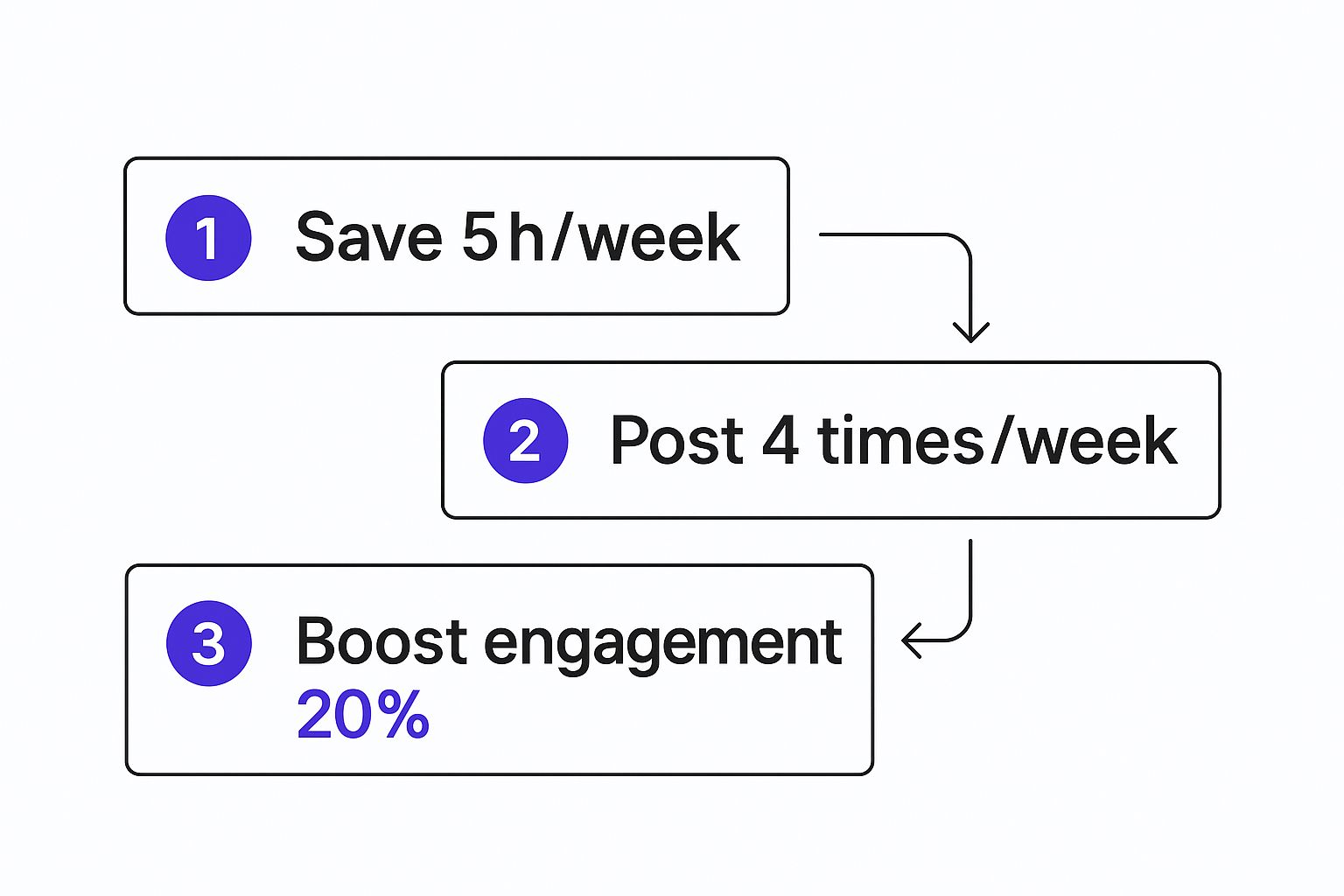
This kind of organized planning leads directly to saving time, posting more consistently, and seeing better engagement. Simple, right?
Consider adding these powerful columns to your template:
- Content Pillar: Connect each post to a key theme, like 'Behind the Scenes,' 'Educational Tip,' or 'Product Spotlight.' This ensures your feed stays balanced and interesting.
- Approval Status: This is a lifesaver for teams. Use a simple dropdown menu ('Needs Review,' 'Approved,' 'Changes Needed') for instant clarity on where every post stands.
- Link/CTA: A dedicated spot for the specific URL you want to drive traffic to. This makes tracking campaign performance so much easier down the line.
Here’s a quick look at how these components come together to create a powerful, all-in-one planning tool.
Essential Components of Your Content Planning Template
A breakdown of the crucial columns to include in your content planning spreadsheet and why each one matters for a seamless workflow.
| Template Component | Purpose and Key Benefit |
|---|---|
| Post Date | Pinpoints the exact publishing schedule, ensuring timeliness and consistency across all your channels. |
| Platform | Clearly designates the target social network, helping you tailor content for each audience. |
| Copy | Serves as the final, approved text, eliminating any last-minute guesswork or errors. |
| Visuals | Provides a direct link to the creative asset, making it easy for anyone to access the correct file instantly. |
| Hashtags | Organizes your hashtag strategy, ensuring you're using the right mix to maximize reach and discoverability. |
| Content Pillar | Aligns each post with your overarching content strategy, guaranteeing a diverse and balanced feed. |
| Approval Status | Creates a transparent review process, preventing bottlenecks and miscommunication within your team. |
| Link/CTA | Tracks the specific call-to-action URL, which is essential for measuring traffic and conversion goals from each post. |
By including these elements, you’re not just listing posts—you're building a complete, strategic overview of your social media efforts.
The real magic happens when you document your plan. You create a single source of truth for your entire social media operation. It stops being just a spreadsheet and becomes the engine that drives your strategy forward.
Let's face it, social media is complex. The average person uses nearly seven different platforms every month. It’s no wonder that around 90% of organizations now rely on a documented content strategy to manage it all. A well-built template is more critical than ever for keeping everything coordinated.
For a deeper dive into this, you can learn more about how to create a content calendar in our in-depth guide right here: https://repostly.app/blog/how-to-create-a-content-calendar-68a978a344be737efa9f3c61
Tailoring Your Template for Each Social Platform
Let's be honest. A killer LinkedIn article is going to bomb on TikTok. This is where most content planning falls apart—the one-size-fits-all approach just doesn’t work anymore. Your core social media content planning template is a great starting point, but the real magic happens when you customize it to speak the language of each platform.
This is so much more than just resizing an image. True platform-native thinking means tweaking your template to account for what makes each network unique. By adding a few specific fields, you’re setting yourself up to create content that feels right at home and actually performs.
Ultimately, the goal is to shift from cross-posting to cross-promoting. That subtle change in mindset makes a world of difference in how your content lands with both audiences and algorithms.
Add Platform-Specific Columns
To really level up your template, you need to add columns that mirror the unique features of the networks you’re active on. It's a small change, but it transforms your plan from a generic to-do list into a smart, platform-aware strategy. You stop just planning the "what" and start defining the "how" for every single channel.
Here are a few ideas I've used that work wonders:
- Instagram: Think about adding a column for a
Reel Cover Imageto keep your grid looking sharp, or aCarousel Slide 1 Hookto force you to think about that crucial first impression. - TikTok: I always include a field for
Trending Sound IDor aVideo Hook (First 3s). It bakes virality into your process from the very beginning. - LinkedIn: It’s helpful to have a
Target Audiencecolumn (e.g., 'VPs of Marketing') or anArticle Headlinefield for those longer, more detailed posts. - X (formerly Twitter): A simple
Thread Hook (Tweet 1)column can be a game-changer for structuring those compelling, multi-part stories that perform so well.
Building these details right into your workflow creates a system that naturally encourages high-quality, native content. No more juggling separate documents for every platform.
Customizing your template isn't about giving yourself more work; it's about making the work you're already doing more effective. It forces you to consider the user experience on each platform before you even think about hitting 'publish'.
A Real-World Customization Scenario
Let’s say your core idea for the week is a case study about a client's recent success. Instead of just spraying the same text everywhere, your customized template will guide you to turn that one idea into three completely different, platform-native posts.
Getting this right has never been more important. With global social media ad spending projected to hit an eye-watering $276.7 billion by 2025, a smart template is your best defense against wasted budget. A detailed plan ensures every dollar is spent on content built to perform on its intended platform. You can read more about social media ad spend growth and see why this kind of targeted planning is no longer optional.
So, how does that case study idea actually break down in your template?
For LinkedIn: The
Content Typecolumn is set to 'Article.' You’ve already planned a professionalArticle Headlinelike, "How [Client Name] Boosted Q3 Leads by 40%." The main copy is a detailed, 500-word post with clean, professional graphics.For Instagram: Here, the
Content Typeis 'Carousel.' You use yourCarousel Slidecolumns to map out a visual story: Slide 1 is a bold, attention-grabbing hook, Slides 2-4 highlight the key stats with icons, and Slide 5 is a direct call-to-action.For TikTok: This time,
Content Typeis 'Reel.' Your template has aVideo Scriptcolumn where you’ve outlined a snappy, 15-second video. TheTrending Sound IDfield is a reminder to pair it with a popular audio track to give it an instant visibility boost.
This is how you stay organized and on-message while ensuring every single post is perfectly tuned for its audience. Managing it all from a single social media content planning template is the secret to maintaining a strong brand voice without sacrificing the engagement that comes from platform-specific content.
Connecting Your Template to Scheduling Tools
Your social media content planning template is your game plan, but the real time-saver is your scheduling tool. The trick is getting them to talk to each other. When you connect your carefully built spreadsheet to your automation software, you turn that static plan into a hands-off publishing machine.
This isn’t about shaving off a few minutes. It's about getting you out of the weeds of daily manual posting. When your template feeds directly into a scheduler, you free up hours to focus on what actually grows your brand: talking to your audience and figuring out what content they love.
Getting Your Template Ready for a Smooth Upload
Before you can sync everything up, you need to get your template into a format your scheduler can actually read. Most of the big players—like Repostly, Buffer, or Sprout Social—let you upload posts in bulk using a CSV (Comma Separated Values) file. Basically, you're translating your spreadsheet into a universal language for scheduling tools.
The first step is exporting your Google Sheet or Excel file as a .csv. The most important part of this process is making sure your column headers match what the scheduling tool is looking for. They’re usually pretty simple:
- Date and Time: Get this right. Most tools want a specific format, often something like
MM/DD/YYYY HH:MM. - Post Copy: This is the column with all the text for your posts.
- Link: The full URL you want to share.
It sounds small, but getting the formatting right here is everything. It’s what prevents those annoying upload errors and makes sure your content goes out exactly when you planned.
The best social media workflows are built on minimizing manual work. Prepping your template for a bulk upload means you can schedule a whole month of content in the same amount of time it used to take you to post for one day.
The Bulk Upload and Scheduling Workflow
Okay, your CSV file is ready—now for the fun part. You’re about to upload a month's worth of content in just a few clicks. In a tool like Repostly, for instance, you’d head over to the bulk composer, upload your file, and then simply match your spreadsheet columns to the right fields in the platform.
Once it's uploaded, your entire content calendar will populate with all the posts you planned. From there, you can do a final review, add any images or videos (since those can't go in the CSV), and make last-minute changes. The real beauty of this system is that it scales. The process is the same whether you're scheduling 30 posts or 300.
Of course, picking the right platform is what makes this whole process feel so easy. If you're still weighing your options, our guide on the best social media scheduling tools can help you find a perfect fit for your workflow.
This whole process transforms your social media content planning template from a simple document into the command center for your entire publishing strategy.
Using Your Template to Measure What Matters
Let's be honest: a plan without a way to track performance is just a wishlist. The real magic of your social media content planning template happens when it stops being just a schedule and becomes a living, breathing performance dashboard. This is where you connect all your hard work to actual, tangible results.
The shift is surprisingly simple. It all starts by adding a few powerful columns right into the spreadsheet you've already built. Right next to each post you've planned out, you'll create new spaces to drop in key performance indicators (KPIs) once the content is live. This single step closes the loop on your entire strategy.
Integrating Performance Metrics
To make this happen, you'll want to add columns for the metrics that actually align with your goals. The key is to avoid overcomplicating it. Just start with the essentials that tell a clear story about what your audience truly connects with.
These are the numbers you can easily pull from each platform’s built-in analytics.
- Reach: How many unique eyeballs saw your post? This is your visibility score.
- Engagement Rate: This one is a big deal. You calculate it by dividing total engagements (likes, comments, shares) by your reach, then multiplying by 100. It tells you how compelling your content actually was.
- Clicks: The raw number of clicks on your link, profile, or call-to-action button. This is a direct measure of how well you inspired action.
- Saves: On platforms like Instagram, a save is a huge compliment. It signals that your content was so valuable, someone wanted to keep it for later.
Really getting a handle on content engagement metrics is what separates the pros from the amateurs, so it's worth spending time here.
Creating a Review Cadence
Once you have data trickling into your template, the next move is to build a consistent habit of reviewing it. This is non-negotiable for anyone serious about social media growth. Block out time every week—or at the very least, at the end of each month—to sit down and dig into your performance.
As you review, try color-coding your best posts. Maybe green highlights high engagement, while yellow marks posts that drove a lot of clicks. Before you know it, patterns will start jumping out at you. You might realize your "Behind the Scenes" pillar consistently sparks the most comments, or that your educational carousels are getting all the saves.
This data-driven feedback loop is what turns a basic posting schedule into a powerful growth engine. You stop guessing and start making informed decisions that actually move the needle, month after month.
This regular analysis is your ticket to doubling down on what’s working and ditching the content that just isn't landing. For a deeper dive on what to track, check out our guide on essential social media metrics and reporting. This cycle of planning, executing, and measuring is how you continuously improve and prove your impact.
Questions We Hear All the Time About Content Planning
Even with the best template in the world, some questions always pop up. It's one thing to build a killer social media content planning template, but actually using it day-in and day-out is where the real work begins. Let's walk through some of the most common things people ask so you can run your template like a pro.
Nailing these little details is what transforms your template from a static spreadsheet into the engine that drives your social media growth. It’s all about building a workflow that actually works for you, not one that adds more stress to your plate.
How Far Out Should I Actually Plan My Content?
For most brands, a month is the magic number. Planning one full month ahead gives your team enough time to create graphics, write copy, get things approved, and make tweaks without that last-minute scramble. It also keeps you agile enough to hop on a trending topic or share unexpected company news.
Now, if you're gearing up for something big like a major product launch or a huge holiday sale, you'll want to start mapping out the key messages and dates 2-3 months in advance.
A good approach I've seen work time and again is the 80/20 rule. Plan out 80% of your core content for the month, but deliberately leave that other 20% of your schedule open. That’s your pocket of flexibility for those spontaneous, in-the-moment posts that make your brand feel human and relevant.
What’s the Real Difference Between a Content Calendar and a Planning Template?
This question trips a lot of people up, but the difference is pretty simple when you think about it. Your planning template is the kitchen—it's where you do all the prep work and store all the ingredients. The content calendar is the menu you show to your guests, telling them what's coming up each day.
The social media content planning template is your command center. It’s the detailed spreadsheet that holds everything:
- The final, polished post copy
- Direct links to the images or videos
- The exact hashtags you plan to use
- A column to track approval status
- A place to drop in performance data after it goes live
A content calendar is usually just a high-level, visual grid showing post dates and maybe a topic. We're focused on the template here because it’s the strategic heart of your operation—the single source of truth everyone on the team can rely on.
Should I Just Use Google Sheets or Is Paid Software Better?
Honestly, you can build a completely professional social media system using free tools like Google Sheets or Airtable. Google Sheets is incredible for collaboration and you can customize it to do pretty much anything you need, all without spending a cent. It’s the perfect place to start and really master your workflow.
Paid software often brings scheduling and deeper analytics into one place, which is nice, but those features aren't mission-critical when you're just getting started. My advice? Start with a free template. Once you've got your process down to a science, you'll know exactly which features are worth paying for if you decide to upgrade later.
The best tool is the one you'll actually use consistently. Start simple with a free template, perfect your process, and only upgrade when you have a clear problem that a paid tool can solve.
How Do I Weave User-Generated Content Into My Plan?
User-generated content (UGC) is pure gold for building trust and showing your brand in the real world. The easiest way to manage it is to add 'UGC' as a content pillar or type right in your main template. That way, you can see at a glance how often you’re highlighting your community.
I also strongly suggest creating a separate tab in your spreadsheet that acts as a UGC library. It's a lifesaver. In that tab, just create a few columns to track the essentials for every piece of content you find:
- Creator's Handle: Who made the original post?
- Link to Content: A direct URL to the post.
- Permission Status: Use a simple dropdown with options like 'Requested,' 'Granted,' or 'Denied.'
Once someone gives you the green light, you can pop their content into your main plan. This simple system keeps you organized, ensures you always give proper credit, and builds a library of awesome, authentic content you can pull from anytime.
Ready to stop guessing and start growing? Repostly gives you the tools to schedule your perfectly planned content, automate your workflows, and track what’s working across all your platforms. Start your free 7-day trial of Repostly today and see how easy social media can be.
Keep reading

10 Fresh Instagram Story Idea Tactics for 2025
Stuck for content? Discover our top Instagram story idea list, with actionable tips to boost engagement and grow your audience in 2025.

A Practical Social Media Planner for German Markets
Build a results-driven social media planner for Germany. This guide offers actionable strategies for content, scheduling, and analysis in the German market.

Crafting Your Social Media Content Plan
Stop guessing and start strategizing. This guide provides an actionable social media content plan to audit, plan, and execute content that gets results.
Post once. Show up everywhere.
Start your 7-day free trial and publish your next video to every platform in minutes.Pick a plan and publish your next video to every platform in minutes.
Start your free trialSee plansCancel anytime