The Best Free Social Media Schedulers and What Their Free Plans Allow
Which schedulers have a real free plan in November 2026, what each one caps, which are only trials, and when native tools or a paid plan make more sense.

You can schedule social media posts for free in two ways: with the scheduler each platform builds in, or with the free plan of a third-party tool. In November 2026, the free plans worth using are Buffer (three channels, 10 queued posts each), Publer (three accounts, 10 queued posts each, no X) and Metricool (one brand, 20 posts a month, no LinkedIn or X without paying). Later, Hootsuite, Repurpose.io and Repostly have trials, not free plans.
The caps matter most. A free plan that holds 10 posts per channel is fine for someone posting three times a week and useless for someone who films a month of videos in one weekend. Below is what each free plan allows, taken from each company’s own pricing page and checked November 2026, then the native options and when paying makes sense.
Free plans at a glance
| Tool | Free plan? | What you get free | Main catch |
|---|---|---|---|
| Buffer | Yes | 3 channels, 10 scheduled posts per channel at a time | 1 user, 30 days of analytics |
| Publer | Yes | 3 accounts, 10 scheduled posts per account at a time | No X; published posts kept for 24 hours |
| Metricool | Yes | 1 brand, 20 scheduled posts a month | LinkedIn needs a paid plan, X a paid add-on |
| Zoho Social | Yes, after a 15-day trial | 1 brand with 6 channels | No TikTok, YouTube or Threads |
| Post Bridge | A free tier | 5 posts a month | One post to 4 platforms counts as 4 |
| Later | No | 14-day trial | A paid plan is needed after the trial |
| Hootsuite | No | 14-day trial | 10 to 20 posts a day, no bulk scheduling during the trial |
| Repurpose.io | No | 14-day trial and 10 free videos without a card | Trial ends after 14 days or 10 videos, whichever comes first |
| Repostly | No | 7-day trial | Payment method needed to start |
All rows checked November 2026 on the linked pages. Plans change often, so open the page before you sign up.
What each free plan really allows
Buffer
Buffer’s free plan connects up to three channels, where a channel is one account: one TikTok, one Instagram profile, one Facebook Page and so on. Each channel can hold 10 scheduled posts. When one publishes, its slot opens again, so the cap is on how far ahead you can queue, not on how much you post in a month (Buffer pricing, checked November 2026).
The free plan has one user, 30 days of analytics history, up to 100 saved ideas, the AI assistant, a community inbox for comments and an API key. What it leaves out is mostly convenience: first-comment scheduling, the hashtag manager, custom video covers and reports.
Two details are easy to miss. Buffer’s paid trial lasts 14 days, and if you don’t add payment details by the end, the account drops to the free plan; channels beyond the third get locked. And if you later upgrade, you pay for every channel, including the three that used to be free.
Good for: someone posting a few times a week to up to three accounts, on a mix of video and text networks.
Publer
Publer calls its free plan “free forever.” It gives one user and one workspace, three social accounts (X can’t be connected on free), 10 scheduled posts per account at a time and 25 saved drafts (Publer plans, checked November 2026). Like Buffer’s, the post cap refills: once a scheduled post goes out or you delete it, you can schedule another. Posting right away isn’t capped.
The catch worth knowing is the post history. On the free plan, Publer keeps published posts on its servers for only 24 hours, so don’t count on it as a record of what went out. Pinterest also has a rule on free: you can only connect accounts with at least 100 followers or a verified website. TikTok, Instagram, YouTube, Facebook and Threads are all on its supported list.
Good for: the same person Buffer suits, if you don’t need X.
Metricool
Metricool’s free plan covers one brand and its social accounts, with up to 20 scheduled posts per month, 30 days of analytics and up to five competitor profiles to watch (Metricool pricing, checked November 2026). It works with every network Metricool supports except LinkedIn and X. LinkedIn comes with the paid Starter plan, and X is a paid add-on.
Twenty posts a month is a different kind of cap from Buffer’s. It limits volume, not how far ahead you queue. If a video goes to three platforms, check in your account how Metricool counts it before you plan a month around that number.
Good for: a single brand that cares about numbers and posts a few times a week.
Zoho Social
Zoho Social moves every account to a “forever free plan” when its 15-day trial ends (Zoho Social pricing, checked November 2026). The free plan is one brand with one team member and six channels: one each of X, Instagram, Facebook Page, LinkedIn company page, LinkedIn profile and Google Business Profile.
That list is the problem for video creators. TikTok, YouTube and Threads aren’t in it. For a local business that posts to Facebook, Instagram and Google, it’s a reasonable free option.
Post Bridge
Post Bridge gives free users five posts a month, and its FAQ is clear that one post to four platforms counts as four (Post Bridge pricing, checked November 2026). That’s one cross-posted video and a bit. Treat it as a way to see the interface, alongside the 7-day trial on its paid plans.
Trials that get called free plans
Several tools show up in “free scheduler” lists that don’t have a free plan at all. That’s fine if you know it going in.
- Later offers a 14-day free trial on every plan and no free plan (Later pricing).
- Hootsuite has a 14-day trial, and regular billing starts when it ends unless you cancel first. During the trial there’s a daily posting limit of 10 to 20 posts per organization, depending on the plan, and no bulk scheduling (Hootsuite plans).
- Repurpose.io has a 14-day trial and 10 free videos without a card. Its FAQ says the trial ends after 14 days or 10 published videos, whichever comes first, and then you pick a paid plan (Repurpose.io pricing).
- Repostly, which we make, has a 7-day free trial on every plan. More on that below.
All checked November 2026. A trial is still useful. Use it for the week you’d actually post, not a quiet week, so you see the tool under real load before the card gets charged.
The built-in schedulers cost nothing
If you post to one platform, or two, you may not need any of the above. Every platform Repostly supports has its own free scheduler. None of them limits you to three accounts or ten queued posts; their limits are mostly about timing (all checked November 2026):
- TikTok: only on tiktok.com in a desktop browser, from 15 minutes to 10 days ahead. Scheduled posts can’t be edited, only deleted, and the help page lists account requirements for the feature.
- Instagram: in the app, for public accounts, up to 25 posts a day and up to 30 days ahead (Instagram Help).
- Facebook Pages: in Meta Business Suite, from 20 minutes to 29 days ahead (Meta Business Help).
- YouTube: in YouTube Studio’s Schedule card; the video stays private until it goes live (YouTube Help).
- Threads: from the composer’s three-dot menu; scheduled posts wait in your drafts (Threads announcement).
The cost is your time. Five platforms means five uploads, five captions and five places to check later. The step-by-step for each, and when a single scheduler starts to save time, is in how to schedule social media posts.
How the caps play out in practice
Take a creator who posts one short video a day to TikTok, Instagram and YouTube.
On Buffer’s or Publer’s free plan, that’s three accounts, which fits exactly. With 10 queued posts per account, you can schedule about ten days ahead. That works if you film every week. It doesn’t if you batch a month of content at once.
On Metricool’s free plan, one brand covers all three, but 20 posts a month runs out in the first week if each platform counts as a post. Even if a cross-post counts once, a video a day is 30 a month, which is over the cap.
Add a fourth account, say Facebook or a second TikTok, and Buffer and Publer are both full. Zoho Social can’t take TikTok or YouTube at all. The built-in schedulers have room for everything, at the price of doing it three times.
So the usual sequence is: one platform, use its own scheduler. Two or three accounts and a weekly rhythm, a free plan works. Beyond that, something has to give.
When paying is worth it
A paid plan makes sense when one of these is true for you, not because a tool’s pricing page says “most popular”:
- You have more accounts than a free plan holds. Most free plans stop at three, or at one brand.
- You batch. If you film on one day and schedule weeks of posts, a 10-post queue per account doesn’t stretch far enough.
- The network you need is paywalled. X on Publer and Metricool, LinkedIn on Metricool, TikTok and YouTube on Zoho Social’s free plan.
- More than one person works on posts, and someone has to approve them. No free plan above includes approvals.
- You need history. Thirty days of analytics, or 24 hours of post history on Publer, won’t show you how last quarter went.
- Re-uploading costs you more than the subscription. If every video goes to five platforms and that takes half an hour each time, a few dollars a week buys that time back.
It isn’t worth paying when you post a few times a week to one or two platforms. The built-in schedulers are free and already in the app you use. It also isn’t worth it to “get serious.” A scheduler doesn’t make posts better; it moves the publishing step to a better time.
If you’re comparing paid tools rather than free ones, the best social media scheduling tools goes through seven of them by use case, with their starting prices.
Where Repostly fits
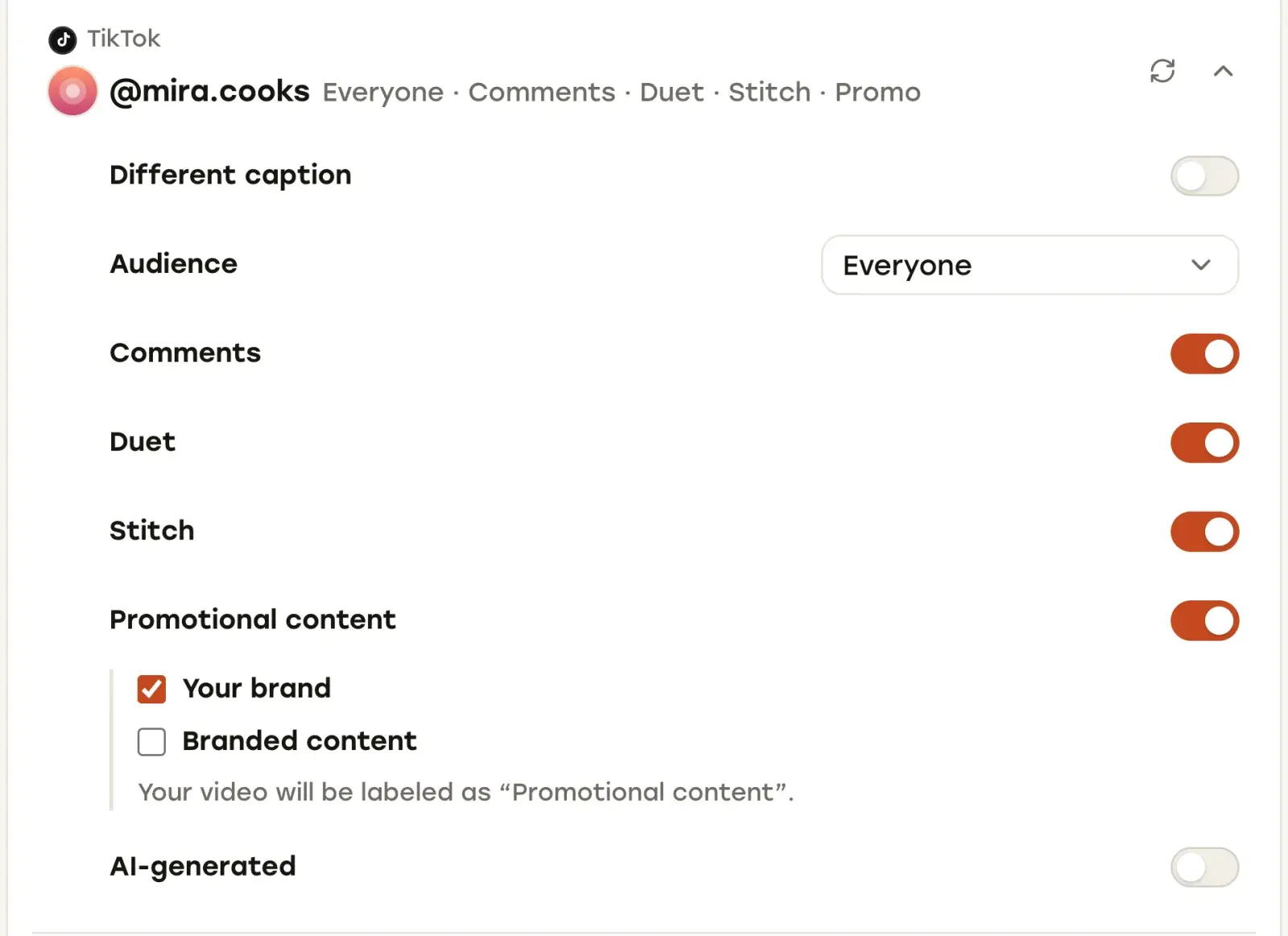
When re-uploading starts to cost you more than a subscription, this is the part Repostly takes over. One upload goes to TikTok, Instagram, YouTube, Facebook Pages and Threads, with several accounts per platform if you have them. You tick the accounts under Destinations, and the Settings card has a row for each one, so TikTok’s audience and disclosure options, a separate YouTube title, or Reels versus a regular Facebook video are set once, in one place. Posts aren’t capped on any plan, so a month of videos scheduled ahead fits on any of them; the limit is the number of connected accounts.
Starter is $19 a month for 5 accounts, and yearly billing gives two months free; current prices are on our pricing section (checked November 2026). Every plan starts with a 7-day free trial. You add a payment method at Stripe checkout and are charged when the trial ends unless you cancel before then, and if you change your mind after paying, you can ask for a refund within 14 days of the first payment.
After posts go out, the Posted list groups them by day and shows each post’s platforms with a status dot on every icon, plus its views, likes and comments, so you can check a week’s posting in one place. Open a post and its detail page shows each destination’s status with its own views, likes and comments.
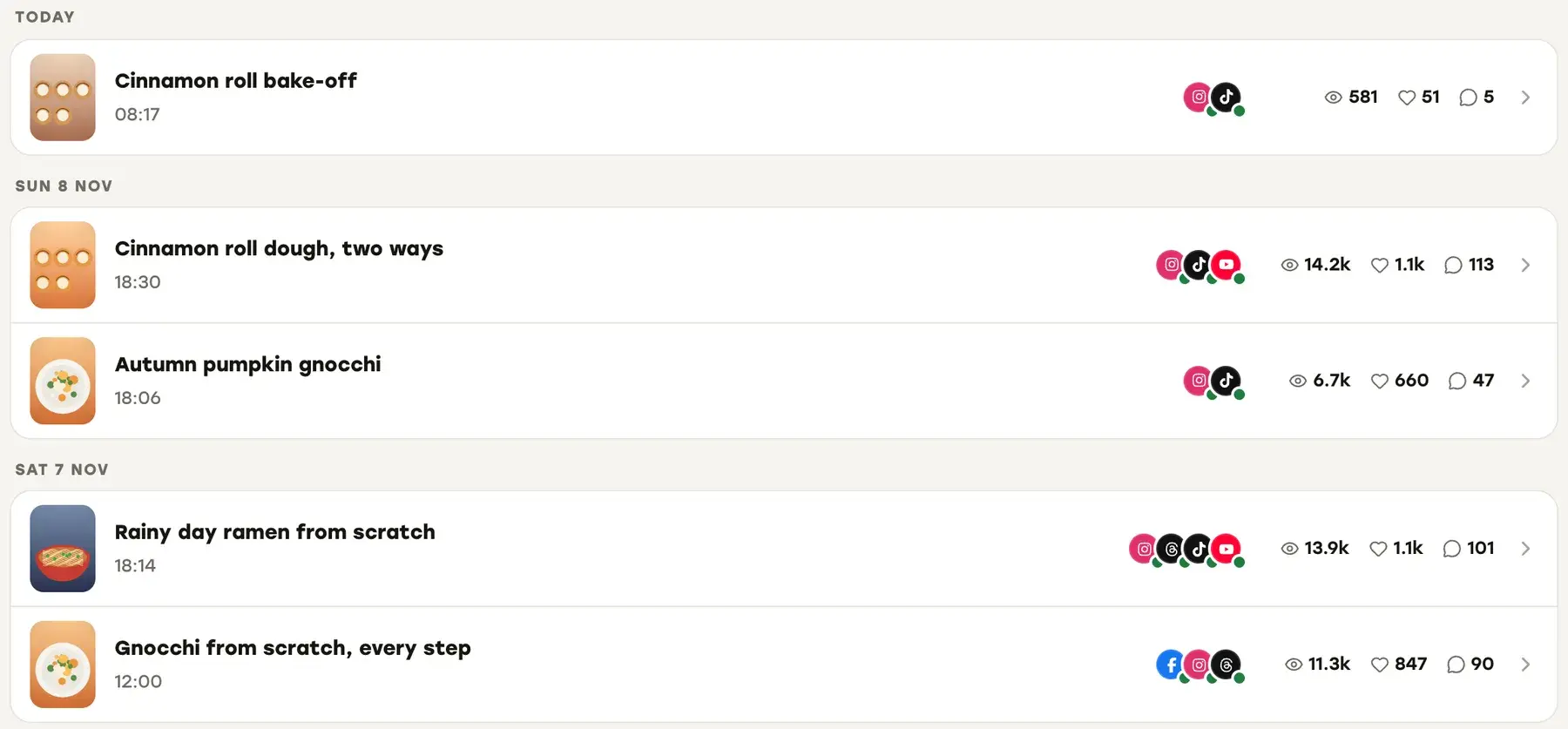
If your week is short videos going to those five platforms, a week is enough to see the difference: try Repostly free for 7 days, schedule your next seven days of posts from one upload each, and check every destination in the Posted list.
Frequently asked questions
What is the best free social media scheduler?
For most people it's Buffer: the free plan covers three channels, which can be TikTok, Instagram or YouTube accounts, and lets you keep 10 posts scheduled per channel at a time. Publer's free plan is similar, with three accounts and 10 scheduled posts per account, but it leaves out X. Metricool's free plan suits you if analytics matter, with one brand and 20 scheduled posts a month, though LinkedIn and X need a paid plan. Later, Hootsuite, Repurpose.io and Repostly only offer trials. If you post to one platform, its own built-in scheduler is free and has no plan or account caps, though each platform's own scheduling limits still apply.
Can I schedule social media posts for free?
Yes. TikTok, Instagram, Facebook Pages, YouTube and Threads all have free built-in schedulers, each for its own platform. If you want one place for several platforms, free plans from Buffer, Publer and Metricool let you schedule to a few accounts with a cap on queued or monthly posts. Check the cap against how far ahead you plan before you rely on one.
Keep reading

The Best Social Media Scheduling Tools, Compared by Use Case
Buffer, Later, Metricool, Hootsuite, Repurpose.io, Post Bridge and Repostly side by side: platforms, free plans, starting prices and who each one suits.

Social Media Automation Tools: What They Can and Can't Do
What social media automation tools really automate, where platform rules draw the line, and seven tools described from their own pages, with honest picks.

Social Media Analytics Tools, Starting With the Free Ones in Each App
Where to find Instagram, TikTok, YouTube, Facebook and Threads analytics for free, what they can't show you, and which analytics tools fill the gaps.
Post once. Show up everywhere.
Start your 7-day free trial and publish your next video to every platform in minutes.Pick a plan and publish your next video to every platform in minutes.
Start your free trialSee plansCancel anytime