The Best Social Media Scheduling Tools, Compared by Use Case
Buffer, Later, Metricool, Hootsuite, Repurpose.io, Post Bridge and Repostly side by side: platforms, free plans, starting prices and who each one suits.

The best social media scheduling tool is the one that covers the platforms you actually post to and charges in a way that fits how many accounts and people you have. For most small businesses posting to several networks, Buffer is the easiest start: it has a free plan and reaches LinkedIn, X and Pinterest as well as the video apps. If short video is your main format and it goes to TikTok, Instagram, YouTube, Facebook and Threads, Repostly is built for exactly that.
Everything else comes down to what you need beyond publishing: approvals for a team, a shared inbox, client reports, or copies of posts you already published natively. Below you’ll find a verdict for each of seven tools, a comparison table and the reasoning behind each call. Facts about other companies come from their own websites, checked November 2026. We make Repostly, the last of the seven.
Quick verdicts
- Buffer: pick it if you want a simple scheduler for many networks, including LinkedIn, X, Pinterest, Bluesky or Mastodon, with a real free plan to start on.
- Later: pick it if Instagram leads your marketing, you plan your grid visually, or you also run creator campaigns.
- Metricool: pick it if reports matter as much as posting, for you or for clients, or you manage ads next to organic posts.
- Hootsuite: pick it if several people share the work and you need a shared inbox, social listening and approvals.
- Repurpose.io: pick it if you already post natively on one platform and want those posts copied to others automatically, Stories included.
- Post Bridge: pick it if you’re one person sending the same post everywhere, X and LinkedIn included, and you’d like an API.
- Repostly: pick it if your posts are mostly short videos for TikTok, Instagram, YouTube, Facebook and Threads, and you want one upload with separate settings for each platform.
There’s no overall winner. Hootsuite’s cheapest plan costs $99 USD per user a month on annual billing and comes with an inbox and social listening; if you work alone and only publish, most of that money goes to parts you won’t open.
Side-by-side comparison
Where a pricing page names its currency, the table shows the lowest paid plan as listed there, checked November 2026. Where it doesn’t, or shows several currencies, the cell links to the page instead. Prices change often and can differ by region or billing period, so click through before you decide.
| Tool | Free option | Paid plans start at | Platforms | Team approvals |
|---|---|---|---|---|
| Buffer | Free plan: 3 channels, 10 scheduled posts per channel | Priced per channel, see its pricing page | 12, including LinkedIn, X, Pinterest, Bluesky, Mastodon | Team plan |
| Later | 14-day trial, no free plan | $18.75 USD a month, billed yearly | 8, including Pinterest, LinkedIn, Snapchat | Growth plan and up |
| Metricool | Free plan: 1 brand, 20 posts a month, no LinkedIn or X | See its pricing page (shown in several currencies) | 11, including X, LinkedIn, Twitch, Google Business Profile | Advanced plan and up |
| Hootsuite | 14-day trial, no free plan | $99 USD per user a month, billed annually | 9, including X, LinkedIn, WhatsApp, Pinterest | Advanced plan and up |
| Repurpose.io | 14-day trial with 10 free videos | $35 USD a month, billed monthly | Many, including Snapchat, Pinterest, LinkedIn, X, cloud storage | Not listed on its pricing page |
| Post Bridge | 5 free posts a month, 7-day trial | 15 accounts on the entry plan, see its pricing page | 10, including X, LinkedIn, Bluesky, Pinterest | Not listed |
| Repostly | 7-day trial, no free plan | $19 a month for 5 accounts | 5: TikTok, Instagram, YouTube, Facebook, Threads | Not included |
Check how each tool counts before comparing prices
The starting prices above aren’t comparable on their own, because every tool charges for a different unit:
- Buffer charges per channel, meaning one connected profile.
- Hootsuite charges per user. Its Standard plan includes 10 social accounts.
- Later sells “social sets,” one profile on each platform it supports. Starter has one set, one user and up to 30 scheduled posts per profile a month.
- Metricool counts brands. The free plan has one.
- Repurpose.io limits accounts per network: three of each on Starter.
- Post Bridge and Repostly count connected accounts in total, 15 on Post Bridge’s Marketer plan and 5 on Repostly’s Starter plan.
A solo creator with one account on five platforms and a small agency with twenty client profiles will end up with different “cheapest” tools. Write down your accounts and the people who need a login, then price each tool against that list.
It’s also worth checking what “auto-publish” means for your account type. Later’s pricing FAQ says it auto-publishes to TikTok for business accounts, and offers notification publishing for Instagram and TikTok, where you get a push alert and finish the post in the app yourself. Buffer’s Instagram page says some Reels and Stories fall back to notifications when Instagram’s API can’t handle them (both checked November 2026). If you want posts to go out with your phone in a drawer, confirm that before you commit.
The seven tools in more detail
Buffer
Buffer keeps scheduling simple and charges only for the channels you connect. The free plan takes up to three channels with 10 scheduled posts each, which you can top up at any time, and it already includes the AI assistant, Insights, a community inbox and API access. Essentials removes the post cap and adds advanced analytics and first-comment scheduling. Team adds unlimited team members, access levels and content approval workflows. Its Instagram page says Stories can be scheduled to publish automatically.
Pick it if you post to a mix of networks, including text-first ones like LinkedIn, Bluesky or Mastodon, and want to start free.
Skip it if social listening or detailed client reporting is the main job. Hootsuite and Metricool cover those.
Later
Later’s scheduler centers on a visual calendar and a preview of your Instagram feed, with a link-in-bio page and influencer marketing tools alongside. A social set covers Instagram, Facebook, TikTok, Pinterest, LinkedIn, YouTube, Threads and Snapchat. On the pricing page, Starter includes platform analytics for up to three months; Growth adds approval workflows, a social inbox, two users, up to 180 posts per profile and a year of analytics. Prices are billed in USD with taxes on top.
It’s a good fit for a brand that lives on Instagram, cares how the grid looks or works with creators, and a poor one if you need X or Bluesky, which aren’t in its social set.
Metricool
Metricool’s free plan is unusually useful for numbers: one brand, 20 scheduled posts a month, 30 days of analytics and up to five competitor profiles to track. LinkedIn needs a paid plan, and X is a paid add-on. Starter brings unlimited posting under a fair-use policy, unlimited analytics history and PDF or PowerPoint reports. Advanced adds team and client management, post approvals, a Data Studio connector and API access. The main site also covers Google, Facebook and TikTok ads in the same dashboard.
Pick it if you report to clients or a boss every month, or organic posts and ads sit with the same person.
Skip it if LinkedIn or X is the reason you’re looking and you hoped to stay on the free plan.
Hootsuite
Hootsuite is the most complete tool here for marketing teams, and the most expensive. According to its plans page, Standard covers 10 social accounts with unlimited scheduling, AI help, one inbox and brand and competitor monitoring. Professional opens up unlimited accounts, automated inbox replies and custom reports. Approval workflows and message routing to teammates arrive with Advanced. During the 14-day trial there’s a daily posting limit and no bulk scheduling, so a trial won’t show you how a heavy week feels.
Pick it if several people answer comments and messages for one brand, or you need to know what people say about you elsewhere.
Skip it if you work alone. Per-user pricing at this level buys a lot you won’t touch.
Repurpose.io
Repurpose.io works differently from a calendar. You keep posting natively, and it picks up new content from a source account and sends it to other destinations. Its FAQ says that includes Stories from Instagram, Facebook and Snapchat, with TikTok Stories “coming soon,” plus images and carousels. The pricing page sets limits per network: Starter connects up to three accounts on each and publishes up to 5,000 videos a month, Pro raises that to 10 accounts per network, and Agency to 25.
Pick it if you film and post inside TikTok or Instagram anyway and just want copies elsewhere without opening another app. If you’d rather finish a post once and set each platform’s options before anything goes live, a scheduler with a calendar suits you better.
Post Bridge
Post Bridge aims at one person doing the marketing. Its Marketer plan includes 15 connected accounts, unlimited posts, several accounts per platform, carousels, bulk video scheduling, an API and an MCP connection for AI agents; analytics are still labeled beta. The Operator plan starts at 99 accounts and adds team invites. On the free tier you get five posts a month, and one post to four platforms counts as four. Its own FAQ says it skips the approval flows and shared inboxes that Buffer and Hootsuite are built around.
Pick it if you’re a solo founder or creator who needs X, LinkedIn or Bluesky next to the video apps, or you want to post from your own scripts.
Skip it if you need mature analytics or a sign-off step before posts go out.
Where Repostly fits
Repostly is built for one job: getting your short videos to TikTok, Instagram, YouTube, Facebook Pages and Threads from a single upload. You choose a post type, add your video or images, tick the accounts under Destinations (several per platform if you have them), and adjust each one in its own row under Settings: a separate YouTube title, Reels or regular video on Facebook, TikTok’s audience and disclosure options. Connections use each platform’s own sign-in, so we never see your passwords.
What each post type can reach:
- Video: all five. Instagram gets it as a reel, Facebook as a reel or a regular video.
- Image and Image carousel: Instagram, Facebook, TikTok and Threads.
- Text: Threads.
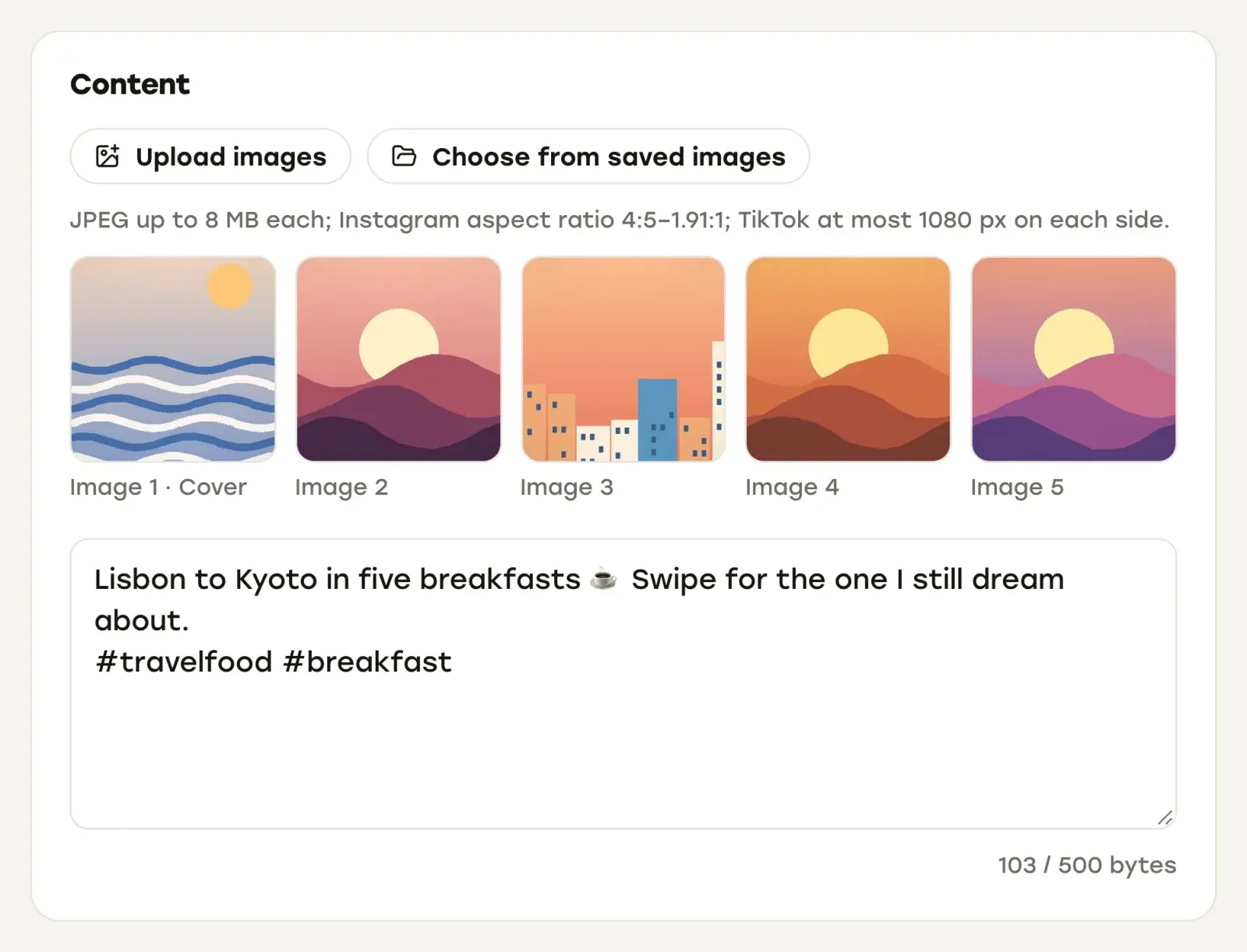
Everything you’ve scheduled and everything already posted sits in one calendar, and each post’s detail page shows every destination’s status with its own views, likes and comments. If publishing was paused when a post was due and it would go out more than five hours late, it waits on Posts that missed their time for your decision instead.
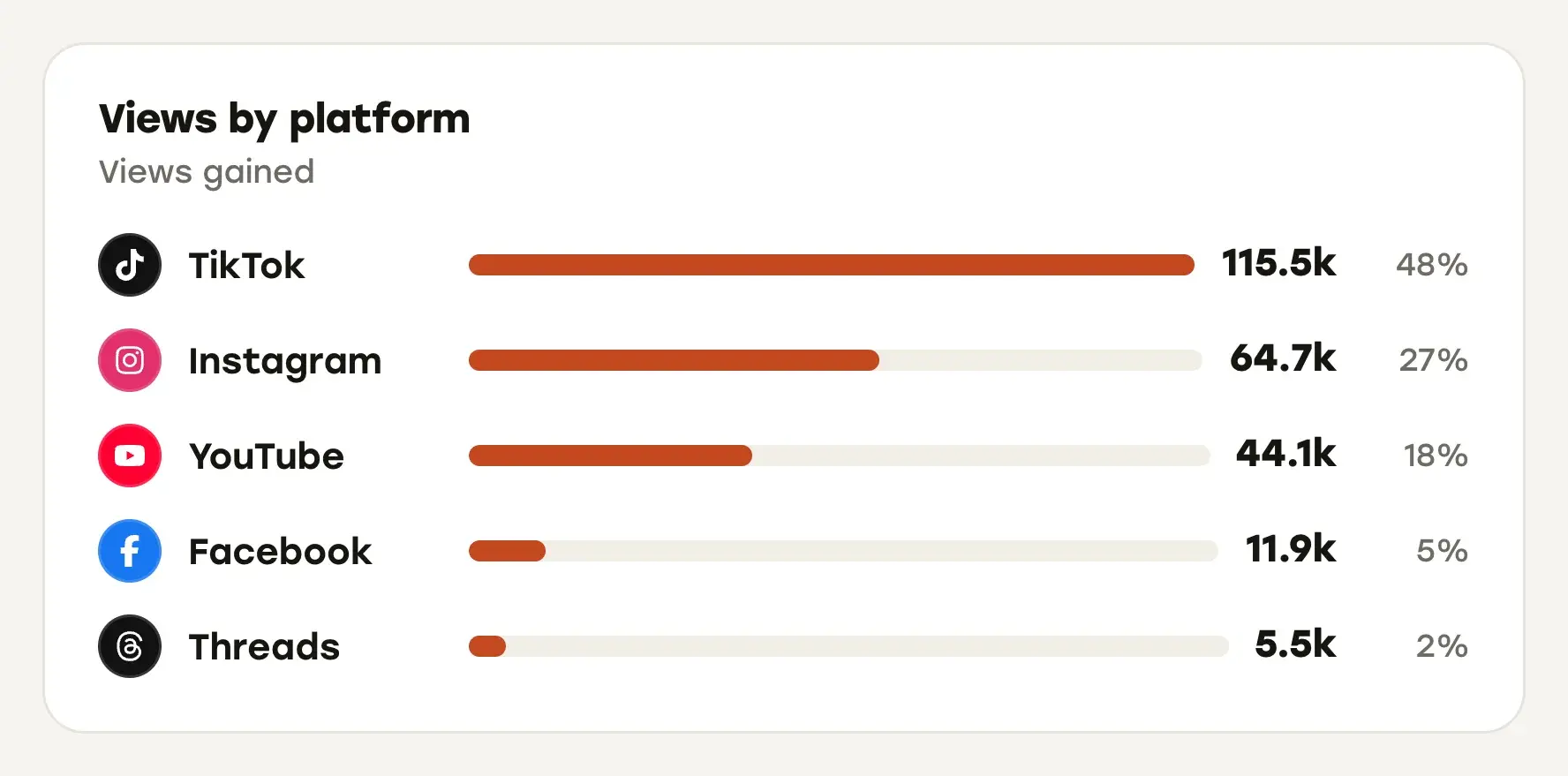
The Insights page collects views, likes, comments, engagement rate, followers and post counts for those five platforms, with a trend chart, top posts, a best time to post and a views-by-platform breakdown. You can filter by platform, account and time range. If analytics are your main reason to switch, compare this with the dedicated tools in social media analytics tools.
Every plan also includes a REST API and an MCP server, so your own code or an AI assistant can schedule posts and read analytics.
Pricing, checked November 2026: Starter is $19 a month for 5 accounts, Pro $39 for 15 and Expert $79 for unlimited accounts. Yearly billing gives two months free. Every plan comes with a 7-day free trial, and you can ask for a refund within 14 days of the first payment. The current numbers are on our pricing section.
Repostly focuses on publishing and results for those five platforms. If LinkedIn, X, Pinterest, Instagram Stories, a shared inbox or approval steps are part of your week, the tools above cover them.
Still deciding between two
Put both through the same test during their free plan or trial. Schedule one video to every platform you use, add an image carousel, and pick a time when you’re away from your desk. Afterward, check what actually went out, whether each platform got the right caption and format, and how clearly each tool told you about anything that failed.
If budget is the deciding factor, the best free social media schedulers goes through what each free plan actually allows. If you’re weighing rules, auto-replies and reposting, social media automation tools covers what automation can safely take over. And if you only post to one platform, its built-in scheduler may be all you need; how to schedule social media posts compares those.
If your week is mostly short videos for TikTok, Instagram, YouTube, Facebook and Threads, try Repostly free for 7 days and run that test with it: upload once, set each account in its own row, and see every destination’s status and views on one post page.
Frequently asked questions
What is the best social media scheduling tool?
There isn't one tool that's best for everyone. Buffer is the simplest place to start if you post to many networks, and it has a free plan. Hootsuite suits teams that need a shared inbox, social listening and approvals. Metricool is strongest on reports. Later suits brands that lead with Instagram. Repostly is built for short videos going to TikTok, Instagram, YouTube, Facebook and Threads from one upload. Choose by the platforms you post to and by how each tool counts accounts and users in its pricing.
What social media management tool is best for a small business?
If one person posts to a few networks, a free plan or a low per-account price is usually enough: Buffer's free plan covers three channels, and Metricool's covers one brand, though not LinkedIn or X. If two or more people work on posts and someone has to sign off, look at plans with approval workflows, such as Buffer's Team plan or Later's Growth plan. If the business mainly posts short videos to TikTok, Instagram, YouTube, Facebook and Threads, Repostly covers those five from one upload.
Keep reading

The Best Free Social Media Schedulers and What Their Free Plans Allow
Which schedulers have a real free plan in November 2026, what each one caps, which are only trials, and when native tools or a paid plan make more sense.

Social Media Analytics Tools, Starting With the Free Ones in Each App
Where to find Instagram, TikTok, YouTube, Facebook and Threads analytics for free, what they can't show you, and which analytics tools fill the gaps.

Social Media Automation Tools: What They Can and Can't Do
What social media automation tools really automate, where platform rules draw the line, and seven tools described from their own pages, with honest picks.
Post once. Show up everywhere.
Start your 7-day free trial and publish your next video to every platform in minutes.Pick a plan and publish your next video to every platform in minutes.
Start your free trialSee plansCancel anytime