Social Media Automation Tools: What They Can and Can't Do
What social media automation tools really automate, where platform rules draw the line, and seven tools described from their own pages, with honest picks.

Social media automation tools take over the repetitive mechanics of posting: publishing at a time you choose, sending one video to several platforms, pulling stats into one report and drafting captions. Some also repost new videos by a rule. What they shouldn’t do is act like a person on your behalf. Auto-likes, follow-and-unfollow bots and bought views break TikTok’s, YouTube’s and Meta’s rules, and the risk lands on your account, not the tool’s.
So the useful question isn’t “which tool automates the most.” It’s which part of your week is pure repetition, and which tool handles that part through each platform’s official channels.
What automation honestly covers
Most tools sold as “automation” do some mix of the following. It helps to know which one you actually need before comparing products.
Scheduling and publishing
This is the core. You finish a post, pick a date and time, and the tool publishes it through the platform’s API while your laptop is closed. TikTok, Instagram, YouTube, Facebook and Threads all offer some native scheduling too; how to schedule social media posts compares those built-in options with a separate scheduler.
The official route matters. TikTok’s Content Posting API lets third-party apps either post directly to your profile or send a draft to your TikTok inbox for you to finish (checked November 2026). A scheduler that publishes this way is doing what TikTok built the API for.
One upload, several destinations
If the same short video goes to TikTok, Instagram Reels, YouTube Shorts and Facebook, uploading it four times is the most obvious waste in your week. Cross-posting tools let you upload once, pick destinations and adjust the caption or settings per platform. For the planning side of reusing a video well, see content repurposing.
Rule-based reposting
Some tools go one step further: you set a rule once, and every new video you publish on one account is reposted to another destination without you opening the tool again. Others can work through your back catalog and republish older posts on a schedule. This is the closest thing to “set and forget” that stays within the rules, as long as it’s your own content.
Analytics and reports
Collecting views, likes, comments and follower counts from five apps by hand is slow and error-prone. Analytics features pull them into one dashboard, and some send scheduled reports to clients or a manager. There’s more on what to look for in social media analytics tools.
AI drafting
Several tools now include an AI assistant for writing or rewriting captions, suggesting hashtags or adapting one post for another platform. Treat it as a first draft. You still decide what goes out under your name.
Replies to people who contact you
Automated replies exist, but within narrow limits. Meta’s Instagram Messaging API only lets an app message someone after that person has messaged the professional account first, and normally within a 24-hour window after that (checked November 2026). Automatic answers to people who reach out are possible; cold messages to strangers aren’t.
Where automation stops
TikTok, YouTube and Meta draw the line in roughly the same place: automating your own publishing is fine, automating fake activity isn’t. These are the relevant rules, all checked November 2026.
- TikTok. The Integrity and Authenticity guidelines forbid automation tools and scripts made to get around TikTok’s systems, and trading services that inflate engagement or trick the recommendation system. TikTok says it removes fake likes and followers when it finds them.
- YouTube. The fake engagement policy bans using automated systems to inflate views, likes or comments, buying them from third-party services, and sub-for-sub trades. Content can be removed, and channels can get strikes or be terminated.
- Facebook, Instagram and Threads. Meta’s Community Standards cover all three apps plus Messenger. The spam policy prohibits posting, engaging or creating accounts at very high frequencies, whether by hand or automatically, and buying, selling or trading likes, follows, views and other engagement.
In practice, that rules out:
- Bots that like, comment or follow on your behalf.
- Services or groups that sell or trade views, followers and likes.
- Mass messages to people who never contacted you.
- Pushing the same post out over and over at a pace no person would manage.
Two more warning signs. A tool that asks for your password instead of sending you to the platform’s own sign-in screen isn’t using the official connection. And any tool that offers to repost other people’s videos is setting you up for copyright trouble. Automation should only ever move content you made or have the rights to.
Seven automation tools, described from their own pages
This isn’t a ranking. Each entry below sticks to what the company says on its own website, checked November 2026, and names the case where it fits better than the others. Plans and prices change often, so follow the pricing links rather than trusting any number you read in a roundup. For a wider comparison of schedulers, see the best social media scheduling tools.
| Tool | Main focus | Platforms it lists | Pricing page |
|---|---|---|---|
| Buffer | Publishing, analytics, comment replies, AI assistant | 12, including LinkedIn, Pinterest, Bluesky, Mastodon | buffer.com/pricing |
| Later | Scheduling, link in bio, influencer marketing | Instagram, Facebook, Pinterest, TikTok, LinkedIn, Threads, YouTube Shorts, Snapchat | later.com/pricing |
| Metricool | Analytics, reports, ads, planning | 11, including Twitch and Google Business Profile | metricool.com/pricing |
| Hootsuite | Team publishing, inbox, social listening | 9 or more, including X, LinkedIn, WhatsApp, Pinterest | hootsuite.com/plans |
| Repurpose.io | Automatic reposting between platforms | Many, including Snapchat, Pinterest, LinkedIn, X and cloud storage | repurpose.io/pricing |
| Post Bridge | Write once, post everywhere, with an API | 10, including X, LinkedIn, Bluesky, Pinterest | post-bridge.com/pricing |
| Repostly | Short video to five platforms from one upload, analytics | TikTok, Instagram, YouTube, Facebook, Threads | repostly.app/#pricing |
Buffer
Buffer groups its features into creating, publishing, analytics (“Insights”), replying to comments (“Community”) and team approvals, with an AI assistant for writing and adapting posts. It also has an API and MCP access for connecting AI tools. It lists Instagram, Facebook, TikTok, LinkedIn, X, YouTube, Threads, Pinterest, Google Business Profile, Bluesky, Mastodon and Substack, and offers a free plan.
Best for: a mix that includes LinkedIn, Bluesky, Mastodon or Pinterest, when you want a simple scheduler with a free starting point.
Later
Later’s scheduler gives you a visual calendar, a drag-and-drop feed preview and a Best Time to Post suggestion based on your past results. Around it sit a link-in-bio page, a social inbox for comments and DMs, AI caption tools, and influencer marketing software with creator programs. It names Instagram, Facebook, Pinterest, TikTok, LinkedIn, Threads, YouTube Shorts and Snapchat.
Best for: brands where Instagram is the main channel, the look of the grid matters, or creator campaigns run alongside.
Metricool
Metricool leans hardest into numbers: analytics over time, competitor tracking, automated reports and a Data Studio connection, plus managing Google, Facebook and TikTok ads in the same dashboard. Planning, an inbox and an AI assistant are included. It also sells an add-on called Flows that sends automatic replies or DMs when someone comments with a keyword, messages you or reacts to a Story. Metricool has a free plan.
Best for: reporting, especially for clients, or organic posts and paid ads side by side.
Hootsuite
Hootsuite pitches its features at team work. Beyond scheduling with best-time recommendations, it has a shared inbox with message routing, team assignments and internal notes, social listening for trends and brand mentions, competitor analysis and an AI layer it calls Wisdom. Its integrations page names networks including Facebook, Instagram, X, LinkedIn, TikTok, YouTube, Threads, WhatsApp and Pinterest, and mentions Bluesky elsewhere on the page.
Best for: teams where several people answer messages for one brand, or that need to track what people say about them, not just what they post.
Repurpose.io
Repurpose.io is built around automated workflows: post on one platform and the content is reposted to others, resized, with platform watermarks removed. It handles Stories from Instagram, Facebook and Snapchat, images and carousels, and backups to Google Drive or Dropbox, and it can schedule or publish right away. Its FAQ lists YouTube, TikTok, Instagram, Facebook, Snapchat, Pinterest, LinkedIn, X, Bluesky and Twitch among its connections.
Best for: covering Stories or Snapchat, or reposting to more destinations than the big five.
Post Bridge
Post Bridge keeps things simple: write a post once and publish or schedule it to X, Instagram, LinkedIn, Facebook, TikTok, YouTube, Bluesky, Threads, Pinterest and Google Business, with tweaks per platform. It supports video, images, carousels and text, bulk video scheduling, an API and an MCP connection for AI agents. Analytics are marked as beta. It describes itself as made for one person marketing a business.
Best for: solo marketers who need X, LinkedIn or Bluesky alongside video platforms, or who want to post from their own scripts.
Repostly
Repostly is ours. It sends one upload of a short video to TikTok, Instagram, YouTube, Facebook and Threads, with separate settings for each destination on one screen; images and text go to the platforms that take them. It’s covered in more detail below.
Best for: creators whose main format is short vertical video and whose videos go to those five platforms.
How to choose by the job that eats your week
Start from the task, not the feature list:
- “I upload the same video four or five times.” You need cross-posting with per-platform settings. Repostly and Post Bridge both describe this; Buffer also schedules to several channels. Check which of your platforms each one lists.
- “I already post natively and just want copies elsewhere.” A reposting tool such as Repurpose.io fits better than a calendar.
- “My client wants a monthly report.” Metricool, or Hootsuite on a larger team.
- “We get hundreds of comments and DMs.” You need an inbox, which points to Hootsuite, Later or Metricool. Buffer covers replying to comments.
- “I’m running many accounts for different brands.” Look at how each tool counts accounts on its pricing page; managing multiple social media accounts covers the setup side.
If two tools fit, pick the one whose free plan or trial lets you schedule a real week of posts. Ten minutes of actual use tells you more than any comparison table.
What Repostly automates
Here’s what Repostly takes off your plate.
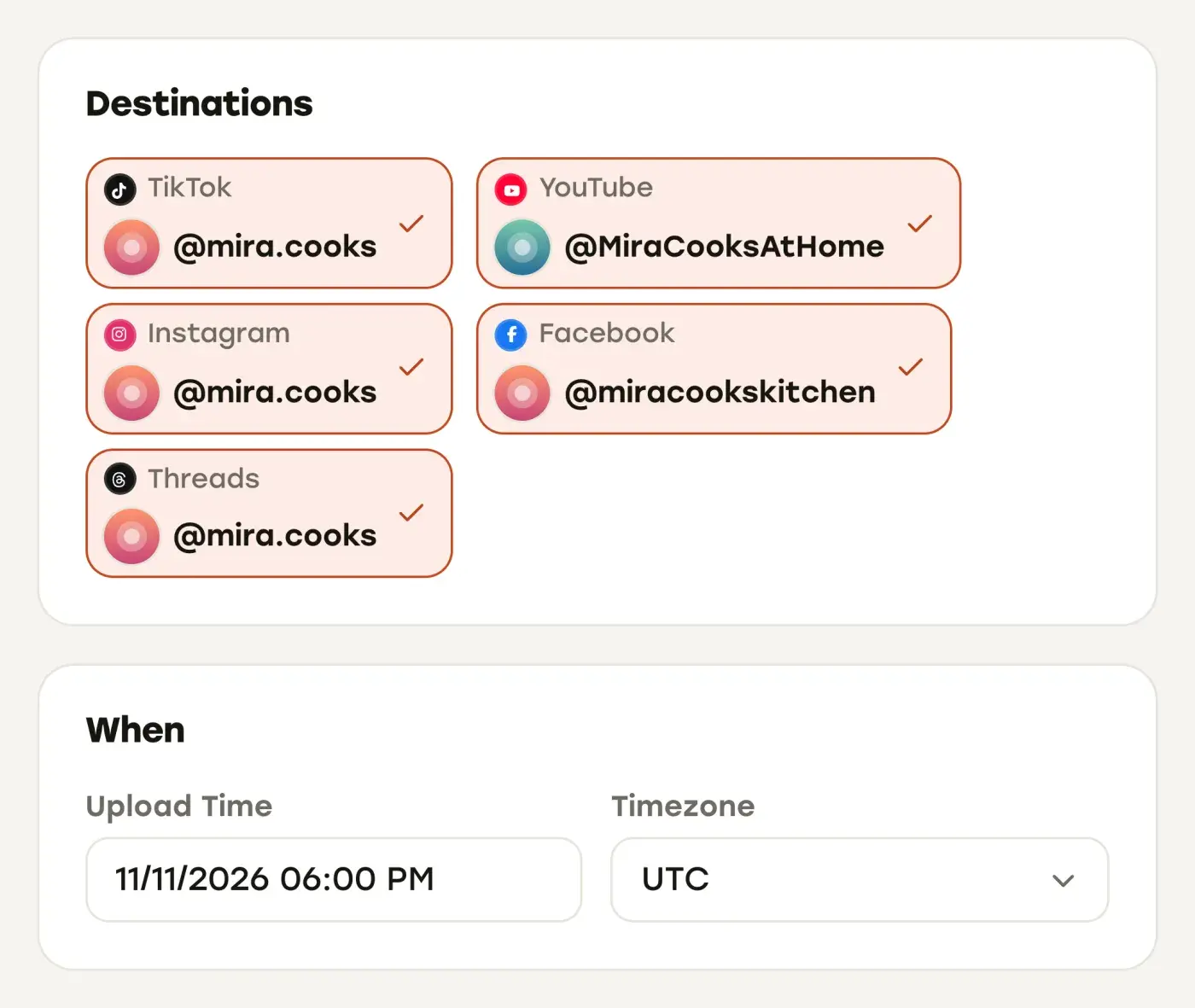
Publishing to five platforms from one upload. You upload a video once, tick the accounts under Destinations (several per platform if you have them) and pick a date, time and time zone under When. Each destination has its own settings row, so YouTube can get a separate title, Facebook can go out as a reel or a regular video, and TikTok gets its own audience, interaction and content disclosure choices. Publishing runs on our servers through each platform’s official API, and you connect accounts through the platforms’ own sign-in, so we never see your passwords.
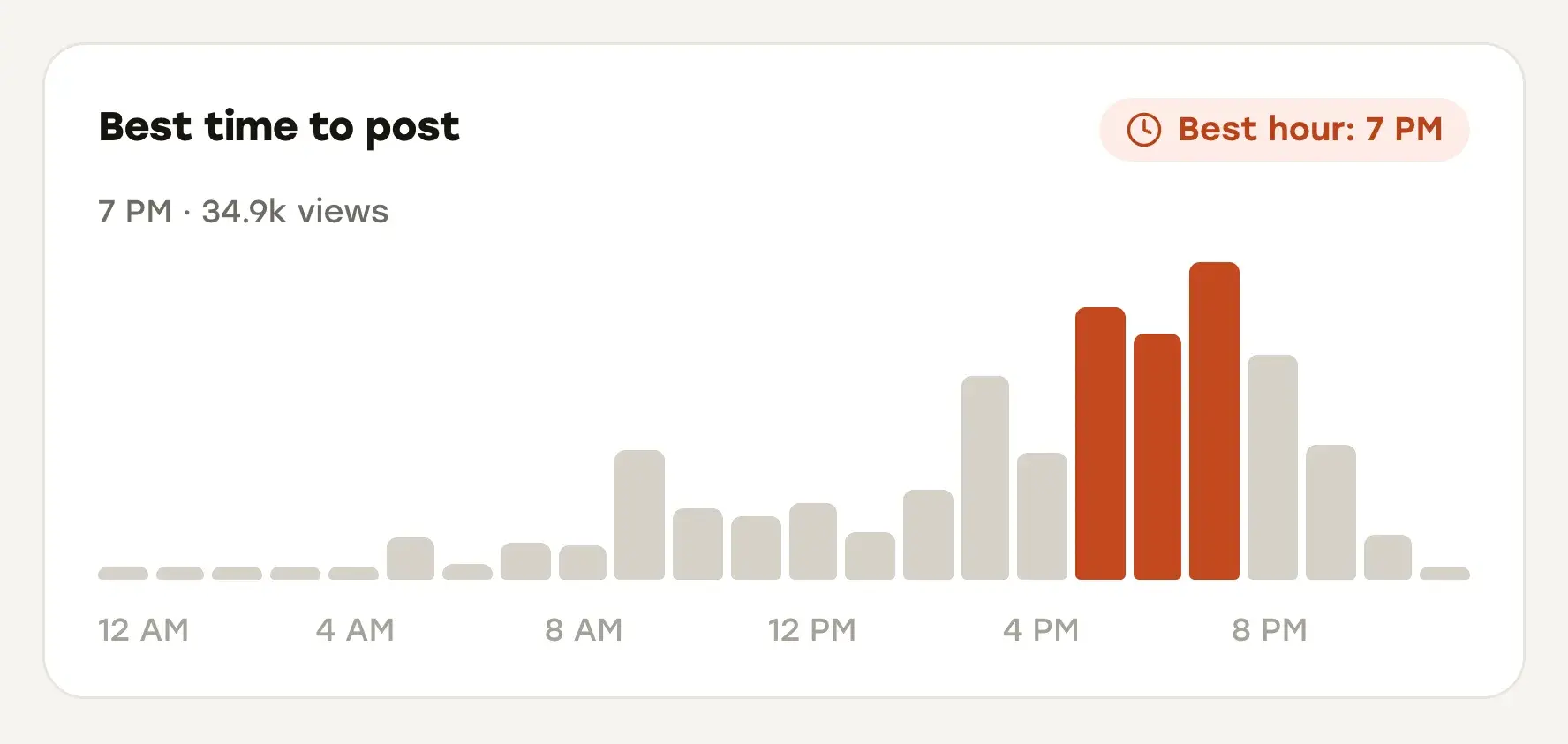
Insights. The Insights page shows views, likes, comments, engagement rate, followers and post counts, with a trend chart, your top posts, views by platform and a best time to post based on the hours of the day in which your posts gained the most views, counted at Repostly’s hourly checks. You can filter by platform, account and time range. The timing card is a good starting point, and the best time to post on social media explains how to read it.
API and AI assistants. Every plan includes a REST API and an MCP server, so your own scripts, or an assistant such as Claude or ChatGPT, can schedule posts and read analytics. That’s also how AI caption help works with Repostly: an assistant connected over MCP can draft a caption and, when you tell it to, schedule the post.
One calendar and a safety net. Everything scheduled and everything posted sits in one calendar, and each post’s detail page shows every destination’s status with its own views, likes and comments. If publishing was paused when a post was due and it would go out more than five hours late, it waits on Posts that missed their time for your decision instead.
No engagement on your behalf. Repostly publishes your posts through each platform’s official API. It never likes, follows or comments on your behalf, and we won’t add that.
Repostly focuses on publishing and results for those five platforms; for a shared inbox, social listening or Instagram Stories, use one of the tools above.
If uploading the same video four or five times is the job eating your week, try Repostly free for 7 days. Plans start at $19 a month for 5 accounts, and yearly billing gives two months free; the details are on our pricing section.
Frequently asked questions
What are social media automation tools?
They are apps that take over the repetitive mechanics of posting: publishing at a time you set, sending one upload to several platforms, collecting stats into reports, drafting captions and answering people who message you first. Some tools also repost new videos by a rule you define. They should not like, follow, comment or message people on your behalf to fake activity. TikTok, YouTube and Meta all prohibit that kind of automated engagement in their own policies.
Keep reading

The Best Free Social Media Schedulers and What Their Free Plans Allow
Which schedulers have a real free plan in November 2026, what each one caps, which are only trials, and when native tools or a paid plan make more sense.

The Best Social Media Scheduling Tools, Compared by Use Case
Buffer, Later, Metricool, Hootsuite, Repurpose.io, Post Bridge and Repostly side by side: platforms, free plans, starting prices and who each one suits.

Social Media Analytics Tools, Starting With the Free Ones in Each App
Where to find Instagram, TikTok, YouTube, Facebook and Threads analytics for free, what they can't show you, and which analytics tools fill the gaps.
Post once. Show up everywhere.
Start your 7-day free trial and publish your next video to every platform in minutes.Pick a plan and publish your next video to every platform in minutes.
Start your free trialSee plansCancel anytime