The Best Time to Post on Social Media Is in Your Own Analytics
Why universal best-time charts don't fit your account, where Instagram, TikTok, YouTube, Facebook and Threads show your audience's hours, and how to test them.

There’s no single best time to post on social media that holds for every account. The hours in “best time to post” roundups are averages across many other accounts, with other audiences in other time zones, so they can be far from when your own followers are around. The reliable answer is in your analytics: Instagram, TikTok, YouTube, Facebook and Threads each show when your audience is active, and a few weeks of deliberate testing tells you whether the hour matters for your account at all.
This post covers why the generic charts mislead, where each app keeps its “active times” data, a simple test you can run, and how Repostly’s Best time to post card and scheduler help you run it.
Why the published best times don’t fit your account
Most best-time charts come from someone pooling posts across a large set of accounts and finding the hours with the highest average engagement. That’s a real measurement, but of a crowd, not of your audience.
- Your audience isn’t the average. A cooking account followed by parents, a gaming channel watched by students and a B2B page read at desks have different days. Averaging them gives an hour that suits none of them particularly well.
- Time zones get lost. “Wednesday at 11 a.m.” means one thing in New York and another in Berlin. If half your followers are in a different region, a chart in your local time points at the wrong hour for them.
- The averages describe when people already post. If most accounts in a dataset post at lunchtime, lunchtime gets the most data, and the result can reflect posting habits as much as audience behavior.
- Short videos keep going after the first hour. A video’s own analytics, such as its page in TikTok Studio, can show views still arriving days after it went up. The publishing hour mostly shapes the first few hours of that curve, which can be a smaller lever than the charts suggest.
None of this means timing is irrelevant. It means the useful version of the question is “when is my audience around, and does posting then make a difference for me?”
Where each app shows when your audience is online
Every platform Repostly supports shows this for free, inside its own analytics or scheduler. Paths and limits below come from each platform’s help pages, checked November 2026. If you’ve never opened these screens, our guide to social media analytics tools walks through where each app keeps its analytics.
| Platform | Where to look | What it covers |
|---|---|---|
| Account insights, in the Total followers section | Times your followers are most active; needs a public account and at least 100 followers | |
| TikTok | TikTok Studio, Analytics, Viewers tab (also the Followers tab) | When your viewers were most active over the last 7 days; follower activity by hours and days |
| YouTube | YouTube Studio, Analytics, Audience tab | “When your viewers are on YouTube,” over the last 28 days |
| Facebook Page | Meta Business Suite, when you schedule a post | An Active times button with recommended publishing times |
| Threads | threads.com, Insights, Audience tab | Most active times of your viewers or followers over the last 30 days |
Instagram. Instagram’s overview of account insights lists “times they’re most active on Instagram” among the follower insights, which appear once you have at least 100 followers. Instagram offers these insights to public accounts (checked November 2026). The same section shows your followers’ top locations, which helps with the time zone question.
TikTok. TikTok’s Creator Academy article introducing TikTok analytics puts Most active times on the Viewers page, covering the last 7 days, and says the Followers tab breaks down when your audience is active by hours and days (checked November 2026). Seven days is a short window, so look at it on a few different weeks before trusting a pattern.
YouTube. Google’s article on understanding your YouTube audience describes the When your viewers are on YouTube report in the Audience tab of YouTube Studio’s Analytics. It shows when your viewers were online across YouTube over the last 28 days, and Google suggests it for timing Premieres and live streams (checked November 2026).
Facebook. Meta’s help page on scheduling posts for a Page says that when you set a date and time in Meta Business Suite, you can click Active times to see recommended publishing times. Scheduling times follow your current time zone (checked November 2026).
Threads. The help article View insights on Threads lists Most active times in the Audience tab of your profile insights. Threads says the times reflect your current time zone and are based on the last 30 days (checked November 2026).
Treat these charts as a shortlist, not a verdict. They show when people are on the app, not when your posts do best. The busiest hour is a good candidate, and so is the hour just before it, but only a test tells you which wins.
A simple test to find your best posting time
This takes three or four weeks of posting you’d do anyway. The only change is that you choose the times on purpose and write down the results.
- Pick two or three time slots. Take them from the charts above, for example the evening peak and a morning slot. Write them down in your audience’s time zone, not just yours.
- Rotate your posts through the slots. Assign each new post to the next slot in turn, so every slot gets a mix of weekdays and topics. If one slot only ever gets Monday posts, you’re testing Mondays.
- Keep everything else as steady as you can. Same kind of video, similar length, your usual captions. Don’t launch a new series in one slot only.
- Compare posts at the same age. Note each post’s views after a fixed time, say 24 hours or three days. Lifetime views favor older posts simply because they’ve had longer. Threads makes this easier: its post insights include a views-over-time line next to your typical views, the median of your last 10 posts.
- Use the median, not the average. One post that takes off can make its slot look like a winner on its own. The middle value of each slot is harder to fool.
- Decide, then move on. If one slot comes out ahead week after week, use it. If the slots are close, the hour isn’t what’s holding your account back, so post whenever it’s convenient and put the effort into the videos.
Run the test per platform if you can. TikTok and YouTube audiences don’t always share a schedule, and one hour won’t necessarily win everywhere. Scheduling the test posts ahead saves you from being at your phone at 7 a.m. on a Sunday; how to schedule social media posts covers the built-in schedulers and when a separate one is worth it.
Re-check every few months, or when something shifts: a video brings in a wave of followers from another country, or your posting rhythm changes.
What Repostly’s Best time to post card shows
If you post through Repostly, the Insights page has a Best time to post card (the image at the top of this post): one bar for each hour of the day, the three strongest hours highlighted and a Best hour label on top. Here’s what goes into it.
It counts when views came in. Repostly checks the view counts of the videos on your connected accounts about once an hour. Each time a count has grown, the gain is filed under the hour of that check, and the card adds up those gains by hour of the day, in your time zone, across the range you picked. So the tall bars mark the hours when your videos picked up the most views, which says something about when your audience watches.
Which videos count. Videos you posted through Repostly count from their first view. Videos you published directly in the apps also count once Repostly has found them on your account, but only for growth after that: the views they already had when Repostly first read them are left out.
Time zone and filters. Hours are shown in your browser’s time zone, using that zone’s current UTC offset, so across a daylight saving change the older hours sit one hour off; the 7- and 30-day ranges avoid that most of the year. You can narrow the card with the filters at the top of the page: one platform or all, one account or all, and a range of 24 hours, 7 days, 30 days, a year or all time.

The card shows bars as soon as views come in. With only a handful of videos, one popular post can decide the whole chart, so thirty days or more, filtered to one platform at a time, gives a steadier picture.
How to read it. The card reflects your own habits too. A new video can pick up many of its views in its first hours, so if you always post at 6 p.m., the evening bars may get a boost from that alone. Counts are taken about hourly, so each bar is roughly the views from the hour before that check: read it as “early evening,” not “6:47 p.m.” That makes it a good second hint next to the platforms’ own activity charts, useful for adding or ruling out a candidate slot, and the test above settles the rest.
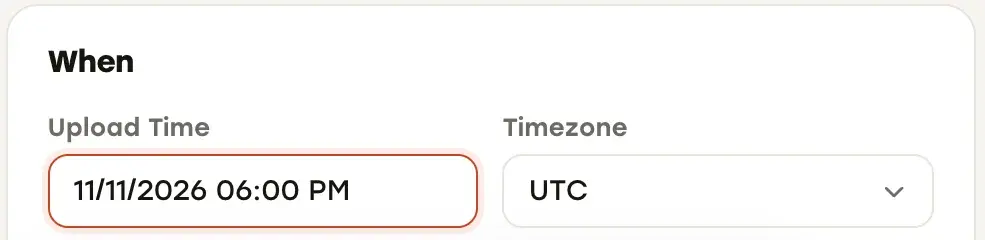
Repostly also helps you run the test itself. One upload goes to TikTok, Instagram, YouTube, Facebook Pages and Threads, and the calendar shows everything scheduled and posted, so you can see your rotation at a glance. The When card in the composer has a Timezone field, so you can schedule in your audience’s zone rather than your own.
After a post goes out, its detail page shows each destination’s status and its own views, likes and comments, plus an Insights chart of views over 24 hours, 7 days or 30 days that you can narrow to one destination. Each post has one publishing time for all its destinations, so to test TikTok at noon and YouTube at 6 p.m., schedule them as two posts.
Insights, including this card, come with every Repostly plan; our features overview shows what else is included. If you want to run your timing test without being at your phone at odd hours, try Repostly free for 7 days: schedule the slots once, and the Best time to post card fills in as the views arrive. Plans start at $19 a month for 5 accounts.
Frequently asked questions
What is the best time to post on Instagram?
There isn't one hour that works for every account. Open your Instagram insights and look at the times your followers are most active, which Instagram shows to public accounts with at least 100 followers. Pick two or three of those hours, post at each in rotation for a few weeks, and compare the posts at the same age, for example by their views after 24 hours.
What is the best time to upload YouTube videos?
Look at the When your viewers are on YouTube report in YouTube Studio, under Analytics and then the Audience tab. It shows when your viewers were on YouTube over the last 28 days. Use the busiest hours as candidate upload times, try two or three of them over several weeks, and compare videos by their views at the same age rather than by lifetime totals.
Keep reading

Content Repurposing for Short Videos: What to Change Per Platform
How to repurpose your own short videos for TikTok, Reels, Shorts, Facebook and Threads, and what each platform's limits and originality rules really say.

How to Schedule Social Media Posts: Native Tools vs. One Scheduler
Where TikTok, Instagram, Facebook, YouTube and Threads let you schedule posts, how far ahead each allows, and when one scheduler for all of them is worth it.

How to Manage Multiple Social Media Accounts Without Losing Track
How TikTok, Instagram, YouTube, Facebook and Threads handle several accounts, how to keep them secure, and when one dashboard beats switching apps.
Post once. Show up everywhere.
Start your 7-day free trial and publish your next video to every platform in minutes.Pick a plan and publish your next video to every platform in minutes.
Start your free trialSee plansCancel anytime