Content Repurposing for Short Videos: What to Change Per Platform
How to repurpose your own short videos for TikTok, Reels, Shorts, Facebook and Threads, and what each platform's limits and originality rules really say.

Repurposing a short video means publishing a video you made on several platforms instead of one, adjusted for each. The version that works is simple: export one clean vertical master without any app’s watermark, keep it to 3 minutes or less, and rewrite the caption or title for every platform. The originality rules that TikTok, Instagram, YouTube and Facebook publish are aimed at reposting other people’s work and at videos that visibly come from another app. None of them says that posting your own video on different platforms is a problem. Facebook does say it reduces the reach of duplicate copies of a video that its systems detect, which is covered below.
The rest of this post covers what those rules actually say, what changes per platform, and when a video shouldn’t be cross-posted as it is.
What the platforms say about originality
You’ll read that “the algorithm punishes cross-posting.” We couldn’t find an official page that says so. Here is what the platforms’ own pages do say (all checked November 2026).
Instagram. Its original content guidelines count work you created yourself as original. Unoriginal means copied from another account, or made by someone else without material edits, and a border, a watermark or a speed change doesn’t count as an edit. An account that mostly posts unoriginal reels, photos and carousels may stop being recommended to people who don’t follow it. It becomes eligible again once a large enough share of its posts over a rolling 30 days is original, and you can check this under Account Status.
Instagram’s recommendation tips for creators go one step further: don’t post reels with watermarks, blurry or low-quality reels, or visibly recycled content. Our reading: the tip doesn’t carve out an exception for your own watermark, so we’d treat a reel with another app’s logo in the corner as the kind of video it warns about, even if you filmed every second.
TikTok. The Creator Academy originality page lists four kinds of unoriginal content: copied from others, largely repurposed from another source without creative edits, combined from several sources with little added, and anything carrying someone else’s visible watermark or superimposed logo. Unoriginal videos may be kept out of the For You feed and don’t qualify for the Creator Rewards Program. A video that’s left out can still be found through search or your profile, and TikTok’s analytics show when one was made ineligible (For You feed eligibility standards).
YouTube. The YouTube channel monetization policies define reused content as repurposing material that’s already on YouTube or elsewhere online. It’s allowed when there’s a meaningful difference from the original, and “content that primarily features the uploading creator” is on the allowed list. The catch is proof: if YouTube can’t tell the content is yours, the policy may apply, and it’s judged across the whole channel, so a problem can cost monetization on every video. This is a YouTube Partner Program rule about earning money, so it matters when you apply to the program or are already in it.
Facebook. Meta’s July 2025 post on unoriginal content says outright that you can post the same content on all your own Pages and profiles. It also says Facebook reduces distribution of duplicate copies so originals get the reach, warns against visible watermarks from other apps, and says adding your own watermark doesn’t count as an enhancement.
Put together: content that isn’t yours is the risk, and so is video that visibly comes from somewhere else. On Facebook, extra duplicate copies of the same video can also lose reach. Repurposing your own work across platforms is mostly a technical job of making each upload look native.
Start from one clean master
Everything below comes back to one file you control.
- Export from your editor, not from an app. Don’t use a copy saved back out of TikTok or Instagram as your source. If it carries that app’s logo or your handle as a watermark, you’ve recreated the problem above.
- Make it vertical. 9:16 at 1080 × 1920 is the safe choice. Meta’s publishing docs for Instagram and Threads recommend 9:16 to avoid cropping or blank space, and YouTube treats a square or vertical video of up to 3 minutes as a Short (YouTube Help), all checked November 2026.
- Keep text off the edges. Meta’s Instagram Reels ad specs suggest leaving at least 14% at the top, 35% at the bottom and 6% on each side free of text and logos, so the profile icon and buttons don’t cover them (checked November 2026). That figure is written for ads. We still use it for organic videos, because the apps lay their caption and buttons over the video, and it’s the only published measurement we know of.
- Leave licensed music out. Meta’s music guidelines say using music for commercial or non-personal purposes is prohibited without the right licenses, and posts with someone else’s music can be muted or blocked. TikTok’s Commercial Music Library terms say commercial use outside TikTok isn’t permitted, including posting the video on other platforms (both checked November 2026). So don’t assume a track you picked in one app’s library is cleared anywhere else. Keep your voice and original sound in the master and add a trending sound inside each app if you want one.
- No app-specific calls to action in the picture. “Follow me on TikTok” burned into the video looks odd on YouTube. Put calls to action in each caption instead.
What changes on each platform
The same master can go everywhere, but the limits around it differ. All checked November 2026:
| Platform | Length that matters | Text you write | Worth knowing |
|---|---|---|---|
| TikTok | Through TikTok’s posting API, every creator can post 3-minute videos; some can post 5 or 10 minutes (TikTok for Developers) | Caption up to 2,200 characters through the API (reference) | Someone else’s visible watermark counts as unoriginal |
| Instagram Reels | Up to 20 minutes in the app, but reels over 3 minutes aren’t recommended to new audiences (Instagram Help) | Caption up to 2,200 characters (Instagram Platform docs) | Through the API: 3 seconds to 15 minutes, 300 MB at most |
| YouTube Shorts | Square or vertical, up to 3 minutes (YouTube Help) | Title up to 100 characters, description up to 5,000 (YouTube Help) | Anything longer or horizontal is a regular video |
| Every uploaded video has been a reel since September 2025, any length (Facebook Help) | Description | Reels published through the API must be 3 to 90 seconds and 9:16 (Meta for Developers) | |
| Threads | Video up to 5 minutes (Threads API docs) | Text up to 500 characters (Repostly counts this as 500 bytes, so emoji and accented letters use more of it) | Recommends 9:16, 1 GB at most |
Two things stand out. First, roughly 3 minutes is the line on three platforms at once, although each is a different kind of limit: it’s what every TikTok creator can post through the API, the point past which Instagram stops recommending a reel to new people, and the maximum for a Short. Second, if a scheduling tool publishes your Facebook reels, 90 seconds is the real limit. A cut between 3 and 90 seconds fits every row in the table.
The text needs more rework than the video. A TikTok caption full of hashtags makes a poor YouTube title, and YouTube gives you only 100 characters for it, so write that one first. Instagram and TikTok captions do double duty as search text, so describe what’s in the video in plain words. In our view, Threads rewards conversation, so a one-line question can fit better there than your full caption.
When not to cross-post as it is
Some videos need a new edit, or shouldn’t move at all:
- It shows another app’s watermark, logo or interactive sticker. Re-export from your project without them.
- It’s built on someone else’s video, like a duet, a stitch or a reaction. The other person’s half isn’t yours to upload elsewhere, and YouTube and TikTok both list content that isn’t yours, with little added, as reused or unoriginal.
- The sound came from one app’s music library. As above, that license doesn’t follow the file.
- It’s horizontal and you want a Short. YouTube will publish it as a regular video. For the reframing options, see how to post a YouTube video on Instagram.
- It runs past 3 minutes and Instagram reach is the point. Cut a shorter version.
- It depends on one platform’s features or trend. A reply to a TikTok comment, or a joke about a trend nobody on Facebook has seen, rarely lands elsewhere.
A repurposing routine that holds up
- Edit once, export the master, keep the project. The project file is what lets you make a shorter or watermark-free version later.
- Write the text per platform. Start with the YouTube title because it’s the tightest, then the captions.
- Decide between posting at once and staggering. This part is our opinion, not platform guidance: none of the official pages we read says spacing your uploads helps or hurts. We’d post everywhere at the same time unless you have a reason not to. It’s less work, and comparing results is fairer when every copy went out at the same moment. Staggering makes sense when you want to see how the first platform reacts before you write the other captions. Each audience may be active at different hours, which is a separate question covered in the best time to post on social media.
- Compare the same video across platforms. After a week, look at where it did well and where it didn’t. Judge the pattern over several videos, not one, before you change what you make.
Doing it in Repostly
Repostly handles the publishing half of this routine. One upload goes to TikTok, Instagram, YouTube, Facebook Pages and Threads, to several accounts per platform if you run them, and each destination gets its own settings on the same screen.
- Click New post and upload your master.
- Under Destinations, tick the accounts it should go to: TikTok, Instagram, YouTube, Facebook and Threads.
- Write the shared caption. Then open the Settings card, which has one row per destination.
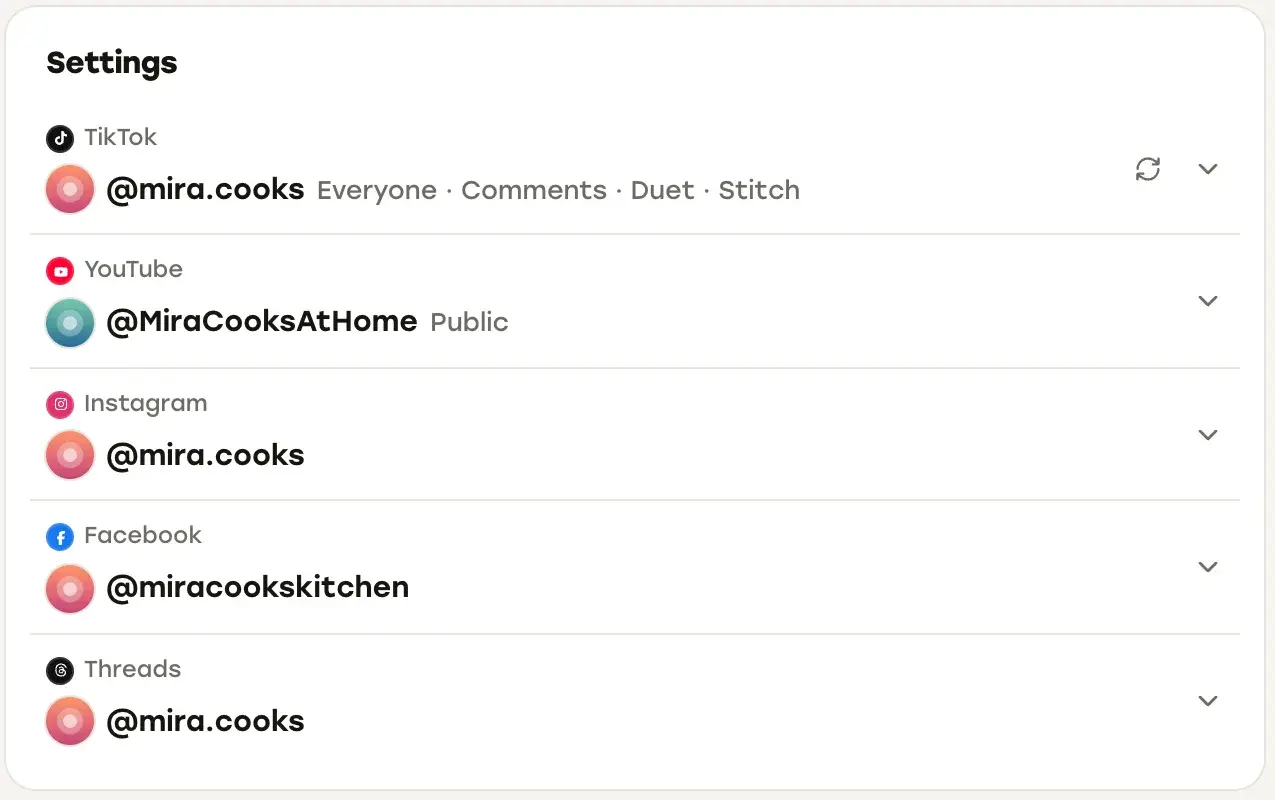
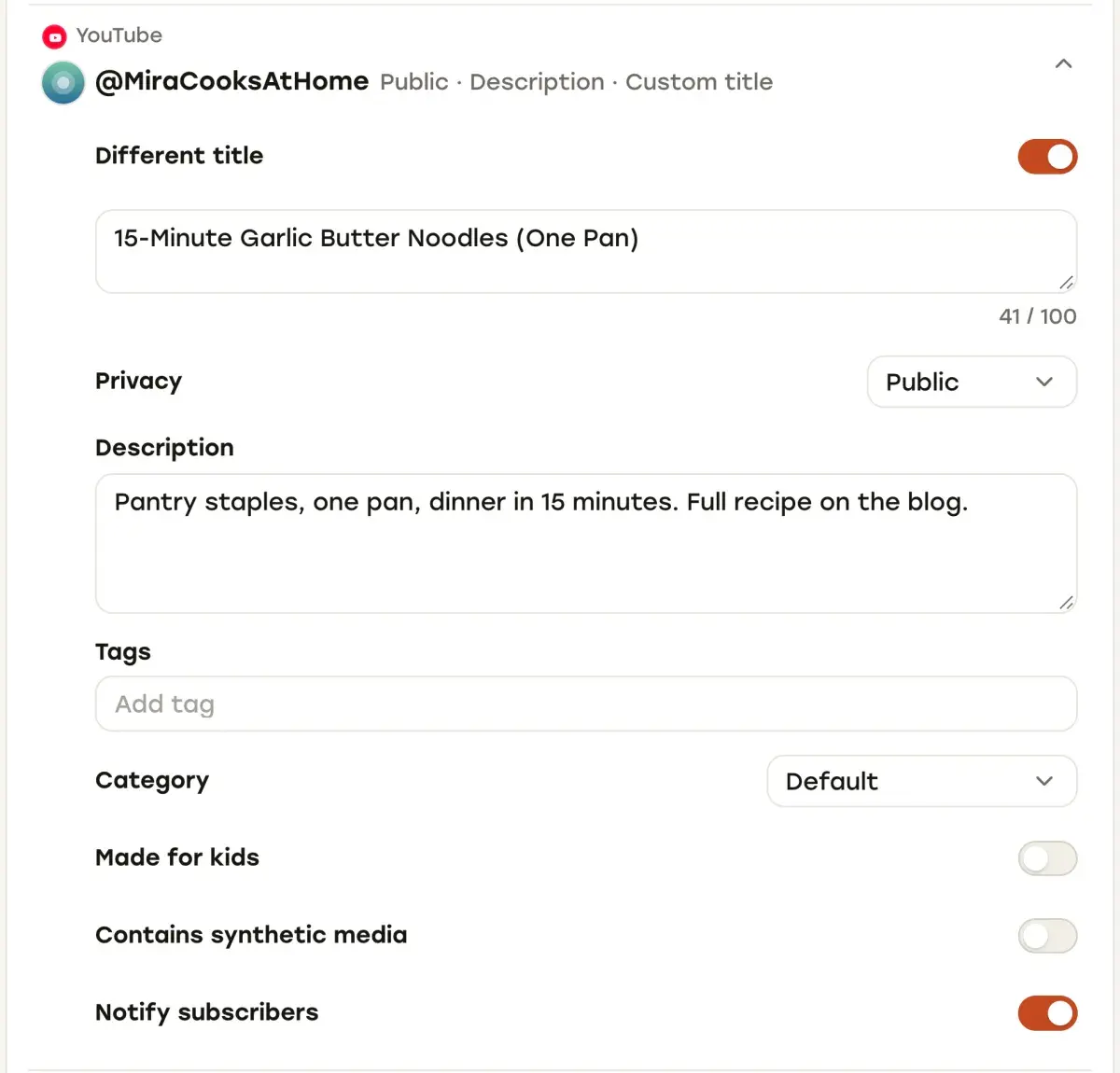
- In each row, switch on Different caption to give that account its own text. For YouTube the switch is Different title, with a 100-character counter, plus a separate description. Facebook’s row has Post as (Reels or Video), and TikTok’s row holds its privacy, comment, Duet and Stitch settings and the content disclosure.
- If you want, set a Cover on the video. Repostly sends it to YouTube as the thumbnail, to Instagram as the reel cover and to Facebook as the video thumbnail. TikTok doesn’t receive it.
- Pick a date, time and time zone under When, then click Schedule Post.
Repostly publishes exactly the file you upload, so the clean master from the steps above is what every platform gets. If one platform needs a different cut, give it its own post with that file. Before you schedule, Repostly checks each destination’s text against the limit it uses for that platform (2,200 characters for TikTok, Instagram and Facebook captions, 500 bytes for Threads, 100 characters for a YouTube title), so a caption that’s too long is caught in the composer.
Once the post is out, its detail page lists every destination with its own status, views, likes and comments, which is exactly the comparison step 4 of the routine asks for. Over the weeks, Insights shows all your platforms in one view, and the calendar holds everything scheduled and posted.
For the platform steps behind one specific move, see how to share a YouTube video on Facebook.
If you publish the same videos to several accounts every week, plans start at $19 a month for 5 accounts, and you can try Repostly free for 7 days.
Frequently asked questions
How do you repurpose content?
Start from a video you made yourself and export one clean master from your editor: vertical 9:16, no app watermark or logo, and no licensed music baked in. Publish that file to each platform with text written for it: a title of up to 100 characters for YouTube, a searchable caption for TikTok and Instagram, a short post for Threads. Re-edit only where a platform needs it, for example a cut of 90 seconds or less if a tool publishes your Facebook reels.
What are good content repurposing strategies for short videos?
Make one strong vertical edit and publish it everywhere it fits instead of making a new video per app. Keep it to 3 minutes or less so it can count as a YouTube Short and still be recommended on Instagram, keep text away from the edges, and add music inside each app rather than in the master. Then compare how the same video did on each platform over several weeks before you change what you make.
Keep reading

Social Media Content Calendar: A Simple Template and Examples
A one-week content calendar template for short videos that you can copy, how to fill it in, an example monthly cadence, and where a scheduler's calendar fits.

The Best Time to Post on Social Media Is in Your Own Analytics
Why universal best-time charts don't fit your account, where Instagram, TikTok, YouTube, Facebook and Threads show your audience's hours, and how to test them.

How to Manage Multiple Social Media Accounts Without Losing Track
How TikTok, Instagram, YouTube, Facebook and Threads handle several accounts, how to keep them secure, and when one dashboard beats switching apps.
Post once. Show up everywhere.
Start your 7-day free trial and publish your next video to every platform in minutes.Pick a plan and publish your next video to every platform in minutes.
Start your free trialSee plansCancel anytime