How to Schedule Social Media Posts for Real Engagement
Learn how to schedule social media posts with strategies that actually work. Our guide covers timing, tools, and content to boost your engagement.
So, what does it really mean to schedule social media posts? It’s all about using a dedicated tool to plan out your content calendar ahead of time. This simple shift turns social media from a frantic, daily chore into a powerful, strategic part of your marketing. You just pick your platform, create your posts in batches, and tell the tool when to publish them.
Why Smart Scheduling Is More Than Just Saving Time
Let’s get one thing straight: everyone knows scheduling saves time. That’s the obvious part. The real game-changer is the strategy it unlocks. This isn't just about efficiency; it's about building a consistent presence that turns casual followers into a genuine community.
When your audience can count on you for great content at regular times, you stop being just another account in their feed and become a reliable, go-to voice.
A well-planned schedule gives your brand a professional and trustworthy feel. It also means you can finally connect with people in different time zones without having to post at 3 AM.
Free Your Mind for High-Impact Tasks
Imagine sitting down and creating a whole week's—or even a month's—worth of content in one focused session. This is what we call "batching," and it does wonders for your mental energy.
Instead of waking up every morning wondering, "What should I post today?", you can pour that creative energy into bigger ideas, engaging with your audience, and actually analyzing what’s resonating with them.
This screenshot breaks down the different pieces of a solid social media marketing strategy, and you'll notice scheduling is right at the heart of making it all work.
As you can see, scheduling is the operational backbone. It makes everything else, from engagement to analytics, run so much smoother.
Build a Reliable Brand Presence
Beyond the time savings, smart scheduling is a powerhouse for hitting your bigger marketing goals. For instance, it's a fantastic way to increase brand awareness. A steady flow of quality content keeps your brand front and center, reinforcing your message day in and day out.
The real magic of scheduling isn't just efficiency; it's consistency. Consistency builds trust, and trust builds a loyal audience that will champion your brand.
This strategic approach is a big deal, and the industry growth proves it. The social media management market was valued at around $17.5 billion in 2024 and is expected to skyrocket to $51.8 billion by 2027. Much of that growth is fueled by AI-powered scheduling tools designed to get the most out of your content. This trend makes it clear: strategic scheduling is no longer a nice-to-have, it’s a must-do.
Build Your Content Foundation Before You Schedule

It's tempting to jump right into a scheduling tool, but let's be real: a great tool can't fix a broken content strategy. Before you even touch the "schedule" button, you have to lay the groundwork. This is where the real magic happens, ensuring every post you queue up actually has a purpose.
Think of it like building a house—you need a blueprint before you start hammering away. Your content strategy is that blueprint. It guides every decision and makes sure your effort leads to real results, not just a calendar that looks busy.
Define Your Goals for Each Channel
First things first, you have to ask yourself the big "why." What are you actually trying to do on each platform? Your goal for LinkedIn is probably going to look completely different from your TikTok strategy, and that's exactly how it should be.
Getting clear on your goals is non-negotiable. It dictates the tone you use, the format you choose, and the call-to-action you include in every single post you create.
Here are a few common goals I see people focusing on:
- Generate Leads: Here, your content is all about getting people to take a specific action, like visiting a landing page, downloading a free guide, or signing up for a webinar.
- Build Brand Awareness: The main objective is to get in front of more eyes. Think shareable content like cool infographics, relatable memes, or inspiring brand stories.
- Foster a Community: This is all about sparking conversation. You’ll be asking questions, running polls, and encouraging your followers to share their own content to make them feel like part of the club.
Identify Your Audience's Digital Hangouts
Once you know what you want to achieve, you have to figure out where your people are. It’s a complete waste of time to pour your heart into creating perfect Instagram Reels if your ideal clients are all hanging out and making connections on LinkedIn. A little homework now saves you from a massive headache later.
Don't just guess. Dig into your existing customer data, see which channels your competitors are thriving on, and use platform analytics to understand who you're already reaching. This is how you make sure you’re showing up in the right places at the right time.
Create Your Core Content Pillars
Content pillars are simply the big-picture topics or themes your brand will talk about over and over again. I've found that having 3 to 5 core pillars is the sweet spot for most businesses. They act as guideposts, keeping your content focused and reinforcing your expertise.
For instance, a financial advisor I worked with landed on these pillars:
- Retirement Planning Tips: Actionable advice on saving for the long haul.
- Market Updates Explained: Breaking down complex financial news into plain English.
- Client Success Stories: Sharing real-world results to build trust and credibility.
Your content pillars are the promise you make to your audience. They tell followers exactly what kind of value they can expect from you, which is the key to earning their long-term attention and loyalty.
With these pieces in place—clear goals, a deep understanding of your audience, and solid content pillars—you're finally ready to build out a content calendar. This roadmap turns your big ideas into a concrete plan. Only then can you start to really see the power of scheduling.
Finding Your Best Time to Post on Any Platform
You’ve probably seen a hundred articles claiming they've found the magical "best time to post." They can be a decent starting point, sure, but here's the reality: your audience is completely unique. If you really want to maximize your reach, it's time to stop guessing and start digging into your own data.
Think about it. General user behavior gives us some pretty solid clues. For instance, people flock to LinkedIn during the 9-to-5 workday, checking their feeds between meetings or on their lunch break. On the flip side, platforms like TikTok and Pinterest usually light up in the evenings and on weekends when everyone is kicking back and relaxing.
Become a Data Detective for Your Own Audience
The real secret to effective social media scheduling is hiding in plain sight: inside your own analytics. Every major platform gives you the tools to see exactly when your followers are most active. This isn't just a vague suggestion; it's a personalized heatmap showing you your audience's online habits.
You have to put on your data detective hat. Your mission is simple: find the exact days and hours when your content has the best shot at making an impact.
Diving into analytics might sound a little intimidating, but it's much easier than it looks. Most platforms lay out this data in a simple chart or graph, showing you peak activity times at a glance.
The best posting schedule isn't one you find in an article—it's one you build yourself. Your data is telling a story about your audience; your only job is to listen and schedule your content to match.
This custom-fit approach is what takes a social media strategy from "good enough" to genuinely great. You're not just throwing content out there; you're delivering it the moment your followers are there and ready to engage.
Uncovering Your Peak Engagement Windows
So, where do you start? Head straight to the analytics or insights section of each of your social media profiles. You're looking for audience activity data, which almost always breaks down follower presence by both day of the week and hour of the day.
For a much deeper dive, you should check out our complete guide on finding your best time to post. It gives you a detailed walkthrough for every major platform.
Here's a quick guide to making sense of what you find:
- Spot Your Top Days: Look for the two or three days of the week that consistently show the highest user activity. These are your go-to publishing days.
- Find Your Peak Hours: Within those top days, narrow it down to the specific hours when the most followers are online. That’s your golden window.
- Test, Measure, Repeat: Start scheduling your most important content during these peak times for a few weeks. Circle back and review your post performance. Have your likes, comments, and shares gone up?
This simple process turns your scheduling from a shot in the dark into a strategy backed by real evidence.
Optimal Posting Times by Social Media Platform
While your own data is always the most important, it helps to have a baseline. Understanding the broader trends across different networks gives you valuable context for your own findings. This table summarizes the general peak engagement windows for the major players.
| Platform | Best Days to Post | General Peak Engagement Window |
|---|---|---|
| Tuesday, Wednesday, Thursday | 9 a.m. - 1 p.m. | |
| Tuesday, Wednesday, Friday | 10 a.m. - 2 p.m. | |
| TikTok | Tuesday, Thursday, Friday | 12 p.m. - 5 p.m. |
| Tuesday, Wednesday, Thursday | 10 a.m. - 12 p.m. | |
| Friday, Saturday | 8 p.m. - 11 p.m. |
Use these as a starting point, but let your analytics have the final say. Notice how weekdays are still dominant for most platforms, with engagement often peaking between 10 a.m. and 1 p.m. globally. Facebook and Instagram tend to get a lot of morning traffic, while TikTok's sweet spot starts around noon and stretches into the early evening.
By combining these global insights with your specific audience analytics, you'll be able to create a posting schedule that’s not just powerful, but precise.
How To Choose The Right Social Media Scheduling Tool
The world of social media scheduling tools is jam-packed, and it’s easy to get overwhelmed. Let's cut through the noise. The goal isn’t to find the tool with a million features; it’s to find the one that fits your workflow, team size, and goals perfectly.
A great way to start is by figuring out your absolute must-haves. Do you need a drag-and-drop visual calendar to see your whole month laid out? Is it critical to post on everything from TikTok to LinkedIn? Making a short list of these non-negotiables will instantly help you weed out the wrong options and stop you from paying for bells and whistles you’ll never touch.
Matching The Tool To Your Needs
The right tool for a solo creator is worlds apart from what a large marketing team needs. Think about where you are right now and, just as importantly, where you see your brand in the next six months.
- For Solo Creators & Freelancers: Your best bet is something simple and affordable. You need a straightforward scheduler that connects to your main platforms without a massive learning curve.
- For Growing Businesses: Look for tools that offer solid analytics and collaboration features. You’ll want to track what’s working and have a smooth process for team members to draft and approve posts.
- For Large Teams & Agencies: An all-in-one platform is non-negotiable here. Think advanced approval workflows, client management portals, and deep-dive reporting to handle multiple brands without chaos.
The best scheduling tool isn't always the most popular one—it's the one that feels like a natural part of your strategy. It should make your life easier, not add another complicated step to your to-do list.
Sometimes, your strategy goes beyond just posting your own content, especially if you're working with influencers. When looking for tools to manage those partnerships, digging into comparisons like Upfluence vs. other influencer platforms can save you a lot of headaches and help you find the right fit for your campaigns.
Key Features That Actually Matter
When you’re comparing different tools, don't get lost in the marketing fluff. Focus on the features that will genuinely save you time day-to-day. For instance, some tools offer smart AI recommendations that analyze your audience data to suggest the best times to post. That feature alone takes a ton of guesswork out of the equation.
Another game-changer is a unified content calendar. Being able to see all your scheduled content visually helps you maintain a healthy mix of post types and ensures your brand voice stays consistent across all channels. It’s the difference between a planned strategy and just throwing content at the wall.
This visual shows just how much time you can save by scheduling content in batches, comparing the effort for one week versus an entire month.
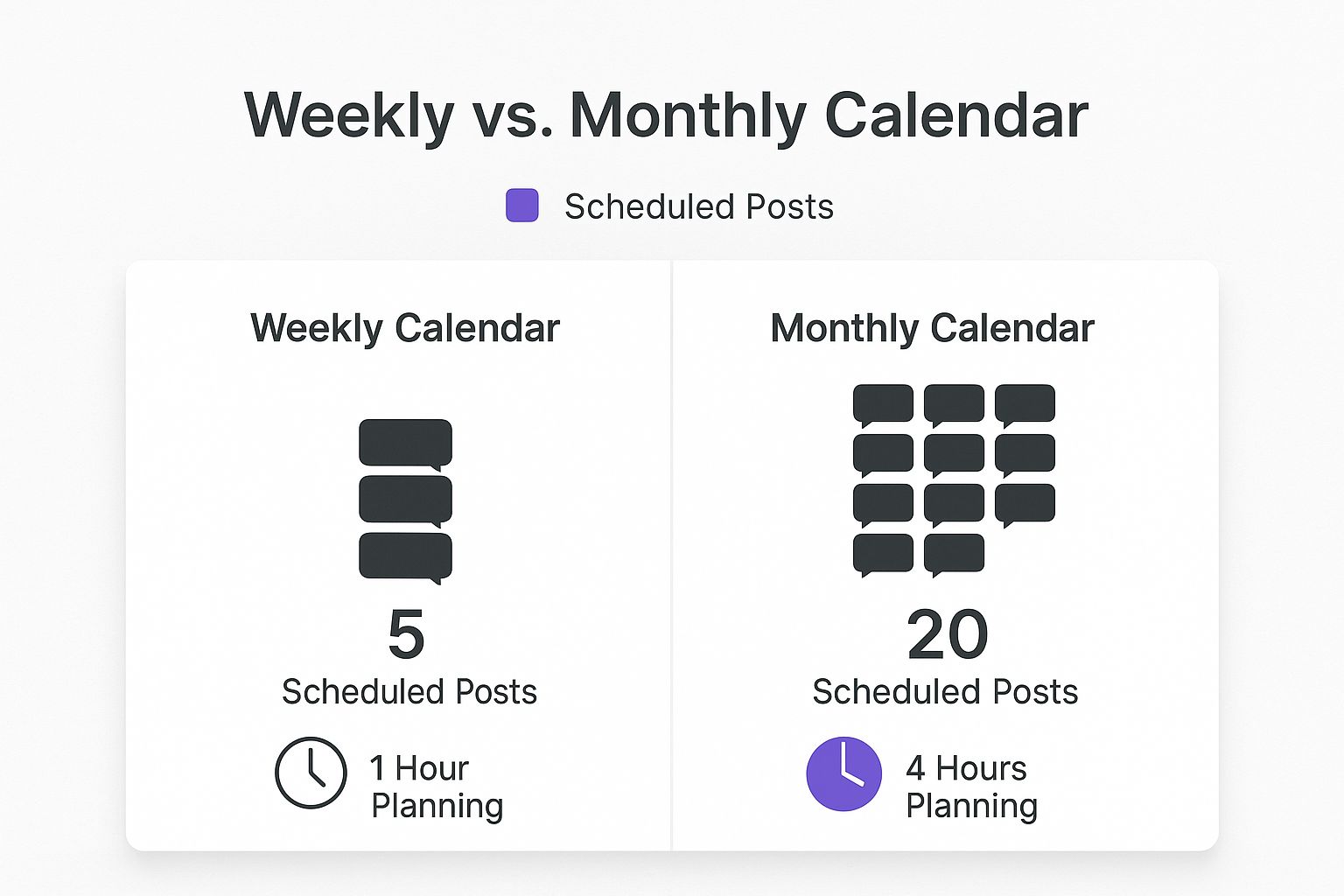
As you can see, planning monthly is way more efficient. That freed-up time is time you can spend on what really matters—creating great content and engaging with your audience.
Comparison Of Social Media Scheduling Tools
To give you a clearer picture, here’s a side-by-side look at how different types of scheduling tools stack up. This should help you figure out which category is the best fit for your current needs.
| Feature | SimplePost (Beginner) | GrowthSuite (Business) | EnterpriseConnect (Enterprise) |
|---|---|---|---|
| User Interface | Simple, drag-and-drop | Advanced, with dashboards | Fully customizable, white-label options |
| Analytics | Basic (likes, comments) | In-depth performance tracking | Comprehensive, custom reporting |
| Team Features | Single user | Collaboration and approvals | Advanced roles & client portals |
| Best For | Solo creators, freelancers | Small to medium businesses | Agencies, large brands |
Ultimately, the right tool aligns with your specific goals and grows with you. If you’re ready to dive deeper into some specific names and models, our complete breakdown of the best social media scheduling tools offers detailed reviews to guide your decision: https://repostly.app/blog/best-social-media-scheduling-tools-68a586e344be737efa9f3c3f.
Setting a Posting Cadence That Actually Works
"How often should I post?" It's the million-dollar question, and I've heard it countless times. The honest-to-goodness answer? It depends. The perfect posting cadence isn't about hitting some magic number; it’s about finding a rhythm that works for you and provides real value to your audience.
I'll say this again and again: consistency will always beat frequency. Posting three high-quality, engaging updates a week on Instagram will do more for you than spamming your followers with ten rushed, low-effort posts. Every platform has its own vibe and user expectations, and that's what should guide your strategy.
Take X (formerly Twitter), for example. It's a fast-moving, conversational space that rewards more frequent, timely updates. On the flip side, a platform like LinkedIn is all about thoughtful, in-depth content. A few well-crafted posts a week there will be far more impactful than daily chatter.
Platform-Specific Frequency Guidelines
Getting a feel for these nuances is where a good scheduling strategy really clicks. You just can't slap a one-size-fits-all plan on your social media and expect amazing results. The goal is to match the platform's energy without burning yourself out or overwhelming your audience's feed.
The data backs this up. Research shows that businesses, on average, post 18.1 times per week on X, but that number drops to just 9.3 times on Instagram. For most brands, a sweet spot is around 3 to 5 Instagram posts per week and maybe 1 to 2 Facebook posts a day.
Here are some good starting points I recommend to my clients:
- X (Twitter) & Threads: These are built for high frequency. Aim for at least a few posts spread throughout the day to stay visible in that rapid-fire feed.
- Instagram & Facebook: Quality is king here. A solid goal is 3-5 times per week. This keeps you present without sacrificing the engagement that comes from great content.
- LinkedIn: Think less is more. A couple of high-value, professional posts each week is often the perfect amount to connect with that audience.
Don’t forget, a steady posting schedule is a direct line to building a real connection with your followers. For more on this, our guide on https://repostly.app/blog/how-to-increase-social-media-engagement-688db46144be737efa9f3b2c has some great, actionable tips.
The Power of Content Batching
This is the secret weapon for real efficiency. Content batching is simple: you block out a chunk of time—maybe a few hours on a Monday morning—to create and schedule all your posts for the week or even the whole month. It’s a game-changer for how you manage social media.
Of course, to do this well, you first need to build a comprehensive social media content calendar. This becomes the roadmap for your batching sessions.
Instead of scrambling for ideas every single day, batching lets you get into a creative flow state. The result? Better, more cohesive content. Plus, it frees up your daily schedule for what really matters: engaging with your community in real-time.
When you schedule your core content ahead of time, you create breathing room. This gives you the flexibility to jump on a trending topic or share a spontaneous, behind-the-scenes moment. It’s how you keep your feed feeling human and authentic, not like it’s run by a robot. That balanced approach is the key to a cadence that truly works.
Got Questions About Scheduling Posts? We've Got Answers
When you're first getting the hang of scheduling social media content, a few questions always seem to pop up. It’s totally normal. Getting clear on these points from the get-go helps you build a strategy that actually works. We've heard them all, so we've put together some straight-to-the-point answers for you.
Think of this as your cheat sheet for sidestepping common pitfalls and making your workflow even smarter.
So, Does Scheduling Posts Actually Hurt My Engagement?
This is easily the most common concern we hear, and the short answer is a firm no. Using a reliable, platform-approved tool like Repostly won't get you penalized. The big players like Instagram and Facebook provide official access (through APIs) for tools to publish content. They wouldn't offer this if they were just going to punish you for using it.
If you ever see a dip in engagement after scheduling, the culprit is almost always something else. It usually comes down to one of these things:
- The Content Itself: Is the post actually something your audience wants to see? Is it helpful, entertaining, or interesting?
- Bad Timing: You might have posted at 2 PM, but what if your audience is most active at 8 PM?
- You're Not Sticking Around: Are you replying to comments and DMs? Social media is a two-way street, even when posts are automated.
The scheduling tool is just the delivery truck. Your content and your strategy are the cargo, and that’s what really matters for engagement.
How Far Out Should I Realistically Schedule My Content?
This is all about finding that sweet spot between being prepared and staying flexible. For most people, scheduling content one to two weeks in advance is the perfect cadence. It's enough time to get organized and batch your creative work, but not so far ahead that you can't react to things happening in the moment.
Planning your feed months in advance might sound super productive, but it can make your brand feel out of touch with current conversations or trends. A two-week buffer gives you a solid foundation while leaving you room to hop on a trending meme or share a timely piece of news in your industry.
Scheduling isn't meant to lock you in. It's about creating a consistent baseline so you have the mental energy to be spontaneous and creative when an opportunity pops up.
Should I Just Post the Exact Same Thing on Every Platform?
Please don't! While the core idea of your post can be the same, a pure copy-and-paste job is a missed opportunity. Every social network has its own vibe, its own audience expectations, and its own "language." The real magic of scheduling social media posts efficiently is in adapting your message, not just blasting it everywhere.
Think about it: that polished, in-depth update you wrote for LinkedIn is going to feel completely out of place on TikTok. An Instagram caption filled with 30 hashtags will just look like spam on Facebook. Always tweak your captions, visuals, and hashtags to feel native to the platform you're posting on.
Ready to stop hopping between tabs and start building a powerful, consistent presence? Repostly brings your entire social media workflow under one roof, letting you schedule, analyze, and engage from a single, clean dashboard. Start your free 7-day trial and feel the difference today.
Keep reading

10 Fresh Instagram Story Idea Tactics for 2025
Stuck for content? Discover our top Instagram story idea list, with actionable tips to boost engagement and grow your audience in 2025.

A Practical Social Media Planner for German Markets
Build a results-driven social media planner for Germany. This guide offers actionable strategies for content, scheduling, and analysis in the German market.

Crafting Your Social Media Content Plan
Stop guessing and start strategizing. This guide provides an actionable social media content plan to audit, plan, and execute content that gets results.
Post once. Show up everywhere.
Start your 7-day free trial and publish your next video to every platform in minutes.Pick a plan and publish your next video to every platform in minutes.
Start your free trialSee plansCancel anytime