Master the Instagram Story Format IG for Creators
Unlock the secrets to the story format IG. Our guide offers expert tips on specs, content creation, and engagement to help you grow your audience.
If you want to create the perfect Instagram Story, there's one golden rule: think vertically. Your target is a 1080px by 1920px canvas with a 9:16 aspect ratio. Getting this right means your content will fill the entire screen on a mobile phone, giving your audience a seamless, immersive experience without any weird cropping or distracting black bars.
What Is the Instagram Story Format
Think of the Instagram Story format as the perfect stage for mobile storytelling. It’s a full-screen, vertical space designed from the ground up for how we all naturally hold our phones. This vertical-first design isn’t an accident; it’s a deliberate choice to grab attention instantly in a feed where people are scrolling and tapping at lightning speed.
At the heart of it all are the dimensions. You’ll want your images and videos to be exactly 1080 pixels wide by 1920 pixels high. This creates that all-important 9:16 aspect ratio, which matches the standard screen on most modern smartphones.
Stick to these specs, and you’ll look professional. Stray from them, and Instagram will often try to "fix" it by awkwardly cropping or zooming in on your content. This can cut off key parts of your message and, frankly, make your brand look a bit careless.
Picture your Story as a tiny, vertical theatre. You've only got a few moments to wow your audience before they tap away to the next show. Every single element on that stage, from where you place your text to how you frame your video, needs to be perfectly positioned to make a real impact.
Key Specifications at a Glance
To make your life easier, it’s always a good idea to have a quick reference for the technical details. These aren't just arbitrary numbers; they're the foundation for every great Story, ensuring what you create in your head is exactly what people see on their screens.
This infographic breaks it down visually, showing the story format ig as that vertical stage we talked about, with the 9:16 dimensions front and centre.
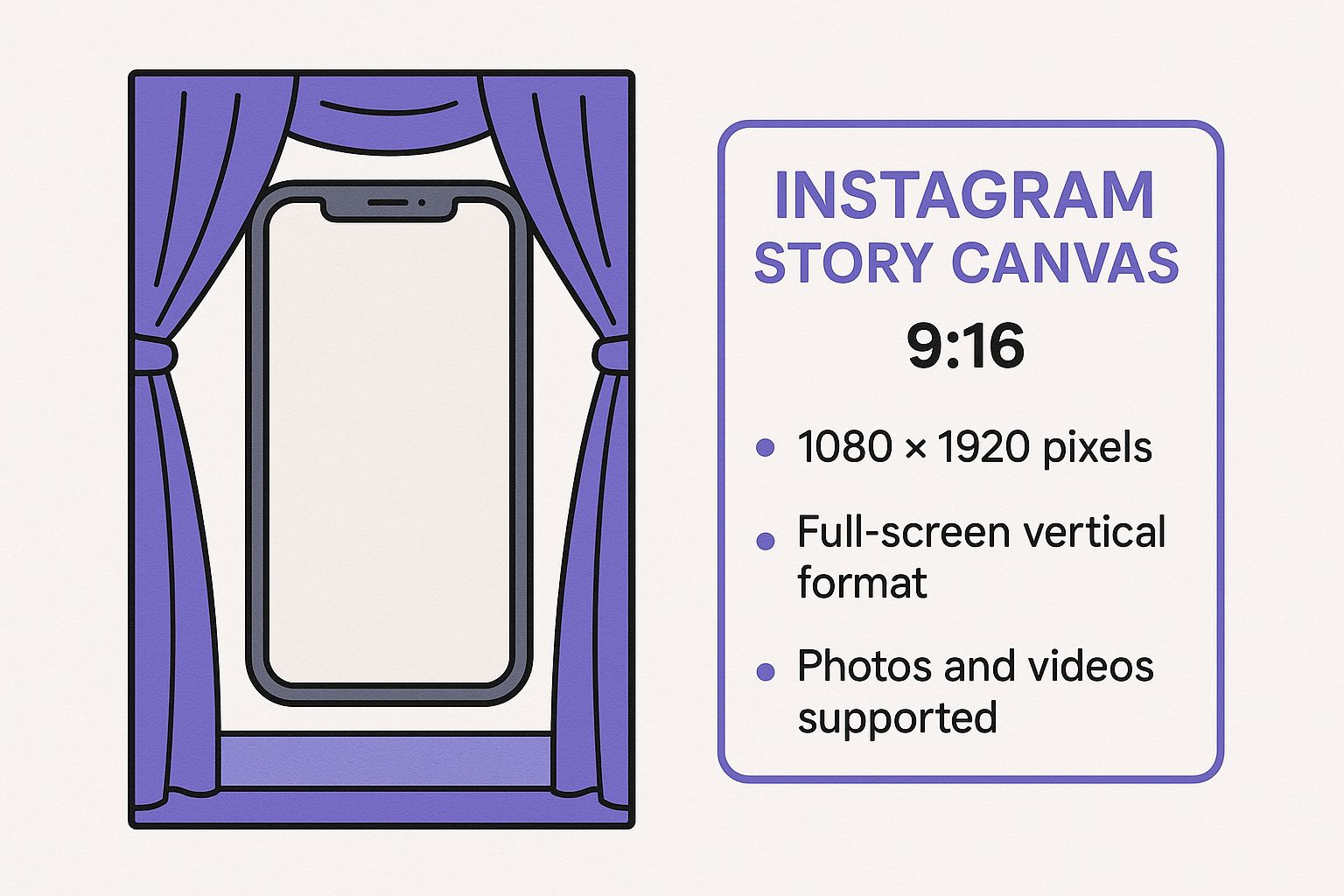
It’s a simple reminder that Stories are built for vertical viewing on mobile phones, a totally different beast from traditional landscape content.
For a more detailed breakdown, here’s a handy table with the essential tech specs. Keeping these numbers in mind while you’re creating will save you from common headaches like upload errors or blurry visuals.
Instagram Story Format Quick Reference
This table provides a quick summary of the essential technical specifications you need to create perfect Instagram Stories every time.
| Specification | Requirement |
|---|---|
| Dimensions | 1080px by 1920px |
| Aspect Ratio | 9:16 |
| Image File Types | JPG, PNG |
| Video File Types | MP4, MOV |
| Max Image Size | 30MB |
| Max Video Size | 4GB |
| Max Video Length | 60 seconds per Story slide |
Treat this as your checklist before you hit publish. If you stick to these guidelines, your content will always look its best, helping you stand out in a crowded space.
Why Stories Are a Game Changer for German Audiences
So, why have Instagram Stories become such a massive deal in the German market? It all comes down to a shift in what people want online: genuine, in-the-moment content. Unlike a perfectly curated feed post that might have taken hours to create, a Story feels raw and real. It’s that unedited, behind-the-curtain peek that builds the kind of trust and connection German audiences really respond to.
The magic of Stories is that they disappear. That 24-hour countdown creates a subtle but powerful sense of urgency – you know it as "fear of missing out," or FOMO. This gets your followers into the habit of checking in with you every single day, making you a regular feature in their lives without the pressure of a permanent post on your feed.
Tapping into Key Demographics
The growth of Instagram in Germany alone tells you everything you need to know. As of January 2025, the platform boasts a staggering 33.8 million active users. That's up from 32.05 million just a year before, meaning nearly a third of the entire country is scrolling through Instagram. If you want to see the full breakdown, you can find more insights about German Instagram demographics on Statista.com.
Here's the really important part: the biggest chunk of those users is in the 25–34 age group. This is a key demographic that absolutely loves the interactive, visual nature of the story format ig. Women in this age bracket are particularly engaged, making them a prime audience for many brands and creators. They aren't just watching Stories; they're actively participating and looking for that authentic, behind-the-scenes content.
When you look at the numbers, it becomes crystal clear. Stories aren't just some nice-to-have feature; they are the main stage for connecting with the most active and influential audience in Germany.
Building Community Through Interaction
Think of Stories less as a broadcast and more as a conversation. The whole format is built to get people involved, with a bunch of built-in tools that can turn someone from a passive viewer into an active part of your community.
- Polls and Quizzes: These are your best friends for quick feedback. A local fashion brand, for instance, could run a simple poll asking which colour of a new jumper their followers prefer. It’s easy, it's fun, and it gets people talking.
- Question Stickers: This is a goldmine for engagement. You're literally inviting your audience to ask you anything. It’s perfect for Q&A sessions, sharing expert tips, or just letting your community get to know the real you.
- Behind-the-Scenes Glimpses: German audiences value transparency, so show them how the sausage is made! Take them into your workshop, introduce your team, or share a candid moment from your day. This is what humanises your brand and builds a loyal following that feels truly invested in what you do.
When you start using these features regularly, your Stories stop being just updates and become a living, breathing space for your community. This is how you turn followers into genuine fans who feel a real connection to you, making the story format ig an absolutely vital part of your strategy.
Getting the Technical Details Right
Alright, we've talked about the creative side of things, but now it's time to get into the nitty-gritty. Think of these technical specs as the foundation of your house—if you don't get them right, everything you build on top will be shaky. Nailing these details means your content looks crisp, professional, and free from those annoying upload errors or fuzzy compression artefacts.
The goal here is simple: feed Instagram exactly what it wants. When you give the platform a file it likes, its algorithm doesn't have to aggressively compress your work, which is what causes that dreaded blurry or pixelated look. Stick to the rules, and you'll be rewarded with quality.
Essential File Formats and Sizes
Let's start with the basics. Instagram keeps its accepted file types straightforward, which is great for creators.
- For Images: You'll want to use JPG or PNG files. A good rule of thumb is to use JPGs for photographs (they keep file sizes smaller) and PNGs for graphics, especially if they have text or need a transparent background. Keep your image file under 30MB.
- For Videos: Your go-to formats are MP4 or MOV. Honestly, MP4 is almost always the better choice. It hits that sweet spot between high quality and manageable file size, making it the universal standard for a reason. Make sure your video file is no larger than 4GB.
Remember, each Story slide has a time limit. For a video, you get up to 60 seconds of screen time per slide. If you upload something longer, Instagram will automatically slice it into 60-second chunks for you. Pro tip: it's always better to edit the cuts yourself beforehand to control the pacing and flow.
I see so many creators make the same mistake: they ignore the file size and type. Trying to upload a massive, unoptimised file is a guaranteed way to make your content look bad. Instagram will force it to fit, and your quality will take a hit every single time.
Understanding Video Quality Settings
If you really want to make your Stories pop, you have to look beyond just the file type. Digging into your video editing software's export settings is where the magic happens. The two most important settings to master are bitrate and frame rate.
Video Bitrate Explained
Think of bitrate as the amount of information packed into every second of your video. A higher bitrate means more detail and better quality, but it also means a bigger file. For a 1080p Instagram Story, a bitrate between 4-6 Mbps (megabits per second) is the perfect target. It gives you fantastic visual clarity without creating a file so large that Instagram has to wrestle with it.
Frame Rate for Smooth Motion
Frame rate, measured in frames per second (fps), is all about how smooth your video looks. While movies are often shot at 24 fps for that "cinematic" feel, online content just feels more natural and fluid at 30 fps. Sticking to this standard ensures your video plays beautifully on any phone without looking jittery. If you're keen to dive deeper, you can find many detailed content creation guides to help you perfect these settings.
Once you have your perfectly crafted content, the next step is staying consistent. To keep your audience engaged without burning out, learning how to schedule Instagram Stories is a total game-changer. It frees you up to batch-create high-quality posts in advance.
Creating Stories That Captivate and Convert
Okay, you’ve got the technical specs down. Now for the fun part: turning that perfectly sized canvas into something that actually gets people to stop and watch. A successful Story isn't just about nailing the story format ig dimensions; it's about telling a story that makes people want to see what happens next, not just mindlessly swipe past.
Think of each Story as a tiny film. A single photo can be striking, sure, but a sequence of them creates a real narrative. You need a hook to grab their attention, a middle to build some intrigue, and a clear call to action at the end. It's a classic formula for a reason—it keeps people tapped in.
To keep things fresh, it's always a good idea to explore innovative ways to spark creativity and bring new life to your content.
Respect the Safe Zones
Picture your phone screen. You've got your profile icon and the "X" at the top, and the "Send Message" bar at the bottom. These are no-go areas. If you put your killer headline or a crucial call-to-action button there, it's going to get cut off. Simple as that.
Always keep the good stuff—your text, logos, or main subject—smack in the middle. This central “safe zone” ensures everyone sees your message clearly, regardless of what phone they’re using.
Drive Interaction with Native Tools
Instagram’s built-in features like stickers, polls, and quizzes are your best friends. They’re not just for fun; they’re a direct line to your audience, turning your Story from a monologue into a genuine conversation.
The real magic of Stories is in the interaction. Every time someone votes on your poll or answers your question, they’re telling the Instagram algorithm that your content matters. This can give your reach a serious boost.
This is especially true when targeting key audiences. In Germany, for instance, Stories are a massive hit with the 25–34 age group, which is made up of 9.9 million people. This demographic loves the raw, in-the-moment feel of interactive content, making them the perfect audience to engage with.
Ready to get people tapping? Here are a few ways to do it:
- Polls & Quizzes: Settle a debate or test your audience's knowledge. A fashion brand could ask, "This dress in blue or black?" A chef could run a quiz on "Guess the secret ingredient."
- Question Stickers: Run a mini Q&A or just ask for ideas. It’s an incredible way to find out what your followers actually want from you.
- Sliders: Perfect for gauging emotion or opinion on a scale. Ask followers to rate a new product with the heart-eyes emoji or show how excited they are for an event.
Using these tools regularly doesn't just make your content more engaging; it gives you priceless feedback straight from the source. For more ideas on sparking conversations, check out our guide on https://repostly.app/blog/how-to-get-more-engagement-on-instagram-68c136e044be737efa9f3dd5.
How to Fix Common Story Format Problems
We've all been there. You spend ages getting a video just right, only for it to look blurry the moment you upload it to your Story. Or that perfectly designed graphic suddenly has its edges chopped off. It’s frustrating, but don't worry—these are incredibly common hiccups, and thankfully, most have simple fixes.
Think of this as your troubleshooting guide for getting your content back on track. A quick check of your export settings or the original file dimensions is usually all it takes to solve the problem and make sure nothing gets between your great idea and your audience.

Why Your Content Looks Blurry or Pixelated
This is easily the number one complaint I hear. You upload a sharp, beautiful video, and Instagram turns it into a fuzzy mess. The reason? It’s almost always down to Instagram’s aggressive compression. If you give it a file that's too big or has a bitrate that's too high, the platform will automatically squash it down, and quality is the first thing to go.
The trick is to give Instagram a file it already likes, right from the start.
- Export Settings: When you export your video, stick to 1080p resolution at 30 frames per second (fps). This really is the sweet spot for a clean look without being overkill.
- Video Bitrate: Keep your bitrate between 4-6 Mbps. Anything higher is just asking for Instagram’s algorithm to compress it heavily.
- File Type: Use MP4. It’s the gold standard, offering a fantastic balance between quality and manageable file size.
When you optimise your content before you hit upload, you’re taking back control from the algorithm. This little bit of prep work goes a long way in preserving the quality you worked so hard to achieve.
The key is to be proactive. Don't just export at the highest possible settings and cross your fingers. By setting up your exports specifically for Stories, you’re basically pre-compressing the file in a controlled way. The result is always much, much better than letting Instagram do it for you.
Solving Cropping and Black Bar Issues
Another all-too-common headache is seeing your masterpiece either awkwardly cut off or framed by distracting black bars. This is a dead giveaway that your content doesn't match the required 9:16 aspect ratio.
If you shot your video horizontally (like for a TV), Instagram has to figure out how to shoehorn it into a tall, vertical frame. It usually does this by either zooming in and cropping the sides or shrinking your video down and filling the rest of the space with black.
Here’s how to nail it every time:
- Start with the Right Canvas: Before you do anything else, set up your project in your editing software to 1080x1920 pixels. This is non-negotiable.
- Frame Your Shots Vertically: When shooting on your phone, just hold it upright. Simple, but it means you’re already capturing footage in the perfect 9:16 ratio.
- Use Editing Tools: Have some horizontal content you absolutely must use? No problem. Place it onto a 1080x1920 background in a video editor. You can fill the empty space with a blurred version of the video itself or a branded graphic to make it look intentional and stylish.
Getting the aspect ratio right is fundamental to a polished, professional Story. It’s what creates that immersive, full-screen experience that makes Stories so powerful in the first place.
Your Questions About the IG Story Format
Even when you've got all the best practices down, specific questions about the IG story format are bound to pop up. Think of this as your go-to guide for those last-minute technical queries, so you can stop second-guessing and start posting with confidence.
We've tackled some of the most common head-scratchers we hear from creators and broken them down into simple, straightforward answers.
Can You Post Horizontal Content?
The short answer is yes, you can. The better answer is that you probably shouldn't. When you upload a horizontal video or photo (think 16:9 like a YouTube video), Instagram forces it into the vertical Story frame by slapping big, ugly bars at the top and bottom.
It instantly kills that immersive, full-screen vibe that makes Stories so powerful. Your content suddenly looks tiny and out of place. If you absolutely have to use horizontal footage, a much better approach is to pop it into a 1080x1920 canvas in your favourite editor first. That way, you can creatively fill the extra space with text, branding, or other graphics instead of letting Instagram do it for you.
What Are the Best Export Settings for Quality?
We've all been there: you export a crystal-clear video, but the second it hits Instagram, it looks blurry and pixelated. That's Instagram's compression algorithm at work. The trick is to give it a file it likes from the get-go, so it doesn't have to do so much "fixing."
For buttery-smooth, high-quality uploads, use these export settings as your bible:
- Resolution: 1080 x 1920 pixels
- Frame Rate: 30 frames per second (fps)
- File Format: MP4 (using the H.264 codec)
- Video Bitrate: Aim for 4-6 Mbps
Sticking to these export settings is the single most effective way to ensure the quality you see in your editor is the quality your audience sees on their phones. It's about taking control away from the algorithm.
Why Do My Colours Look Different After Uploading?
This is a frustrating one, and it usually comes down to something called a "colour profile." Many professional cameras and editing programs use wide colour gamuts like Adobe RGB, but almost every screen on a phone or computer uses a standard called sRGB.
When you upload a file with the wrong colour profile, Instagram has to convert it, which can make your brand's vibrant red look a little dull or a brilliant blue appear washed out. The fix is thankfully simple: when you export your final file, just make sure you select "sRGB" as the colour profile. It’s a tiny checkbox that makes a massive difference in keeping your visuals consistent and polished. To see what visual styles perform best, it helps to understand how to check Instagram analytics.
Ready to take your content strategy to the next level? Repostly helps you schedule and automate your posts across all major platforms, saving you hours every week. Start your free trial at Repostly today and see how easy social media management can be.
Keep reading

10 Fresh Instagram Story Idea Tactics for 2025
Stuck for content? Discover our top Instagram story idea list, with actionable tips to boost engagement and grow your audience in 2025.

A Practical Social Media Planner for German Markets
Build a results-driven social media planner for Germany. This guide offers actionable strategies for content, scheduling, and analysis in the German market.

Crafting Your Social Media Content Plan
Stop guessing and start strategizing. This guide provides an actionable social media content plan to audit, plan, and execute content that gets results.
Post once. Show up everywhere.
Start your 7-day free trial and publish your next video to every platform in minutes.Pick a plan and publish your next video to every platform in minutes.
Start your free trialSee plansCancel anytime