Automate Social Media Marketing with Repostly
Learn how to automate social media marketing with our Repostly guide. Discover strategies for scheduling, cross-posting, and analytics to grow your brand.

Automating your social media marketing simply means using software to take care of the repetitive, everyday jobs—things like scheduling posts, pulling in content, and keeping an eye on performance. This shift frees up your creative energy so you can focus on big-picture strategy and real conversations with your audience, instead of getting buried in manual tasks.
Why Automate Your Social Media Marketing

Let's get one thing straight: social media automation isn't about setting up a robot to do your marketing. It’s about making the human part of your marketing better. Think of it as a powerful assistant that handles all the tedious work, freeing you and your team to pour your energy into what actually grows your brand—creativity, strategy, and genuine connection.
The most obvious win is saving a huge amount of time. Manually posting across several platforms, every single day, is a massive resource drain. Automation lets you sit down once and schedule weeks or even months of content, guaranteeing you stay active without the daily scramble.
Maintain a Consistent Brand Voice
Nothing muddies a brand’s identity faster than an inconsistent voice. When you have multiple people managing accounts, or when posting is done on the fly, your message can easily get fragmented.
Tools like Repostly solve this by giving you a central hub for your content calendar and messaging. It’s a simple way to make sure every post, whether it’s for LinkedIn, TikTok, or Instagram, sounds and feels like your brand. Over time, that consistency builds trust and makes your brand instantly recognisable.
Deepen Audience Engagement
It might sound strange, but automating your posting can actually lead to better engagement. With all your scheduling handled, you have more time to jump into real-time conversations. You can monitor brand mentions, reply to comments thoughtfully, and interact with user-generated content without constantly worrying about what you need to post next.
Automation creates the space needed for authentic, timely interactions. It shifts your role from a content publisher to an active community participant, which is where true audience loyalty is built.
Being there when your audience is active is the key to great engagement. Automation gets your content out at the perfect moments, starting conversations that you can then join in person. For a closer look at the mechanics behind this, it's worth understanding automated social media posting and its core concepts.
Make Smarter Marketing Decisions
Today's automation platforms are so much more than just schedulers; they’re powerful analytics tools. They pull all your performance data into one place, showing you exactly what’s working—and what’s not—across all your channels.
With a tool like Repostly, you can forget about hopping between different native analytics dashboards. This data-first approach lets you make smarter moves by helping you:
- Pinpoint top-performing content: See which topics and formats your audience loves so you can create more of them.
- Optimise posting times: Find out the precise times your followers are most likely to like, share, and comment.
- Measure campaign ROI: Draw a clear line from your social media activity to real business goals, like website clicks and new leads.
You can learn more about how this works by checking out our guide on the benefits of workflow automation. This kind of strategic insight turns your social media from a daily chore into a reliable engine for growth.
Building Your Automation Foundation in Repostly
Alright, let's get your Repostly dashboard from a blank slate to a well-oiled marketing machine. This isn't just about plugging in your social accounts; it's about building a smart framework so every automated post has a clear purpose. Think of it as laying the groundwork for a system that will soon save you countless hours every week.
First things first, let's get all your social channels under one roof. In Repostly, that means connecting your key accounts—LinkedIn, Instagram, Facebook, X, and TikTok. This gives you a central command centre and stops the endless tab-switching between platforms.
Get Your Digital Footprint Organised
Once your accounts are linked, the next step—and it's a crucial one—is setting up Workspaces. This might seem like a simple organisational feature, but trust me, it’s a lifesaver. If you're juggling multiple brands, client accounts, or even different campaigns for the same business, Workspaces keep everything neat and prevent embarrassing mix-ups.
A freelance social media manager, for example, could structure their Workspaces like this:
- "Client A - E-commerce": For their retail client’s Instagram, Facebook, and TikTok.
- "Client B - B2B SaaS": Housing the LinkedIn and X accounts for a software company.
- "Personal Brand": To manage their own professional presence online.
This kind of segmentation ensures the content, schedules, and analytics for one project stay completely separate from another. It’s a clean, efficient way to manage complexity right from the start.
Define Your Content Pillars
With your accounts sorted, it’s time to think about what you're actually going to post. Great social media automation isn't about firing off a random stream of updates. It’s built on a balanced content strategy, and that's where Content Pillars come into play.
Content pillars are the 3-5 core themes your brand consistently talks about. They act as the backbone for your content calendar, making sure your feed stays focused, valuable, and true to your brand's voice.
I can't stress this enough: defining your content pillars is the single most important step in making sure your automated feed doesn't feel robotic. It builds in variety and relevance, which keeps your audience leaning in, not tuning out.
Let's take a local fitness studio. Their content pillars might look something like this:
- Workout Tips & Tutorials: Short video clips and graphics showing proper form.
- Nutritional Advice: Quick recipes and myth-busting about healthy eating.
- Member Success Stories: Highlighting client transformations and testimonials.
- Class Info & Promotions: Keeping followers in the loop about schedules and special offers.
By making sure every post fits into one of these pillars, the studio creates a healthy mix of educational, inspirational, and promotional content. No more guesswork.
Create Your Master Content Calendar
Now, let's bring those pillars to life inside Repostly’s master content calendar. This is your command centre, giving you a bird's-eye view of everything scheduled across all your accounts and Workspaces. You can start mapping out your posts here, colour-coding by pillar if you like, to see your strategy at a glance.
This initial setup—connecting accounts, organising them into Workspaces, and defining your content pillars—is what sets the stage for a truly effective automation strategy.
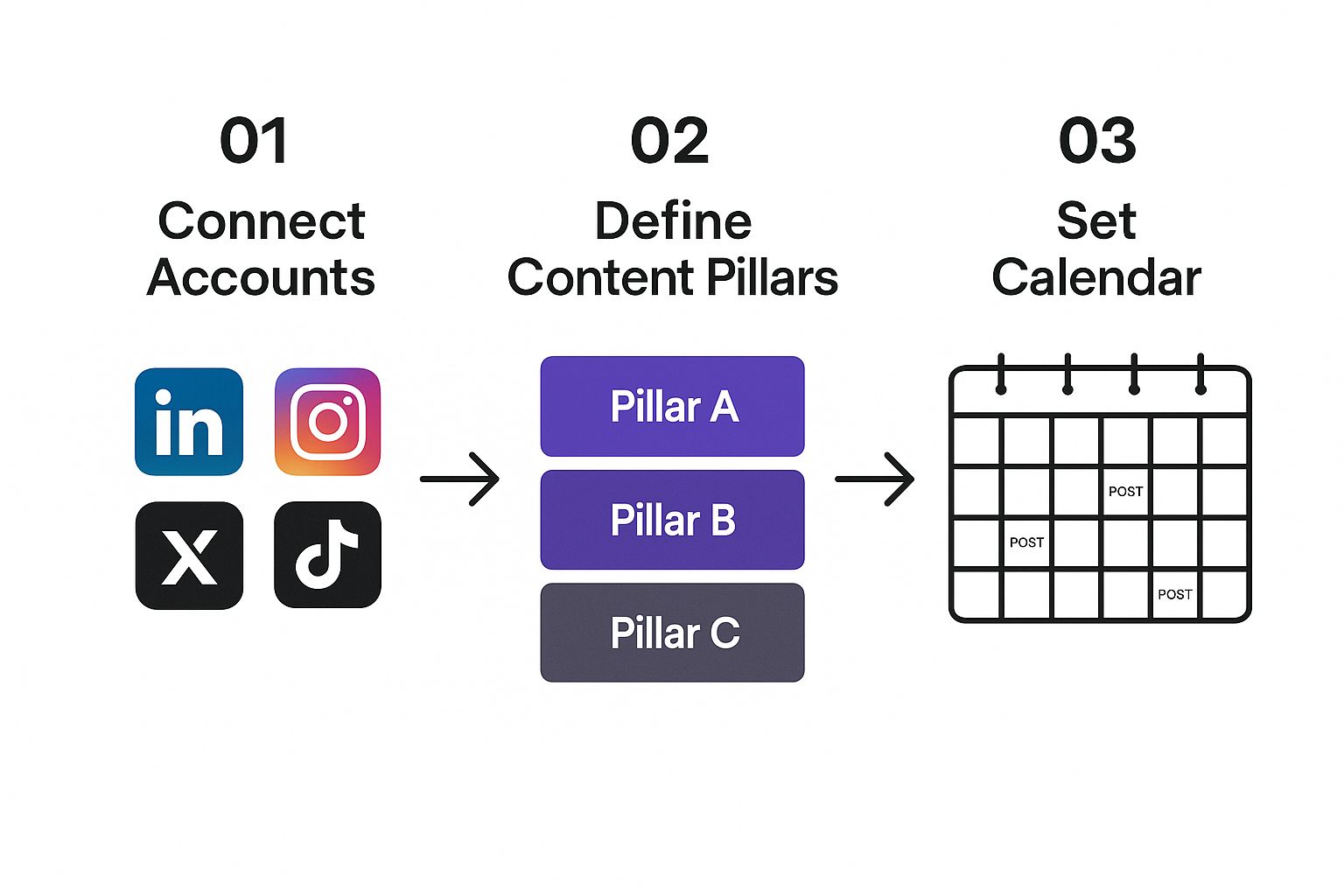
The workflow is designed to be logical: connect your channels, define your strategy, and then schedule your content. It removes the guesswork and helps you build a consistent presence. If you need a bit more guidance on planning, our social media content planning template is a great resource.
Optimise Your Posting Schedule
A brilliant post that goes live when no one is watching is a wasted effort. Repostly helps you nail your timing by letting you define the best posting schedules for each platform based on when your audience is most active. You can set unique time slots for every day of the week.
For instance, you might find your LinkedIn audience is online and engaged on Tuesday and Thursday mornings, while your Instagram crowd is scrolling most on weekday evenings and Saturday afternoons. You can configure Repostly to automatically push content live at these peak times, getting you maximum visibility without you having to be there to hit "publish."
This is especially critical in markets like Germany, where mobile use is incredibly high. By 2025, over 67.8 million Germans will be on social media—that's more than 80% of the population. And with 95.1% of them using mobile devices to get there, your content has to show up exactly when they're scrolling.
Build Your Evergreen Content Queues
Finally, let's talk about filling the gaps in your calendar with minimal effort. Not every single post needs to be brand new. This is where evergreen content—posts that stay relevant for a long time—becomes your best friend. Think timeless tips, cornerstone blog articles, or powerful case studies.
In Repostly, you can create "queues" filled with this evergreen content. The tool will then automatically pull from these queues to fill any empty slots in your schedule. It’s a fantastic way to keep your profiles consistently active and your brand top-of-mind, even during your busiest weeks.
Mastering Content Scheduling and Cross-Posting
Alright, with the groundwork laid, it’s time to get into the really good stuff. This is where we move from simply setting things up to actually making your social media machine run itself. We're talking about more than just scheduling a post here and there; we're diving into the advanced techniques that let you multiply your impact without chaining yourself to your desk.
True automation is smart, not just fast. It’s not about blasting content into the void. It's about getting the right message, in the right format, to the right audience, on the right platform—every single time. That’s exactly what Repostly was built to do.
Go Beyond One Post at a Time
Scheduling posts one by one is fine, but if you want to reclaim your week, bulk scheduling is where it's at. Imagine having your entire month's content calendar locked and loaded after just one focused afternoon. With Repostly, you can do precisely that with a simple CSV file.
Just prep all your captions, links, and image paths in a spreadsheet, upload it, and you're done. This is a lifesaver for big campaigns, mapping out weekly themes, or just getting way ahead of schedule. It turns a daily chore into a strategic monthly power session.
And for those moments of inspiration? The Repostly browser extension is your best friend. Ever stumble upon a brilliant article or a must-share statistic and think, "I should post this later"? Now you can. A couple of clicks and it’s straight into your Repostly queue. No more great ideas lost to the ether.
The "One-Size-Fits-All" Content Trap
Here’s the biggest mistake I see brands make when they try to automate social media marketing: they post the exact same message everywhere. A text-heavy, professional update crafted for LinkedIn is going to land with a thud on Instagram. This is where most automation falls flat—sacrificing effectiveness for a false sense of efficiency.
Your audience has different expectations on each platform. People on LinkedIn want professional insights. Instagram users are there for stunning visuals and authentic stories. And X (formerly Twitter) is all about quick, punchy updates. If you ignore these unwritten rules, your content feels like an intruder, and engagement plummets.
The real goal of cross-posting isn’t just to be present everywhere; it’s to be native everywhere. Your content should feel like it was made for the platform it’s on, even when it’s part of a bigger campaign.
This is where Repostly's customisation features really shine. You can create one core post and then tweak it for each social network before it ever goes live. It’s the perfect blend of automated efficiency and the thoughtful touch of manual posting.
This table shows just how you can take one idea and adapt it seamlessly across channels right inside the platform.
Platform-Specific Customisation in Repostly
| Platform | Automated Customisation Feature | Example Application |
|---|---|---|
| Unique Caption & Hashtag Sets | Craft a formal caption, add #BusinessGrowth and #Leadership, and tag relevant company pages. |
|
| First Comment Scheduler | Publish the post with a clean caption, then automatically add your hashtags in the first comment to keep it tidy. | |
| X (Twitter) | Link Shortening & Threading | Post a snappy hook, then schedule follow-up tweets to create a thread, all with a shortened link for tracking. |
| Custom Call-to-Action Buttons | Add a "Learn More" button that links directly to a blog post or product page, driving targeted traffic. |
Being able to tailor your message like this ensures your automation actually builds connections instead of just creating noise.
A Real-World Cross-Posting Scenario
Let's make this practical. Imagine you just published a new blog post: "5 Ways to Improve Team Productivity." You want to promote it on LinkedIn, Instagram, and X.
Instead of logging into each platform, you create a single campaign in Repostly and then adapt the content.
- For LinkedIn: You’d write a professional caption highlighting a key statistic from the article. You'd use business-focused hashtags like #Productivity and #Leadership and maybe tag an influencer you mentioned. The call-to-action is a direct link to the blog.
- For Instagram: Here, it’s all about the visuals. You could create a five-image carousel, with each graphic explaining one of the tips. The caption would be more conversational, asking, "What's your favourite productivity hack?" and pointing people to the "Link in bio!"
- For X: Brevity is everything. You'd pull the most surprising tip, frame it as a bold statement, and drop the blog link with a few trending hashtags.
You schedule this entire multi-platform push from a single screen. You get the polish of a platform-native approach without the logistical nightmare. This kind of smart strategy is becoming standard, especially in markets like Germany, where 46% of marketers are using AI to fine-tune their social media content and timing. This reflects a major shift towards more intelligent automation. You can explore more on how AI is transforming digital strategy in Germany.
By customising your message, your efforts to automate social media marketing lead to genuine engagement, not just empty impressions. You're respecting the culture of each platform, and your audience will reward you for it.
Using Analytics to Refine Your Automation Strategy
https://www.youtube.com/embed/mKu6FI53BxE
Automating your posting schedule is a fantastic start, but it's only half the equation. If you’re not paying close attention to what happens after your content goes live, you’re basically driving with your eyes closed. This is where analytics come in, transforming your automation from a simple time-saver into a smart, data-driven growth engine.
Putting your content out there is the easy part. The real magic happens when you understand the feedback loop. Repostly's unified analytics dashboard is built to close that loop, giving you clear insights into what’s resonating with your audience and, just as importantly, what’s falling flat.
Moving Beyond Vanity Metrics
It’s so easy to get caught up in follower counts and likes. And while those numbers feel good, they don't paint the full picture. To truly sharpen your strategy, you’ve got to dig deeper into the metrics that signal genuine audience connection.
Repostly pulls all your performance data into one central hub, so you can stop toggling between different native platform analytics and start seeing the bigger picture. Having everything in one place is crucial for making direct, apples-to-apples comparisons across all your channels.
Here are the key performance indicators (KPIs) I always recommend focusing on:
- Engagement Rate: This is the big one. It’s the percentage of your audience that actually interacts with your content (likes, comments, shares) relative to your follower count. A high engagement rate is a clear sign that your content is hitting the mark.
- Click-Through Rate (CTR): If you're trying to drive traffic to your website or a landing page, this metric is non-negotiable. It tells you exactly how many people are clicking the links in your posts.
- Reach and Impressions: While not a direct measure of engagement, these figures tell you how many unique people saw your post (reach) and the total number of times it was viewed (impressions). A sudden drop here can be an early warning that something is off with your timing or content.
By focusing on these more substantial metrics, you get a much clearer understanding of your actual performance. To do this well, it’s worth exploring some of the top social media monitoring tools out there to gather these insights effectively.
Turning Data into Actionable Decisions
Gathering data is pointless if you don't use it to make better choices. Think of your analytics dashboard not just as a report card, but as a roadmap showing you exactly where to go next. The aim is to create a continuous cycle: post, analyse, refine, and repeat.
The most successful social media strategies are not set in stone. They are living, breathing things that adapt based on real-world performance data. Your analytics are the feedback you need to evolve.
Let's walk through a real-world scenario. Imagine a small e-commerce brand selling handmade jewellery. They notice their Instagram posts featuring behind-the-scenes videos get three times the engagement of their polished product photos.
Instead of stubbornly sticking to their original plan, they use this insight to adjust their automation. They create a new content category in Repostly just for "Studio Stories" and schedule more of this top-performing content. This simple, data-driven pivot leads to a massive boost in community interaction and, ultimately, sales.
Here’s how you can use your data to make similar tweaks:
- Pinpoint Your Best Posting Times: Repostly’s reports will show you clear patterns of when your audience is most active online. Stop relying on generic "best times to post" guides and use your own data to adjust your scheduling queues for maximum impact.
- Double Down on What Works: Sort your posts by engagement rate to find your greatest hits. Was it a tutorial video? A customer quote? A simple question? Whatever it is, your audience is telling you they want more of it.
- Know When to Cut a Campaign: If a particular content series or promotion is consistently underperforming with low CTR and engagement, don’t be afraid to pull the plug. Use that space in your calendar for something that actually connects with people.
This iterative process is the absolute key to sustainable growth. You can dive deeper into this in our guide on understanding social media analytics reports. By regularly checking your analytics and making small, informed adjustments, you ensure your efforts to automate social media marketing are always becoming more effective and efficient.
Getting Automation Right for the Long Haul

If you want to truly succeed with social media automation, you have to think beyond just filling up a content calendar. The real goal is to build a system that feels human and responsive, not like a content-churning machine. It's an art, really—balancing the incredible efficiency of a tool like Repostly with the genuine connection that builds a loyal following.
This means you can't just "set it and forget it." Your scheduled content is the baseline, but the real work—the stuff that builds community—happens in real-time. Use the hours you get back to actually talk to people, respond thoughtfully to their comments, and show you appreciate them sharing your stuff.
Don’t Let a Robot Steal Your Personality
The single biggest pitfall with automation is accidentally stripping the personality out of your brand. A feed that sounds like it was written by a corporate committee is a surefire way to get scrolled past and unfollowed.
Every single post you schedule needs to sound like you. Before it goes into the queue, ask yourself: "Would a real person on our team actually say this?" Inject your brand's unique humour, tone, and slang. A great tip is to create a simple brand voice guide—just a page or two outlining phrases to use and, just as importantly, phrases to avoid.
Automation should amplify your brand’s voice, not replace it. The aim is to deliver your authentic personality consistently and at scale, making your audience feel like they're connecting with people, not a scheduling tool.
That human element is what separates smart automation from spam. Always leave a bit of breathing room in your schedule for those spontaneous, off-the-cuff posts about what's happening right now.
Stick to the 80/20 Rule
One of the most reliable strategies I've seen over the years is the 80/20 rule. It's simple: 80% of your content should exist to help, entertain, or inspire your audience. The other 20% can be about your business.
This approach keeps your feed from feeling like one long, annoying sales pitch. When you consistently deliver value, you build trust. Then, when you do post something promotional, people are much more likely to listen because you've already earned their attention.
- The 80% (Value): Think industry news, quick how-to tips, a peek behind the scenes, sharing great content from your followers, and linking to helpful resources.
- The 20% (Promotion): This is for your product launches, special offers, glowing customer testimonials, or links to your sales pages.
Play by the Rules (And Stay Ethical)
As you start automating, you absolutely have to operate within the guidelines. Every social platform has specific terms of service about what you can and can't automate, and breaking those rules can get your account penalised. On top of that, data privacy laws like GDPR in Europe have strict standards for how you interact with users.
This is a big deal, especially in markets where regulations are tight. For instance, the marketing automation sector in Germany is expected to hit USD 327.7 million in 2024 and is forecast to climb to USD 788.7 million by 2030, largely because businesses need tools that are GDPR-compliant. You can read more about the German market growth in automation on grandviewresearch.com.
Using a reputable platform like Repostly is a great start, but it's still on you to stay informed. Protecting your brand and your audience's trust is non-negotiable.
Common Questions About Social Media Automation
Jumping into social media automation always brings up a few questions. It's completely normal to wonder where the line is between being efficient and sounding like a robot. Let's tackle some of the most frequent concerns I hear so you can build your strategy with confidence.
Getting these cleared up from the start helps you use tools like Repostly to work smarter, not just post more often.
Will Automation Make My Engagement Drop?
This is the big one, and it's a perfectly reasonable fear. The short answer? No, not if you do it right. Automation only hurts you when it's used to blast out generic, low-value content on repeat. When done thoughtfully, it actually frees you up to engage more.
Think about it. By scheduling your core content ahead of time, you're not scrambling to post every day. That gives you back precious hours to have real conversations in the comments, jump into trending topics, and actually connect with your audience.
Automation should handle the planned content, leaving you free to handle the personal interactions. It’s a partnership that helps you be more present and responsive—and that's what truly drives engagement.
Your followers don't care if a tool scheduled a post. They care that the post is valuable and that you're around to chat when they reply.
What Percentage of My Content Should I Automate?
There isn't a single magic number that works for everyone, but the 80/20 rule is a fantastic starting point. I generally recommend automating about 80% of your content. This chunk includes your planned articles, evergreen tips, and scheduled campaign updates. It’s what builds a steady, reliable presence.
The other 20%? That’s for the spontaneous, real-time stuff that makes your brand feel human. This could be:
- Your take on breaking industry news.
- Behind-the-scenes photos from a team event.
- Jumping on a trending meme that perfectly matches your brand’s personality.
This mix keeps your feed feeling organised but alive. You get the consistency that builds trust, plus the spontaneity that keeps your audience hooked.
Can I Just Post the Same Content on All My Profiles?
Please don't. This is one of the most common mistakes I see, and it instantly signals that your accounts are run by a robot. Every social platform has its own unwritten rules, formats, and audience expectations. A long, detailed post that crushes it on LinkedIn will fall completely flat on a visual-first platform like Instagram.
The goal of automation isn’t to just blast the same message everywhere. It's to be more efficient with your customisation. Use a tool like Repostly to take one core idea and adapt it for each channel. Tweak the caption, resize the image, add the right hashtags, and tag relevant accounts.
It’s a small extra step, but it shows you understand and respect each platform. Your content will feel like it belongs there, not like it was just dumped as an afterthought.
Ready to move beyond the daily content grind and build a more strategic social media presence? Repostly brings scheduling, customisation, and analytics together in one place. Start your free trial today and see the difference it makes.
Keep reading

10 Fresh Instagram Story Idea Tactics for 2025
Stuck for content? Discover our top Instagram story idea list, with actionable tips to boost engagement and grow your audience in 2025.

A Practical Social Media Planner for German Markets
Build a results-driven social media planner for Germany. This guide offers actionable strategies for content, scheduling, and analysis in the German market.

Crafting Your Social Media Content Plan
Stop guessing and start strategizing. This guide provides an actionable social media content plan to audit, plan, and execute content that gets results.
Post once. Show up everywhere.
Start your 7-day free trial and publish your next video to every platform in minutes.Pick a plan and publish your next video to every platform in minutes.
Start your free trialSee plansCancel anytime