Repostly vs Buffer
If you post the same short video to TikTok, Instagram, YouTube, Facebook and Threads, Repostly is built for that: one upload, each destination's settings on one screen, automatic reposting between your own accounts and one flat price for 5 accounts. If you also post to LinkedIn, X or Pinterest, or you want a free plan or team approvals, Buffer is the better pick.
Facts about Buffer come from its own website, checked . We make Repostly.
Pick Repostly if
- You want one upload to go to all five platforms Repostly covers, with several accounts per platform.
- Each destination needs its own settings, and you want them on one screen: a YouTube title, a Reel or a regular video on Facebook, TikTok's audience and disclosure options.
- You'd rather pay one flat price for 5, 15 or unlimited accounts than pay per channel.
- You post natively in one app and want your other accounts filled automatically, or your back catalog republished.
Buffer is the better pick if
- You also post to LinkedIn, X, Pinterest, Bluesky, Mastodon or Google Business Profile.
- You'd rather start free: Buffer's free plan covers up to 3 channels.
- Several people work on posts and someone has to approve them before they go out.
- You schedule Instagram Stories alongside your Reels.
Feature by feature
Buffer facts link to the page they come from, checked .
| Feature | Repostly | Buffer |
|---|---|---|
| Platforms | TikTok, Instagram, YouTube, Facebook Pages and Threads | 12 channels, including LinkedIn, X, Pinterest, Bluesky, Mastodon, Substack and Google Business Profile1 |
| One video to several platforms | Repostly's edge: One post, one upload, all five platforms. Results per destination on the post page | Pick several channels in the composer. Once scheduled, each channel's post is separate and edited in its own queue2 |
| Automatic reposting | Workflows repost your own new posts or back catalog from one of your accounts to another. Unlimited on every plan | Recurring posts (Beta) republish a post automatically a set number of times3 |
| TikTok | Posts directly. Audience, comments, Duet, Stitch and disclosure set per post, from your TikTok account's options | Publishes automatically or via a phone notification. No TikTok music library or polls4 |
| YouTube | Shorts, with a separate YouTube title per post | Shorts only, no long-form. Title comes from the caption's first line, editable5 |
| Instagram video | A video goes out as a Reel | A single video publishes as a Reel. Automatic publishing needs a Professional account6 |
| Facebook video | A Reel or a regular video to Facebook Pages, chosen per post | Reels to Facebook Pages (3 to 90 seconds) and regular video posts7 |
| Instagram Stories | Not published. Post Stories in the Instagram app | Supported. Stories with music, text, stickers, links or a caption go out as a phone notification8 |
| How the price counts | Per plan: $19 a month for 5 accounts, $39 for 15, $79 unlimited. Two months free on yearly billing | Per channel, billed yearly: Essentials $5 a month ($60 a year), Team $10 a month ($120 a year)1 |
| Free plan and trial | No free plan. 7-day free trial on every plan, payment method required | Free plan: up to 3 channels, 1 user, 10 scheduled posts per channel at a time. 14-day trial of paid plans1 |
| Analytics | Insights across all five platforms, plus each post's results per destination | Insights for TikTok, Instagram, YouTube, Facebook Pages, Threads and most other channels. Not for Facebook Groups or Instagram personal profiles9 |
| Team approvals | One login per Repostly account, no approval step | Drafts on all plans, approvals on the Team plan10 |
| API | REST API on every plan | GraphQL API on every plan, including Free. Videos are passed as a public link, not uploaded11 |
| MCP server for AI assistants | MCP server on every plan | Runs a standard MCP server that works with Claude, ChatGPT and other MCP clients12 |
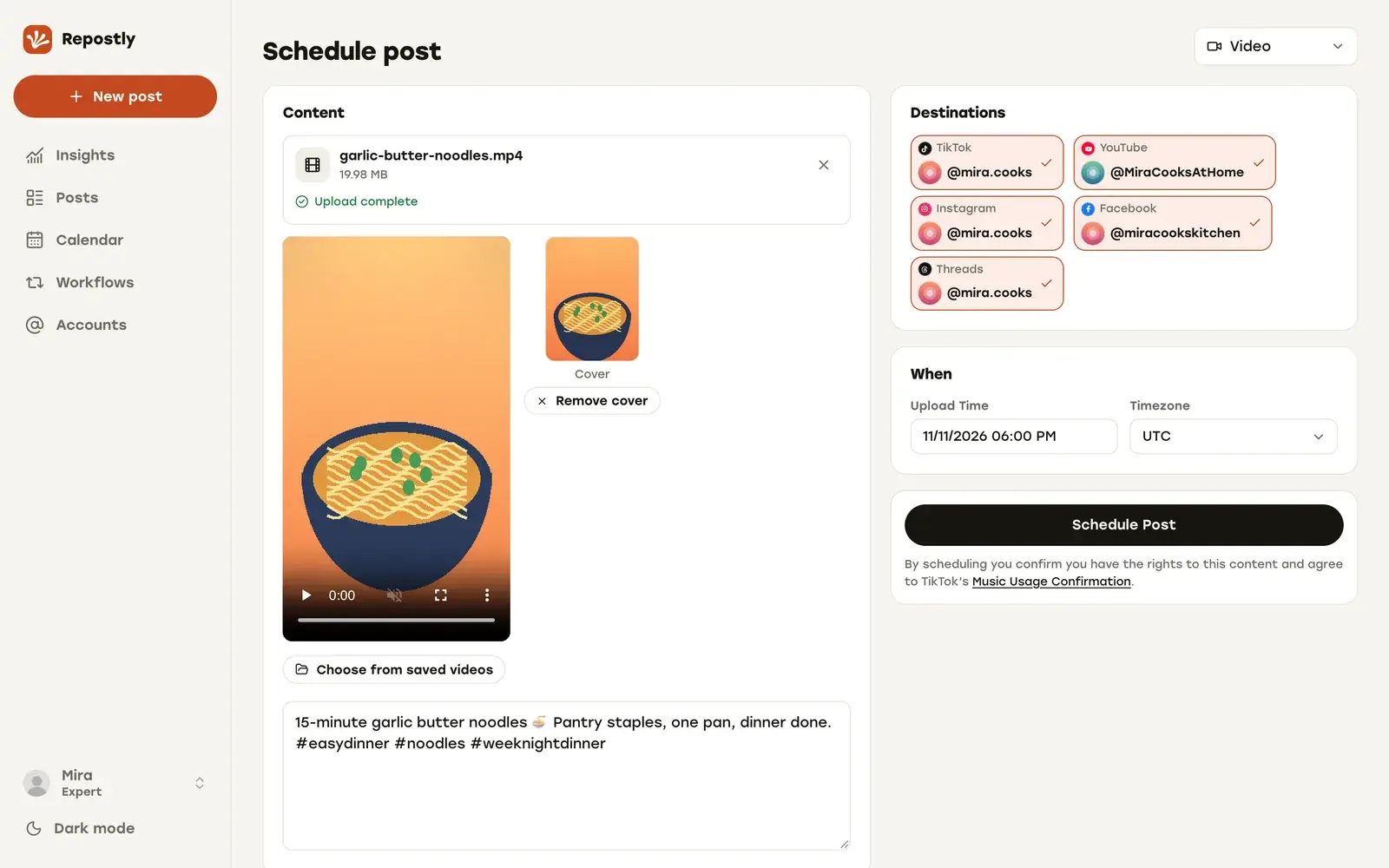
Buffer for many networks, Repostly for short video
Buffer is a general social media scheduler. It reaches 12 networks, from TikTok and Instagram to LinkedIn, Pinterest and Substack, and suits people and small teams who post many kinds of content to many places.
We built Repostly for one job: getting short videos to TikTok, Instagram, YouTube, Facebook Pages and Threads from a single upload. Image and image carousel posts can go to Instagram, Facebook, TikTok and Threads, and text posts to Threads, but the screens are designed around the vertical video you just finished editing.
Publishing one video everywhere
In Repostly you create one post, upload the video once and tick the accounts that should get it. The Settings card then has one row per destination, so a separate caption where you want one, the YouTube title, the choice between a Reel and a regular video on Facebook, and TikTok’s audience, comment, Duet, Stitch and disclosure options are all on the same screen.
After it goes out, the post’s page shows every destination’s status with its own views, likes and comments. You don’t have to piece together five separate posts to see how one video did.
Buffer also lets you pick several channels in one composer. Its help article on multi-channel scheduling (checked 12 November 2026) says the posts become separate once scheduled, and you edit or delete each one in its channel’s queue. That works well when every network gets its own version of a post anyway. For one video going to five places, one post that stays together is easier to change and to check.
TikTok posts go out with the settings you chose. When you add a TikTok account to a post, Repostly loads that account’s current options from TikTok, and it loads them again when the post is due. If something no longer fits (say you switched off Duet in the app last week), the TikTok post fails instead, so nothing goes out with settings you didn’t choose.
Reposting what you already post
Some creators would rather keep posting in TikTok or Instagram itself and have their other accounts keep up. That’s what Workflows are for. You connect one of your accounts as the source and another as the destination. With New posts, Repostly reposts your new posts automatically after you publish them. With Existing posts, it republishes your back catalog at daily times you pick, oldest first or from a date you set. The caption is copied from the source post. A workflow runs on its own next to your scheduled uploads, and you can pause, edit or delete it at any time. On Buffer, the closest thing is recurring posts, in Beta, which republish a post a set number of times (checked 12 November 2026).
What Buffer has that we don’t
Buffer covers networks we don’t: LinkedIn, X, Pinterest, Bluesky, Mastodon, Substack and Google Business Profile. Its Team plan adds approvals before a draft goes out, which matters once a client or manager signs off on posts. It also schedules Instagram Stories, which you post in the Instagram app when you use Repostly. Both have an API and an MCP server, so scripts and AI assistants aren’t a reason to pick one over the other.
If any of that is part of your week, use Buffer for those channels and Repostly for your short videos. Running both is fine.
What five accounts cost
Buffer charges per channel, meaning each connected profile. We charge per plan: Starter covers 5 accounts, Pro 15 and Expert unlimited.
Take a creator with one account on each of the five platforms.
- Repostly Starter: $19 a month, or $190 a year with yearly billing (two months free).
- Buffer Essentials: $5 a month per channel billed yearly, so $300 a year for 5 channels, as shown on Buffer’s pricing page (checked 12 November 2026). Only channels above 10 get a lower rate.
That’s $110 a year less with Repostly. With 4 accounts it’s $190 against $240, and with 7 to 10 accounts Repostly Pro is $390 a year and Buffer is $420 to $600.
Buffer is cheaper in two cases: up to 3 channels, where its free plan also applies, and exactly 6 channels, at $360. We don’t have a free plan, but every plan starts with a 7-day free trial, and you can ask for a refund within 14 days of your first payment.
How to switch from Buffer to Repostly
Connect your accounts
Sign up for the 7-day trial and add each account you post to under Accounts. Each connection uses the platform's own sign-in, so Repostly never sees your passwords.
Upload your next video once
Create a video post, upload the file and tick every account that should get it under Destinations. Several accounts per platform are fine.
Set up each destination, then the time
Open each row in the Settings card: a separate caption where you want one, a YouTube title, a Reel or a regular video on Facebook, TikTok's audience and disclosure options. Then pick the date and time.
Wind down or keep Buffer
Let the posts already queued in Buffer go out, or recreate them in Repostly. If you also post to LinkedIn, X or Pinterest, keep Buffer for those channels. Otherwise, cancel it once its queue is empty.
Frequently asked questions
Is Repostly cheaper than Buffer?
It depends on how many accounts you connect. Buffer costs less for up to 3 channels, where its free plan applies, and at exactly 6. For 4 or 5 accounts, Repostly Starter is $190 a year with yearly billing, and Buffer Essentials is $240 for 4 channels or $300 for 5 (yearly rate, Buffer's pricing page, checked 12 November 2026). For 7 to 10 accounts, Repostly Pro is $390 a year and Buffer is $420 to $600.
Does Repostly have a free plan?
No. Buffer has one, for up to 3 channels. Every Repostly plan starts with a 7-day free trial: you add a payment method at checkout and are charged when the trial ends unless you cancel first. You can also ask for a refund within 14 days of your first payment.
Can I use Repostly and Buffer together?
Yes. Use Repostly for your short videos and keep Buffer for channels Repostly doesn't cover, such as LinkedIn, X or Pinterest. Just don't schedule the same video to the same account in both.
Does Buffer post to TikTok automatically?
Yes. Buffer's help center says it can publish TikTok videos automatically, or send a phone notification so you finish the post in the TikTok app. It notes that it has no access to TikTok's music library or polls.
Do both publish YouTube Shorts and Reels?
Yes. Repostly publishes Shorts to YouTube and sends a video to Instagram as a Reel, and on Facebook you choose a Reel or a regular video. Buffer publishes YouTube Shorts (not long-form videos) and Instagram Reels; automatic Instagram publishing needs a Professional account.
Can Repostly repost my own TikToks to my other accounts automatically?
Yes, with Workflows. Set your TikTok account as the source and, say, your Instagram account as the destination, and each new post you publish on TikTok is reposted there automatically. One workflow covers one pair of accounts, so add one for each destination. Workflows are unlimited on every plan, and both accounts count toward your plan's account limit.
Publish your next video to five platforms from one upload
TikTok, Instagram, YouTube, Facebook and Threads, each with its own settings. Plans start at $19 a month for 5 accounts.
Try Repostly free for 7 daysCompare plansSources
Buffer pages, checked .
- buffer.com/pricing
- support.buffer.com/articles/how-do-i-schedule-posts-for-multiple-social-channels-at-the-same-time-XNPoSegb1W
- support.buffer.com/articles/scheduling-posts-4Qdld7giAZ
- support.buffer.com/articles/using-tiktok-with-buffer-oGEroY9Of2
- support.buffer.com/articles/using-youtube-shorts-with-buffer-Jl8iR6jIck
- support.buffer.com/articles/using-instagram-with-buffer-YSjg2dXFV8
- support.buffer.com/articles/using-facebook-with-buffer-jY1AM9fz2G
- support.buffer.com/articles/scheduling-instagram-posts-reels-stories-and-notifications-3XA98S9Q5p
- support.buffer.com/articles/using-insights-in-buffer-x4gLauQU5a
- support.buffer.com/articles/managing-and-approving-draft-posts-57li7M8tDA
- support.buffer.com/articles/what-is-buffers-api-GtIYIQilz5
- support.buffer.com/articles/connecting-buffer-to-automation-tools-and-ai-assistants-MMoXpjDEEo