Repostly vs Metricool
If you're a creator posting the same short videos to TikTok, Reels, Shorts and Facebook, Repostly gets each one out from a single upload, and one page shows how it did everywhere. If you send clients reports, track competitors or run ads, Metricool is the better pick.
Facts about Metricool come from its own website, checked . We make Repostly.
Pick Repostly if
- Most of what you post is short video, and one upload should reach TikTok, Reels, Shorts, Facebook and Threads.
- You run two TikTok accounts or several Instagram profiles and want them under one login, without setting up a brand for each.
- You'd rather keep posting in the TikTok or Instagram app and have those posts reach your other accounts without uploading again.
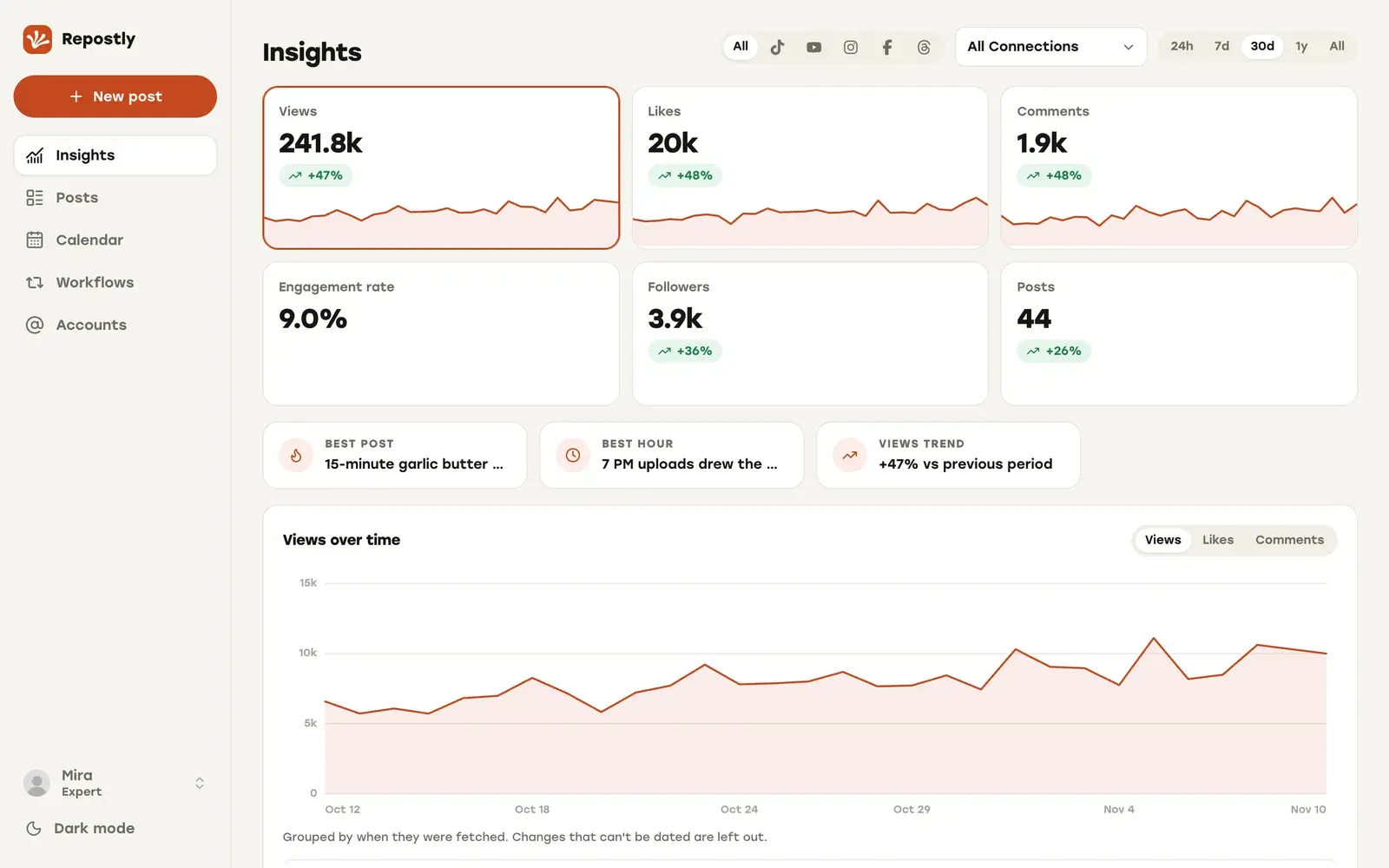
- A quick read of each video's views, likes and comments per platform matters more to you than client-ready reports.
Metricool is the better pick if
- You send clients PDF or PPT reports, or keep an eye on competitors' public posts.
- Ads are part of the job: Metricool creates Meta and Google Ads campaigns and analyzes TikTok Ads.
- Your channels include LinkedIn, Pinterest, Bluesky or Google Business Profile.
- You post a few times a month and want to stay free, within 1 brand and 20 published posts a month.
Feature by feature
Metricool facts link to the page they come from, checked .
| Feature | Repostly | Metricool |
|---|---|---|
| Platforms | TikTok, Instagram, YouTube, Facebook Pages and Threads | Those five plus LinkedIn, Pinterest, Bluesky, Google Business Profile and a website or blog. X is a paid add-on1 |
| Several accounts on one platform | Connect as many per platform as your plan's account count allows | One profile per network in each brand. A second TikTok account needs a second brand1 |
| Automatic reposting | Workflows repost your own new or older posts from one of your accounts to another. Unlimited on every plan | Autolists publish a list of posts you add on the days and times you set. The list can repeat2 |
| TikTok | Posts directly. Your account's TikTok options are checked again when the post is due | Auto-publishes for personal and business accounts, or sends a notification to finish in TikTok. Business accounts can add Top 100 songs3 |
| YouTube | Shorts, with a separate YouTube title per post | Shorts up to 3 minutes and standard videos, with title, privacy and thumbnail4 |
| Instagram video | A video goes out as a Reel | A single video goes out as a Reel, as Instagram's API requires5 |
| Analytics | Insights for views, likes, comments and followers across all five. Each post's page shows results per destination | Analytics with unlimited history on paid plans, 30 days on Free6 |
| Reports | No report export. Insights are shown in the app | PDF and PPT reports on Starter and above, shareable by link7 |
| Competitor analysis | Not offered | Public, organic posts of other profiles. YouTube and X on paid plans only8 |
| Ads | Not offered | Create and manage Meta Ads and Google Ads campaigns. TikTok Ads for analysis only9 |
| How the price counts | Per plan: $19 a month for 5 accounts, $39 for 15, $79 unlimited. Two months free on yearly billing | Per brand. Prices in euros or US dollars, monthly or annual6 |
| Free plan and trial | No free plan. 7-day free trial on every plan, payment method required | Free plan for 1 brand and 20 published posts a month, no credit card. Duplicate posts count once for each network they are published on10 |
| Team approvals | One login per Repostly account, no approval step | Approvals on Advanced and Custom, including outside reviewers by email11 |
| API access | Repostly's edge: REST API on every plan. MCP server on every plan too | API on Advanced and Custom only. Metricool MCP on every plan, including Free12 |
What each tool is built for
Metricool is an analytics and planning suite organized around brands. A brand is one business or client: one profile on each network, from TikTok and YouTube to LinkedIn and Google Business Profile, plus Meta, Google and TikTok ad accounts. That structure fits agencies and freelancers who look after several clients and report back to each of them.
We built Repostly for creators who publish the same short videos everywhere. You connect your accounts, as many per platform as you need, upload a video once and send it to TikTok, Instagram, YouTube, Facebook Pages and Threads.
Getting one clip to four platforms
Say you cut a 40-second clip for TikTok, Instagram Reels, YouTube Shorts and Facebook. In Repostly you create one post, upload the file and tick those four accounts. The Settings card has one row per destination, with a separate caption where you want one, the YouTube title, a Reel or a regular video on Facebook, and TikTok’s audience, comment, Duet, Stitch and disclosure options. Pick a time and the post joins everything else in one calendar.
Metricool publishes to the same four. Its TikTok help article (checked 12 November 2026) describes automatic publishing with privacy, comment, Duet, Stitch and commercial-content options. Single Instagram videos go out as Reels, and YouTube takes Shorts and standard videos.
Your TikTok choices hold until the post goes out. Repostly loads your account’s options from TikTok when you add the account to a post, and again when the post is due. If an option no longer fits, the TikTok post fails rather than going out with settings you didn’t pick.
Once the clip is out, Repostly’s post page lists every destination with its status and its own views, likes and comments, so one look tells you whether it went out everywhere.
Reposting what you post natively
If you post natively in TikTok or Instagram, a workflow fills your other accounts for you. Pick one of your accounts as the source and another as the destination. In “New posts” mode, Repostly reposts your new posts automatically after you publish them. In “Existing posts” mode, it republishes your back catalog at daily times you choose. Workflows run next to the posts you schedule, under the same Repostly login, and every plan includes as many as you need.
What Metricool has that we don’t
Reporting is Metricool’s strength, and our Insights aren’t built to replace it. From Metricool’s Starter plan up you can download PDF or PPT reports and share them by link. Advanced adds your own report templates and a Data Studio connector.
Beyond reports, it follows competitors’ public, organic posts, creates and manages Meta Ads and Google Ads campaigns, and analyzes TikTok Ads in the same dashboard. It also covers networks we don’t, such as LinkedIn, Pinterest, Bluesky and Google Business Profile. If you send a client a report every month or manage an ad budget, Metricool does that job well.
The API is the exception: ours is on every plan, including Repostly Starter, while Metricool’s starts at its Advanced plan. Both run an MCP server on every plan.
How each one charges
Metricool charges by brand. A creator with one TikTok, one Instagram, one YouTube channel and one Facebook Page fits in a single brand. Add a second TikTok account and you need a second brand. Prices are shown in euros or US dollars, monthly or annual and before VAT, so check Metricool’s pricing page (checked 12 November 2026) for your figure.
We charge by connected accounts:
- Repostly Starter: $19 a month for 5 accounts.
- Repostly Pro: $39 a month for 15.
- Repostly Expert: $79 a month, unlimited.
Yearly billing gives two months free: $190, $390 or $790 a year.
Metricool’s free plan is the cheaper start. It covers 1 brand and 20 published posts a month, and its free plan guide (checked 12 November 2026) says duplicate posts count once for each network they are published on. If one clip to four platforms counts as 4 of those 20, the free plan fits 5 such videos a month. Post more often than that and you’re comparing paid plans.
There’s no free plan on our side. Every plan starts with a 7-day free trial: you add a payment method at checkout and are charged when the trial ends unless you cancel first. If it isn’t for you, you can ask for a refund within 14 days of your first payment.
How to switch from Metricool to Repostly
Connect your accounts
Start the 7-day trial and add every account you post to under Accounts, including a second TikTok or Instagram profile. Each connection uses the platform's own sign-in, so Repostly never sees your passwords.
Schedule your next clip in Repostly
Create a video post, upload the file and tick the accounts that should get it. Fill in each row of the Settings card (caption, YouTube title, Reel or regular video on Facebook, TikTok options), then pick the time.
Let Metricool's queue finish
Posts already scheduled in Metricool can go out as planned. Schedule new short videos only in Repostly, so the same clip never posts twice to one account.
Decide what Metricool keeps
If you still use its reports, competitor tracking, ads or LinkedIn and Pinterest posting, keep Metricool for those. If it was only your short-video planner, cancel once its queue is empty. Its help center says a cancellation takes effect at the end of the billing period.
Frequently asked questions
Do Repostly and Metricool have a free plan?
Metricool does, and Repostly doesn't. Metricool's free plan covers 1 brand, 20 published posts a month and 30 days of analytics history, with no credit card. Every Repostly plan starts with a 7-day free trial instead (payment method required), and you can ask for a refund within 14 days of your first payment.
Can Repostly replace Metricool's reports?
Not for client reporting. Repostly has no report export: you see each video's results per destination, and totals in Insights, in the app. Metricool exports PDF and PPT reports and, on Advanced, connects to Data Studio.
Do both publish TikTok videos automatically?
Yes. Repostly posts to TikTok directly, using options loaded from your TikTok account and checked again when the post is due. Metricool's help center says it auto-publishes for personal and business accounts when Auto publish is on, and otherwise sends a notification so you finish the post in TikTok.
Does Repostly repost my TikToks to my other accounts automatically?
Yes. A workflow reposts your own posts from one of your accounts to another, automatically after you publish them, or republishes older posts at daily times you choose. Metricool's Autolists publish a list of posts you add, on the days and times you set, and the list can repeat.
How do I manage two TikTok accounts in each tool?
In Repostly you connect both, and each counts toward your plan's accounts: 5 on Starter, 15 on Pro, unlimited on Expert. In Metricool each brand holds one profile per network, so the second TikTok account goes into a second brand, and the plan sets how many brands you get.
Do both have an API and an MCP server?
Both have an MCP server on every plan. Repostly's REST API is on every plan too, while Metricool's API is on its Advanced and Custom plans.
Can I use Repostly and Metricool together?
Yes. Publish your short videos with Repostly and keep Metricool for reports, ads or networks Repostly doesn't cover, such as LinkedIn or Pinterest. Schedule each video in only one of them, so nothing posts twice.
Publish your next video to five platforms from one upload
TikTok, Instagram, YouTube, Facebook and Threads, each with its own settings. Plans start at $19 a month for 5 accounts.
Try Repostly free for 7 daysCompare plansSources
Metricool pages, checked .
- help.metricool.com/whats-a-brand-in-metricool-and-how-does-it-work-5l78b
- help.metricool.com/schedule-content-from-an-autolist-fxehk
- help.metricool.com/schedule-and-post-on-tiktok-bkepi
- help.metricool.com/schedule-and-publish-on-youtube-gof0k
- help.metricool.com/publishing-requirements-for-images-and-videos-from-metricool-vfc8n
- metricool.com/pricing/
- help.metricool.com/how-to-generate-reports-szc5k
- help.metricool.com/competitor-analysis-ouhue
- help.metricool.com/ads-in-metricool-create-manage-and-analyze-your-campaigns-s2zha
- help.metricool.com/main-differences-between-free-and-paid-plans-bl0v9
- help.metricool.com/how-to-send-posts-for-review-with-metricools-approval-system-yvdr0
- help.metricool.com/plans-add-ons-and-api-access-explained-xux1u