Repostly vs Post Bridge
Repostly is built for posting the same short videos to TikTok, Reels, Shorts and Facebook, and it can repost your own posts from one of your accounts to another automatically. Up to 5 accounts cost $19 a month, where Post Bridge's cheapest listed plan is $39, and from 6 to 15 both cost $39. If you also post text and video to X, LinkedIn or Bluesky, Post Bridge is the better pick.
Facts about Post Bridge come from its own website, checked . We make Repostly.
Pick Repostly if
- Your week is short vertical videos, and one upload should reach TikTok, Instagram, YouTube, Facebook Pages and Threads.
- Five accounts are enough for you, and $19 a month for them beats paying $39 for room you won't use.
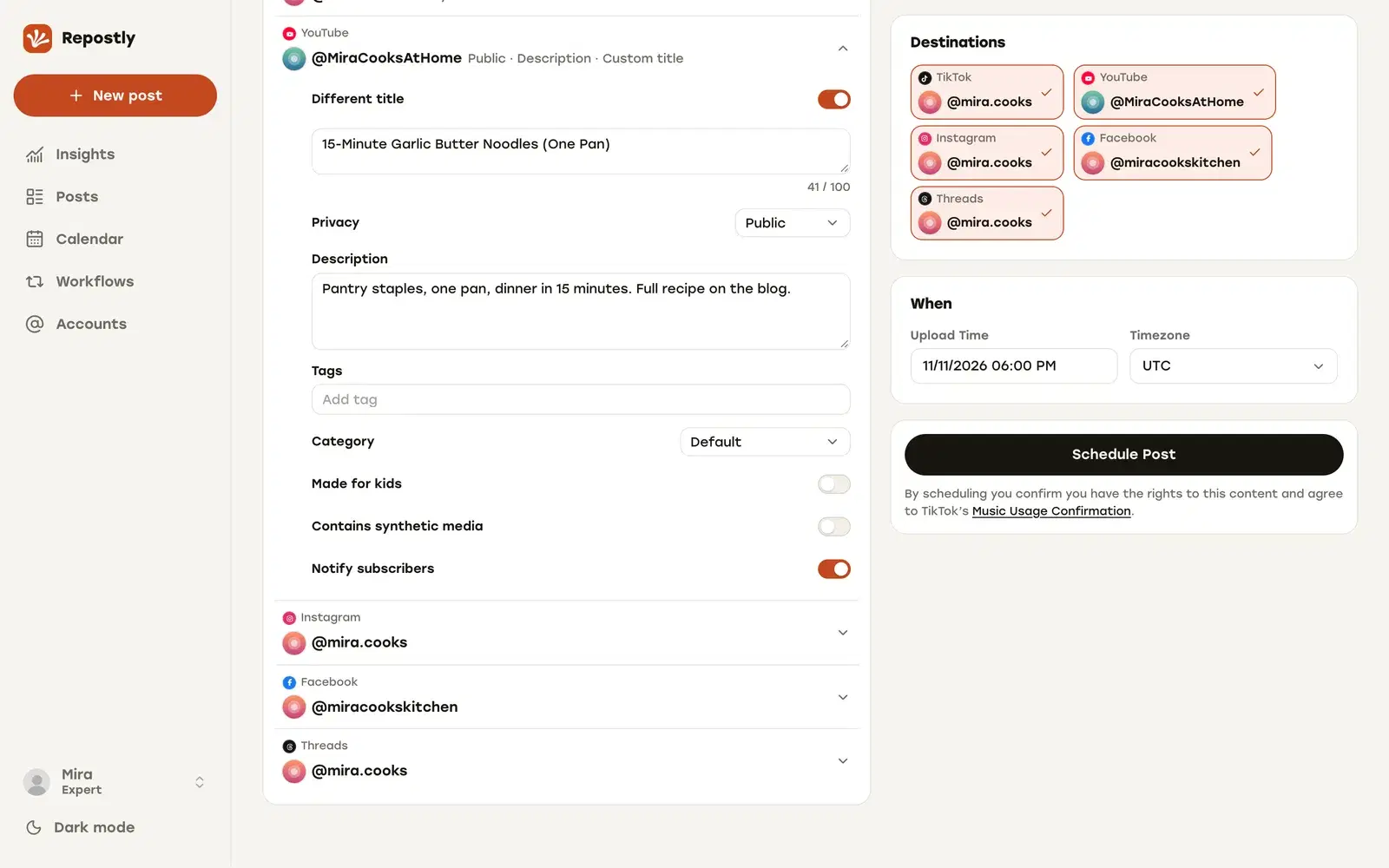
- Before a video goes out, you want each destination's settings on one screen: the YouTube title, Reel or regular video on Facebook, TikTok's audience.
- You post natively in one app and want your posts to land on your other accounts too, without uploading them again.
Post Bridge is the better pick if
- You also post to X, LinkedIn, Bluesky, Pinterest or Google Business Profile.
- Text posts and threads on X or LinkedIn matter as much as your clips.
- Stories belong in the same schedule as your Reels.
- Someone else should be able to post with you. Post Bridge's pricing page lists team invites on its Operator plan.
Feature by feature
Post Bridge facts link to the page they come from, checked .
| Feature | Repostly | Post Bridge |
|---|---|---|
| Platforms | TikTok, Instagram, YouTube, Facebook Pages and Threads | 10 platforms, including X, LinkedIn, Bluesky, Pinterest and Google Business Profile1 |
| Post types | Video to all five, images and carousels to all but YouTube. Text to Threads | Videos, images, text posts, carousels and Reels1 |
| One video to several platforms | One upload, tick the destination accounts. Each destination's results on the post's page | Upload once and override the caption per platform. Each platform is posted and reported separately2 |
| Automatic reposting | Repostly's edge: Workflows repost your own posts from one of your accounts to another. New posts or your back catalog | — |
| TikTok options | Audience, comments, Duet, Stitch and disclosure. Loaded from your account and checked again when the post is due | Public or private, comments, Duet, Stitch, disclosure and an AI-generated label, per its API reference3 |
| YouTube | Shorts, with a separate YouTube title per post | Per its API reference, the title is the caption's first 100 characters unless you set one. Tags and custom thumbnails can be set too3 |
| Instagram Stories | Not published. Post Stories in the Instagram app | Published as a Story with one image or video and no caption, per its API reference3 |
| Your video file | Published as you uploaded it | Converted per platform where a format needs it2 |
| Price for 5 accounts | Repostly's edge: $19 a month (Starter) | $39 a month on monthly billing, for 15 accounts (Marketer, the cheapest plan on its pricing page)1 |
| Price for 15 accounts | $39 a month (Pro) | $39 a month on monthly billing (Marketer)1 |
| More than 15 accounts | Repostly's edge: $79 a month, no account limit (Expert) | $99 a month on monthly billing for 99 accounts, then $1 per extra account (Operator)1 |
| Free trial | 7 days on every plan. Payment method added at checkout | 7 days on both plans. The page says "$0.00 due today"1 |
| Analytics | Insights across all five platforms, plus each post's results per destination | In beta: views, likes and comments for TikTok, YouTube, Instagram and Facebook posts4 |
| Team members | One login per Repostly account | Team invites listed on the Operator plan1 |
| API and AI assistants | REST API and MCP server on every plan | REST API, CLI and MCP server on every plan4 |
Two tools for people who post on their own
Post Bridge and Repostly start from the same idea: one person runs the accounts, and nobody needs approval flows. Post Bridge says on its pricing page that it is “built for one person doing the marketing”. It publishes to 10 platforms, prices by a bucket of connected accounts and handles video, images, text posts and carousels.
We built Repostly for a narrower week. You finish a vertical video, and it should reach TikTok, Instagram, YouTube, Facebook Pages and Threads without five uploads. Images, carousels and Threads text posts work too.
From one upload to every destination
Both tools take one upload and let you change the caption per platform. Post Bridge’s cross-posting page (checked 12 November 2026) says one post can carry a video to TikTok, Reels and Shorts, and that media is converted where a platform needs a different format. Repostly publishes the file exactly as you uploaded it, so what you export is what goes out.
We spent most of our time on the screen before you press Schedule. After you tick the destination accounts, the Settings card has one row per destination. YouTube gets its own title. On Facebook you choose a Reel or a regular video. TikTok’s audience, comment, Duet, Stitch and disclosure options get a row of their own, next to a separate caption wherever you want one.
Those TikTok options come from your TikTok account, and Repostly loads them again when the post is due, so nothing goes out with a setting you didn’t pick. If one no longer fits (you turned off Stitch in the app after scheduling, for example), the TikTok post fails.
If publishing was paused and a post would go out more than five hours late, it waits on “Posts that missed their time” until you decide.
Post Bridge reports each platform’s result separately, and its analytics, in beta, cover TikTok, YouTube, Instagram and Facebook. In Repostly, a post’s page shows every destination’s status with its own views, likes and comments, and Insights adds up views, likes, comments and followers across all five platforms.
Reposting your own posts for you
If you post straight from the TikTok or Instagram app, Workflows save you the second upload. A workflow connects one of your accounts to another and reposts for you. In “New posts” mode, each new post goes to the destination account automatically after you publish it. In “Existing posts” mode, your back catalog goes out at daily times you choose, oldest first or from a date you pick. The caption comes from the source post, and each workflow has a page listing its reposts and their status. Workflows run next to your scheduled uploads in the same Repostly account.
What you’d keep Post Bridge for
The biggest difference is reach. Post Bridge also posts to X, LinkedIn, Bluesky, Pinterest and Google Business Profile. If you write for those networks as often as you post clips, that settles it.
Stories are another gap. Post Bridge’s API reference describes publishing Instagram and Facebook Stories, while with Repostly you post Instagram Stories in the Instagram app. And its pricing page lists team invites on the Operator plan, while a Repostly account has one login.
What a solo creator pays
Say you’re a solo creator with one account on each platform Repostly covers.
- Repostly Starter: $19 a month for 5 accounts, or $190 a year on yearly billing.
- Post Bridge Marketer: $39 a month on monthly billing, for 15 accounts. It is the cheapest plan on Post Bridge’s pricing page (checked 12 November 2026).
That’s $20 a month less with Repostly, or $240 over a year of monthly billing. Both give two months free on yearly billing, but Post Bridge shows its yearly prices only after you switch its pricing page to Yearly, so we compare monthly prices here.
From 6 to 15 accounts the price is the same: Repostly Pro and Post Bridge Marketer are both $39 a month. For that $39, Post Bridge reaches 10 platforms, so if you’d use the networks we don’t cover, it gives you more for the money. If you only post short videos to the five platforms we cover, Repostly’s $39 also includes unlimited workflows between your 15 accounts.
Above 15 accounts, Post Bridge Operator is $99 a month for 99 accounts and $1 for each one after that. Repostly Expert is $79 a month with no account limit.
How to switch from Post Bridge to Repostly
Start a trial and connect accounts
Sign up for the 7-day trial and add each account you post to under Accounts. Each one connects through the platform's own sign-in, so Repostly never sees your passwords.
Upload your next video once
Create a video post, upload the file in its final vertical cut and tick every account that should get it under Destinations.
Fill in each destination's row
In the Settings card, give YouTube its title, choose a Reel or a regular video for Facebook, set TikTok's audience and disclosure options and write a separate caption wherever one helps. Then pick the date and time.
Split the work or wind Post Bridge down
If you also post to networks Repostly doesn't cover, keep Post Bridge for those and move your short videos to Repostly. Don't schedule the same video to the same account in both. Otherwise let its queue run out and cancel. Its pricing page says a cancellation takes effect at the end of the billing period.
Frequently asked questions
Is Repostly cheaper than Post Bridge?
For up to 5 accounts, yes: Repostly Starter is $19 a month, and Post Bridge's cheapest listed plan, Marketer, is $39 a month on monthly billing for 15 accounts. From 6 to 15 accounts both cost $39 a month. Above 15, Repostly Expert is $79 a month with no account limit and Post Bridge Operator is $99 a month for 99 accounts, then $1 per extra account (Post Bridge pricing page, checked 12 November 2026).
Can I try both before paying?
Yes. Both start with a 7-day free trial. Repostly asks for a payment method at checkout and charges when the trial ends unless you cancel first, and you can ask for a refund within 14 days of your first payment. Post Bridge's pricing page shows "$0.00 due today, cancel anytime" on both plans.
Do both send one video to TikTok, Reels and Shorts?
Yes. In Repostly you upload once and tick the TikTok, Instagram and YouTube accounts, each with its own row of settings. Post Bridge's cross-posting page says the same: upload once and send the video to all three in one post, each with its own caption or title.
Can I connect several accounts on one platform?
Yes, in both. Repostly takes several accounts per platform on every plan, and each connected account counts toward the plan. Post Bridge's pricing page lists multiple accounts per platform on Marketer, within its 15-account limit.
Can I use Repostly and Post Bridge together?
Yes. Post your short videos with Repostly and keep Post Bridge for the networks Repostly doesn't cover, such as X or LinkedIn. Just don't schedule the same video to the same account in both.
Does Repostly repost my posts from one account to another automatically?
Yes, with Workflows: pick one of your accounts as the source and another as the destination, and it reposts for you without an approval step per post. Unlimited workflows come with every plan, including the trial. Post Bridge's scheduler page describes a calendar, queue slots and bulk upload for the posts you create in it.
Do both work with AI assistants?
Yes. Both include a REST API and an MCP server on every plan. Post Bridge names Claude, ChatGPT and Cursor as supported assistants and also offers a command-line tool.
Publish your next video to five platforms from one upload
TikTok, Instagram, YouTube, Facebook and Threads, each with its own settings. Plans start at $19 a month for 5 accounts.
Try Repostly free for 7 daysCompare plansSources
Post Bridge pages, checked .